
带注释的文本/标签的ImageMagick.net背景颜色总是黑色
带注释的文本/标签的ImageMagick.net背景颜色总是黑色
提问于 2019-03-22 13:04:29
我试图在现有图像中添加标签/注释文本(其中文本的背景颜色是透明的)。
我试过几种不同的方法,但我不断得到黑色的背景颜色。
如果有人能指出正确的方向,我将非常感激。
尝试1:
using (var images = new MagickImageCollection())
using (var img = new MagickImage(imgBytes))
{
    img.Resize(imageDto.Width, imageDto.Height);

    using (var imgText = new MagickImage(MagickColors.None, imageDto.Width, imageDto.Height))
    {
        var labelSettings = new MagickReadSettings()
        {
            BackgroundColor = MagickColors.None,
            Font = "Arial",
            FontPointsize = imageDto.FontSize,
            FillColor = MagickColors.Blue,
            BorderColor = MagickColors.None,
        };

        imgText.Read("label:" + imageDto.WatermarkText, labelSettings);
        img.Composite(imgText, Gravity.South);


        img.Write($"{Guid.NewGuid().ToString()}.png");
        return img.ToBase64();

    }
}
尝试2:
using (var img = new MagickImage(imgBytes))
{
    img.Resize(imageDto.Width, imageDto.Height);

    // Load the original image and add it to the collection.
    images.Add(img);

    // Text label watermark settings
    var labelSettings = new MagickReadSettings()
    {
        BackgroundColor = new MagickColor(MagickColors.Transparent),
        Font = "Arial",
        FontPointsize = imageDto.FontSize,
        FillColor = MagickColors.Blue
    };

    // Create the label image.
    var label = new MagickImage($"label:{imageDto.WatermarkText}", labelSettings);

    // Extent the width of the label to match the width of the original image.
    label.Extent(img.Width, 0, Gravity.Center);
    label.Transparent(MagickColors.Black);

    // Add the label to the collection.
    images.Add(label);

    // Append the images to create the output image.
    using (var result = images.AppendVertically())
    {
        result.Write($"{Guid.NewGuid().ToString()}.png");
        return result.ToBase64();
    }
}
这两次尝试都生成了一个黑色背景的相同图像(在将文本添加到图像的区域)。

。
回答 2
Stack Overflow用户
回答已采纳
发布于 2019-03-23 14:05:28
您的第一种方法可能是最简单的方法。但是您应该使用以下重载:img.Composite(imgText, Gravity.South, CompositeOperator.Over); --默认为CompositeOperator.In --而不是将标签作为覆盖来使用。
Stack Overflow用户
发布于 2019-03-22 17:02:21
在ImageMagick中,不能为不透明图像上的文本或背景绘制透明度。所以你必须画一个彩色的(黑色)矩形,然后用透明填充它,然后把你的彩色文本画到透明的图像上。例如,使用您的图像:
convert image.png \
-draw "translate 250,250 fill black rectangle -50,-50 50,50 \
fill none matte 0,0 floodfill" \
-fill "rgba(255,0,0,1)" -pointsize 20 \
-gravity center -annotate +0+0 "TESTING" \
result.png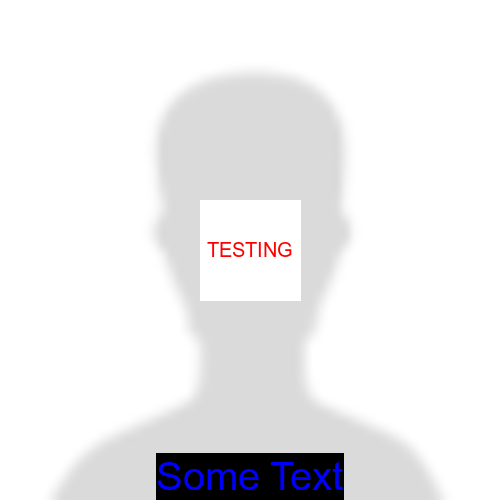
增添:
如果你只想要文本,那就省去背景色,只写文本。
convert image.png \
-fill "red" -pointsize 20 \
-gravity center -annotate +0+0 "TESTING" \
result.png
页面原文内容由Stack Overflow提供。腾讯云小微IT领域专用引擎提供翻译支持
原文链接:
https://stackoverflow.com/questions/55300254
复制相关文章
相似问题
腾讯云开发者

Copyright © 2013 - 2026 Tencent Cloud. All Rights Reserved. 腾讯云 版权所有
深圳市腾讯计算机系统有限公司 ICP备案/许可证号:粤B2-20090059  粤公网安备44030502008569号
腾讯云计算(北京)有限责任公司 京ICP证150476号 | 京ICP备11018762号