
根据pdf格式打印一些文本,同时通过xslt和xsl:fo生成pdf。
根据pdf格式打印一些文本,同时通过xslt和xsl:fo生成pdf。
提问于 2019-03-20 11:20:51
我使用下面的lib/命名空间从xml中生成pdf
<xsl:stylesheet version="1.0"
    xmlns:xsl="http://www.w3.org/1999/XSL/Transform"
    xmlns:fo="http://www.w3.org/1999/XSL/Format"
    xmlns:fn="http://www.w3.org/2005/xpath-functions"
    xmlns:math="http://exslt.org/math"
    xmlns:exslt="http://exslt.org/common"
    xmlns:str="http://exslt.org/strings"
    exclude-result-prefixes="exslt math str">
我的要求是,我想打印一些文本:块容器文本将打印在第二页。
<fo:block-container xsl:use-attribute-sets="section border_red">
    <fo:block xsl:use-attribute-sets="header">Product:</fo:block>
        <xsl:for-each select="ROWSET2/ROWSET2_ROW">
            <fo:block xsl:use-attribute-sets="paragraph indented"><xsl:value-of select="PRODUCTNAME"/></fo:block>
        </xsl:for-each>
        <!-- when page not first print something at the end of this block -->
</fo:block-container>
因此,当块溢出到2ed、3ed时,请在块内打印。页,如果块在第一页上完成,则不需要文本打印。
试过“fo:检索-表标记”
                <fo:table>
                    <fo:table-header>
                        <fo:table-cell>
                            <fo:block xsl:use-attribute-sets="header">Product:
                            </fo:block>
                        </fo:table-cell>
                    </fo:table-header>

                    <fo:table-footer>
                        <fo:table-row>
                            <fo:table-cell>

                                <fo:retrieve-table-marker
                                    retrieve-class-name="test123" retrieve-boundary-within-table="table"
                                    retrieve-position-within-table="last-starting" />

                            </fo:table-cell>
                        </fo:table-row>
                    </fo:table-footer>

                    <fo:table-body>
                        <xsl:for-each select="ROWSET2/ROWSET2_ROW">
                            <xsl:choose>
                                <xsl:when test="position() != last()">
                                    <fo:table-row>
                                        <fo:marker marker-class-name="test123">To be continued...
                                        </fo:marker>
                                        <fo:table-cell>
                                            <fo:block xsl:use-attribute-sets="paragraph indented">
                                                <xsl:value-of select="PRODUCTNAME" />
                                            </fo:block>
                                        </fo:table-cell>
                                    </fo:table-row>
                                </xsl:when>
                                <xsl:otherwise>
                                    <fo:table-row>
                                        <fo:marker marker-class-name="test123"></fo:marker>
                                        <fo:table-cell>
                                            <fo:block xsl:use-attribute-sets="paragraph indented">
                                                <xsl:value-of select="PRODUCTNAME" />
                                                last
                                            </fo:block>
                                        </fo:table-cell>
                                    </fo:table-row>
                                </xsl:otherwise>
                            </xsl:choose>
                        </xsl:for-each>
                    </fo:table-body>
</fo:table>回答 2
Stack Overflow用户
发布于 2019-03-20 15:05:53
如果您的要求是在页尾输出特殊的文本,当FO:块容器分解成多个页面时,XSL 1.1和XSL-FO处理器供应商的扩展(据我所知)中没有这样的功能。
但是,如果您使用fo:table、fo: table -脚注、fo:检索表标记和fo:带表外规则的标记,以及每一行没有规则的条目,那么当表分解为多个页面时,就可以输出特殊的文本。
参见以下博客文章中的示例快照(日文):
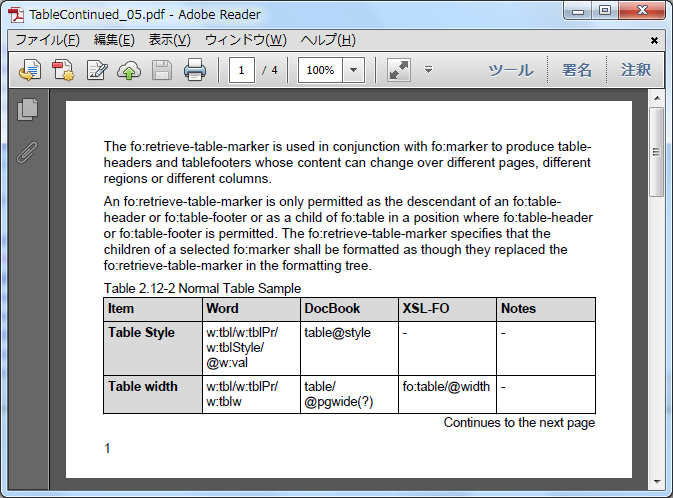
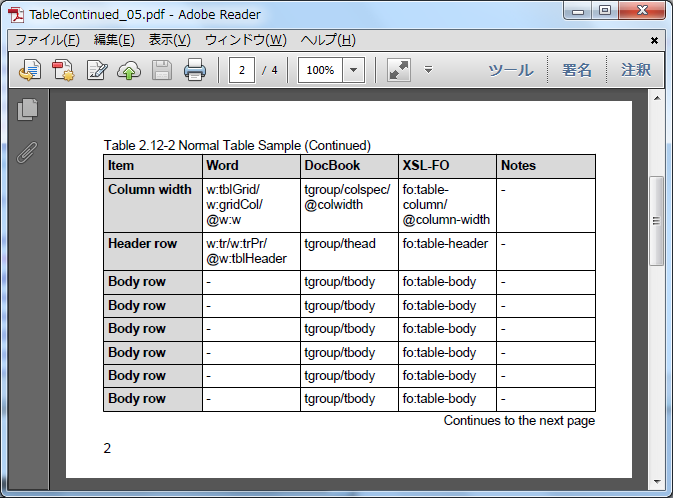
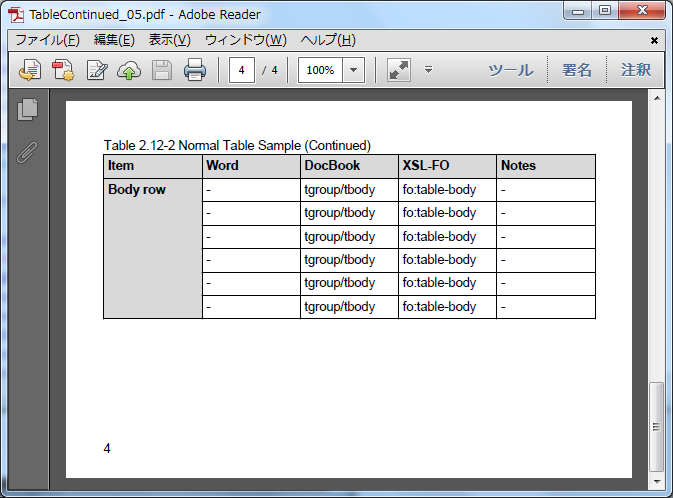
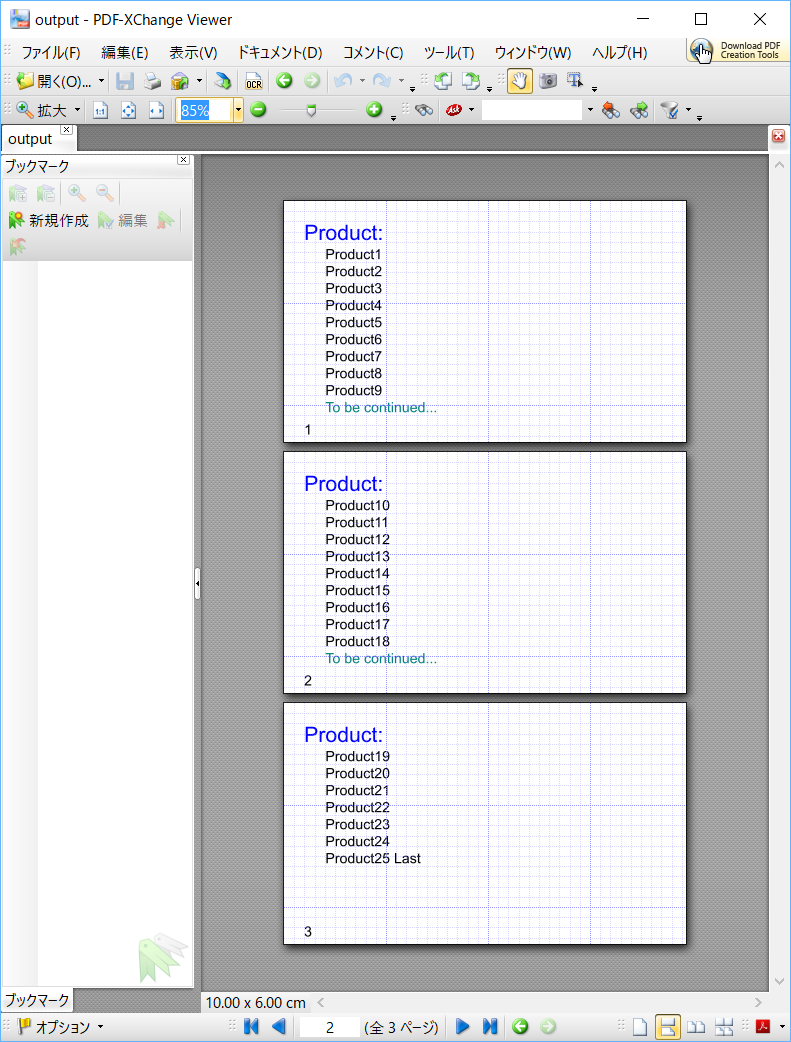
在本例中,“继续到下一页”是在fo:table-cell中的fo:marker中定义的,并通过fo:检索-表-标记在fo:table-脚注中显示。
样本数据:
<?xml version="1.0" encoding="UTF-8"?>
<ROOT>
    <ROWSET2>
        <ROWSET2_ROW><PRODUCTNAME>Product1</PRODUCTNAME></ROWSET2_ROW>
        <ROWSET2_ROW><PRODUCTNAME>Product2</PRODUCTNAME></ROWSET2_ROW>
        ...
        <ROWSET2_ROW><PRODUCTNAME>Product24</PRODUCTNAME></ROWSET2_ROW>
        <ROWSET2_ROW><PRODUCTNAME>Product25</PRODUCTNAME></ROWSET2_ROW>
    </ROWSET2>
</ROOT>
示例代码:
<xsl:template match="ROOT">
    <fo:table width="100%">
        <fo:table-header>
            <fo:table-cell>
                <fo:block xsl:use-attribute-sets="header">Product:
                </fo:block>
            </fo:table-cell>
        </fo:table-header>
        <fo:table-footer>
            <fo:table-row>
                <fo:table-cell>
                    <fo:retrieve-table-marker
                        retrieve-class-name="test123"/>
                </fo:table-cell>
            </fo:table-row>
        </fo:table-footer>
        <fo:table-body>
            <xsl:for-each select="ROWSET2/ROWSET2_ROW">
                <fo:table-row>
                    <fo:table-cell>
                        <fo:block xsl:use-attribute-sets="paragraph indented">
                            <xsl:choose>
                                <xsl:when test="position() = 1">
                                    <fo:marker marker-class-name="test123">
                                        <fo:block xsl:use-attribute-sets="indented" color="teal">To be continued...</fo:block>
                                    </fo:marker>
                                </xsl:when>
                                <xsl:when test="position() = last()">
                                    <fo:marker marker-class-name="test123"/>
                                </xsl:when>
                            </xsl:choose>
                            <xsl:value-of select="PRODUCTNAME" />
                            <xsl:if test="position()=last()">
                                <fo:inline> Last</fo:inline>
                            </xsl:if>
                        </fo:block>
                    </fo:table-cell>
                </fo:table-row>
            </xsl:for-each>
        </fo:table-body>
    </fo:table>
</xsl:template>
样本结果:
Stack Overflow用户
发布于 2019-03-29 16:11:26
找到解决方案:下面的代码正在使用Apachefop2.3
当我在<fo:inline>中使用<fo:marker>时,它就开始工作了。
    <fo:table width="100%" xsl:use-attribute-sets="section border_red">
            <fo:table-header>
                <fo:table-cell>
                    <fo:block xsl:use-attribute-sets="header">Product:
                    </fo:block>
                </fo:table-cell>
            </fo:table-header>
            <fo:table-footer>
                <fo:table-row>
                    <fo:table-cell>
                        <fo:block text-align="end">
                        <fo:retrieve-table-marker
                            retrieve-class-name="test123"
                            retrieve-boundary-within-table="table"
                            retrieve-position-within-table="last-ending"
                            />
                        </fo:block>
                    </fo:table-cell>
                </fo:table-row>
            </fo:table-footer>
            <fo:table-body>
                <xsl:for-each select="ROWSET2/ROWSET2_ROW">
                    <fo:table-row>
                        <fo:table-cell>
                            <fo:block xsl:use-attribute-sets="paragraph indented">
                                <xsl:choose>
                                    <xsl:when test="position() = 1">
                                        <fo:marker marker-class-name="test123">
                                            <fo:inline>To be continued...</fo:inline>
                                        </fo:marker>
                                    </xsl:when>
                                    <xsl:when test="position() = last()">
                                        <fo:marker marker-class-name="test123"/>
                                    </xsl:when>
                                </xsl:choose>
                                <xsl:value-of select="PRODUCTNAME" />
                                <xsl:if test="position()=last()">
                                    <fo:inline>Last..</fo:inline>
                                </xsl:if>
                            </fo:block>
                        </fo:table-cell>
                    </fo:table-row>
                </xsl:for-each>
            </fo:table-body>
</fo:table> 页面原文内容由Stack Overflow提供。腾讯云小微IT领域专用引擎提供翻译支持
原文链接:
https://stackoverflow.com/questions/55259571
复制相关文章
相似问题
腾讯云开发者

Copyright © 2013 - 2026 Tencent Cloud. All Rights Reserved. 腾讯云 版权所有
深圳市腾讯计算机系统有限公司 ICP备案/许可证号:粤B2-20090059  粤公网安备44030502008569号
腾讯云计算(北京)有限责任公司 京ICP证150476号 | 京ICP备11018762号