
一些标注文本的Flexbox样式
我正在尝试使用Flexbox设计一些标注文本。
希望下面的文字能够描述视觉意图。
我有一个移动布局,这将是一个博客帖子。
典型的文本只是一种标准的风格。
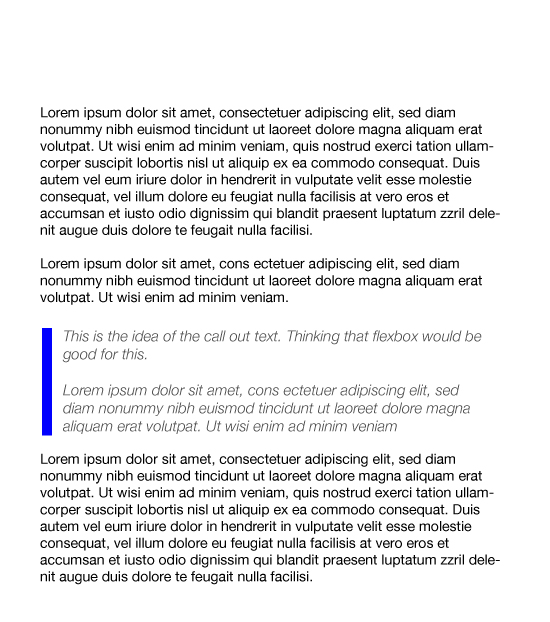
对于文本的某些部分(也许是一个重要的段落),我想用不同的方式来表达--我称之为“标注”。
我希望这种式样有一个薄的蓝色垂直线(约10 to )-与左手侧同花顺。
然后,在这条蓝色线的右边,我想要一个稍微不同风格的标注文本。
蓝线的垂直高度将等于所附标注文本的高度。
我有一个我尽最大努力的例子--参见codepen链接(这看起来很可怕)。在这个例子中,它包含了一些评论,希望这能让我的意图更加清晰。
https://codepen.io/snowman8003/pen/vPrEzJ
以下是相关CSS flex样式的副本:
div .call-out {
display: flex;
flex-direction: row;
align-items: stretch;
flex-wrap: nowrap;
justify-content:space-evenly;
}

div .call-out-bar {
flex: 1;
width: 10px;
background: blue;
}

div .call-out-text {
flex: 1;
width: 100%;
}
下面的图片。希望能把事情弄清楚。
谢谢你的意见,
标记
回答 2
Stack Overflow用户
发布于 2019-03-17 21:52:44
padding-left应该能做到这一点!
编辑:正如@arieljuod所提到的,<em>也可以使用。这样,就不再需要2<div>了。
.call-out-text {
  flex 1;
  width: 100%;

  padding-left: 10px;
  border-left: 5px solid blue;
}

// EDIT
em {
  padding-left: 10px;
  border-left: 5px solid blue;
}
html, body {
 /*  https://material.io/design/typography/the-type-system.html# */
/* light: 300; regular: 400; medium: 500*/

  font-family: 'Roboto', sans-serif;
  line-height: 1.5;
  font-weight: normal;

/*  this sets 1rem = 16px*/
  font-size: 16px;
  width: 100%;
  height: 100%;
  margin: 0;
  padding: 0;
}

.wrap {
  width: 100%;
  height: 100%;
/*  border:1px solid rgba(250,0,0,1);*/
}

p {
  font-size: 0.875rem;
  font-weight: 300;
  letter-spacing: 0.5px;
}

div .call-out {
  display: flex;
  flex-direction: row;
  align-items: stretch;
  flex-wrap: nowrap;
  justify-content:space-evenly;

}

em {
  padding-left: 10px;
  border-left: 5px solid blue;
}

.call-out-text {
  flex 1;
  width: 100%;

  padding-left: 10px;
  border-left: 5px solid blue;
}<head>
<meta charset="UTF-8">
<title>FlexBox Nav</title>
<!-- light: 300; regular: 400; medium: 500 -->
<link href="https://fonts.googleapis.com/css?family=Roboto:300,400,500" rel="stylesheet">
</head>
<div class="wrap">
<article>
<p>ipsum dolor sit amet, consectetur adipisicing elit. Consequatur, beatae?</p>
<p>lorem ipsum dolor sit amet, consectetur adipisicing elit. nulla, illum ea consectetur!</p>
<!-- EDIT -->
<em>Qwerty!</em>
<!-- Original option -->
<div class="call-out">
<div class="call-out-text">
<p><i>This is a callout bar. It displays something important or unusual that should provide the user with some extra information</i></p>
</div>
</div>
<p>Now we are back to normal text...</p>
</article>
</div>
Stack Overflow用户
发布于 2019-03-17 21:52:05
看起来,您只需要使用CSS (左边框和左边框)就可以实现这一目标,您有什么理由使用这种灵活的攻击呢?我建议您使用"EM“标记来强调文本的部分内容,这样在语义上会更好。
<p>lorem ipsum dolor sit amet, consectetur adipisicing elit. nulla, illum ea consectetur!</p>

<p><em>This is a callout bar. It displays something important or unusual that should provide the user with some extra information</em></p>

<p>lorem ipsum dolor sit amet, consectetur adipisicing elit. nulla, illum ea consectetur!</p>
然后只是填充和边框
p em {
  padding-left: 10px;
  border-left: 10px solid blue;
}
https://developer.mozilla.org/en-US/docs/Web/HTML/Element/em
https://stackoverflow.com/questions/55211919
复制相似问题
腾讯云开发者

Copyright © 2013 - 2026 Tencent Cloud. All Rights Reserved. 腾讯云 版权所有
深圳市腾讯计算机系统有限公司 ICP备案/许可证号:粤B2-20090059  粤公网安备44030502008569号
腾讯云计算(北京)有限责任公司 京ICP证150476号 | 京ICP备11018762号