
tensorflow.python.pywrap_tensorflow_internal无模块windows 10 tensorflow gpu
"tensorflow-cpu“在我的windows 10设备上正常工作。我试图安装tensorflow-gpu,安装后它无法导入,显示了以下错误。
tensorflow.python.pywrap_tensorflow_internal no模块
我已经安装了以下程序
库达10.1 Nvidia图形驱动程序版本419 CUDnn用于数据自动化系统10.1 VC++ 2015 REDIST
有人能说我在这里缺少的是完全的错误信息吗?
Traceback (most recent call last):
  File "D:\Program Files\Python\lib\site-packages\tensorflow\python\pywrap_tensorflow.py", line 58, in <module>
    from tensorflow.python.pywrap_tensorflow_internal import *
  File "D:\Program Files\Python\lib\site-packages\tensorflow\python\pywrap_tensorflow_internal.py", line 28, in <module>
    _pywrap_tensorflow_internal = swig_import_helper()
  File "D:\Program Files\Python\lib\site-packages\tensorflow\python\pywrap_tensorflow_internal.py", line 24, in swig_import_helper
    _mod = imp.load_module('_pywrap_tensorflow_internal', fp, pathname, description)
  File "D:\Program Files\Python\lib\imp.py", line 243, in load_module
    return load_dynamic(name, filename, file)
  File "D:\Program Files\Python\lib\imp.py", line 343, in load_dynamic
    return _load(spec)
ImportError: DLL load failed: The specified module could not be found.

During handling of the above exception, another exception occurred:

Traceback (most recent call last):
  File "<stdin>", line 1, in <module>
  File "D:\Program Files\Python\lib\site-packages\tensorflow\__init__.py", line 24, in <module>
    from tensorflow.python import pywrap_tensorflow  # pylint: disable=unused-import
  File "D:\Program Files\Python\lib\site-packages\tensorflow\python\__init__.py", line 49, in <module>
    from tensorflow.python import pywrap_tensorflow
  File "D:\Program Files\Python\lib\site-packages\tensorflow\python\pywrap_tensorflow.py", line 74, in <module>
    raise ImportError(msg)
ImportError: Traceback (most recent call last):
  File "D:\Program Files\Python\lib\site-packages\tensorflow\python\pywrap_tensorflow.py", line 58, in <module>
    from tensorflow.python.pywrap_tensorflow_internal import *
  File "D:\Program Files\Python\lib\site-packages\tensorflow\python\pywrap_tensorflow_internal.py", line 28, in <module>
    _pywrap_tensorflow_internal = swig_import_helper()
  File "D:\Program Files\Python\lib\site-packages\tensorflow\python\pywrap_tensorflow_internal.py", line 24, in swig_import_helper
    _mod = imp.load_module('_pywrap_tensorflow_internal', fp, pathname, description)
  File "D:\Program Files\Python\lib\imp.py", line 243, in load_module
    return load_dynamic(name, filename, file)
  File "D:\Program Files\Python\lib\imp.py", line 343, in load_dynamic
    return _load(spec)
ImportError: DLL load failed: The specified module could not be found.
回答 1
Stack Overflow用户
发布于 2019-03-18 05:14:04
如果您确实在您的Windows计算机上安装了Visual C++ 2015 Redist,那么可能是CUDA版本与Tensorflow版本之间的版本冲突。因为较新的版本在tensorflow上存在一些冲突和更多的冲突,因此需要准确的CUDA和CUDnn库版本才能正常工作。
正确配置它的最佳方法是使用Anaconda来安装和配置tensorflow-gpu,因为conda将自动下载相应的tensorflow所需的of和CUDnn的所有版本。
问题是新的Anaconda默认使用Python 3.7.x,tensorflow或tensorflow-gpu不支持它
所以安装Anaconda你可以下载它这里
现在,通过在Anaconda提示符中键入以下命令,使用conda和python 3.6.x创建一个虚拟环境
conda create -n yourenvname python=3.6 anaconda现在通过输入更改到您的环境。
conda activate yourenvname现在检查python版本,使用它应该向您展示如下内容
> python --version
Python 3.6.7 :: Anaconda custom (64-bit)
现在终于安装了tensorflow-gpu
conda install tensorflow-gpu现在打开python并尝试导入tensorflow
>>> import tensorflow as tf
>>> sess = tf.Session(config=tf.ConfigProto(log_device_placement=True))
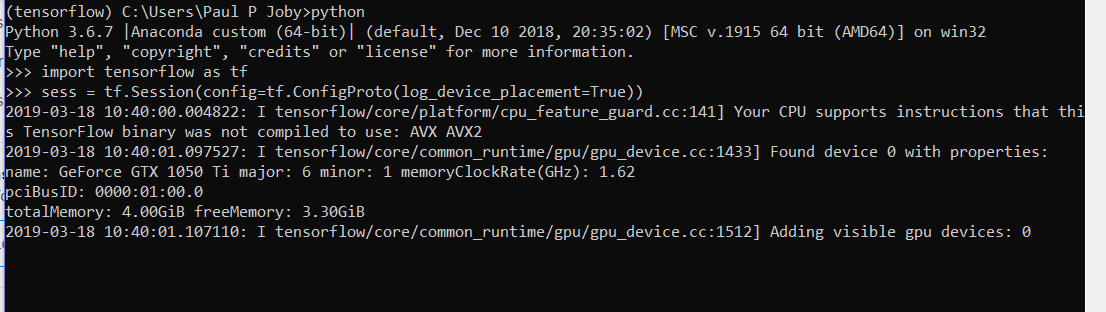
恭喜你!你们都准备好了。
https://stackoverflow.com/questions/55200171
复制相似问题
腾讯云开发者

Copyright © 2013 - 2026 Tencent Cloud. All Rights Reserved. 腾讯云 版权所有
深圳市腾讯计算机系统有限公司 ICP备案/许可证号:粤B2-20090059  粤公网安备44030502008569号
腾讯云计算(北京)有限责任公司 京ICP证150476号 | 京ICP备11018762号