
MYSQL在模式中选择ID
MYSQL在模式中选择ID
提问于 2019-03-12 09:58:32
请帮帮我!我在jquery方面没有足够的经验来自己找到这个解决方案。
我从数据库中显示一张表。我有2行的图像(徽标)是正确显示的。当我想更改徽标时,我会打开模态窗口。
我的问题是:在模态窗口中,如何显示正在尝试修改的当前标志的图像?
我认为我只需要使用行的ID来生成“select”,但是经过大量的研究,我放弃了。
行的ID在模式窗口中很好地显示,但不可能在变量中使用它来进行sql请求。
一个例子
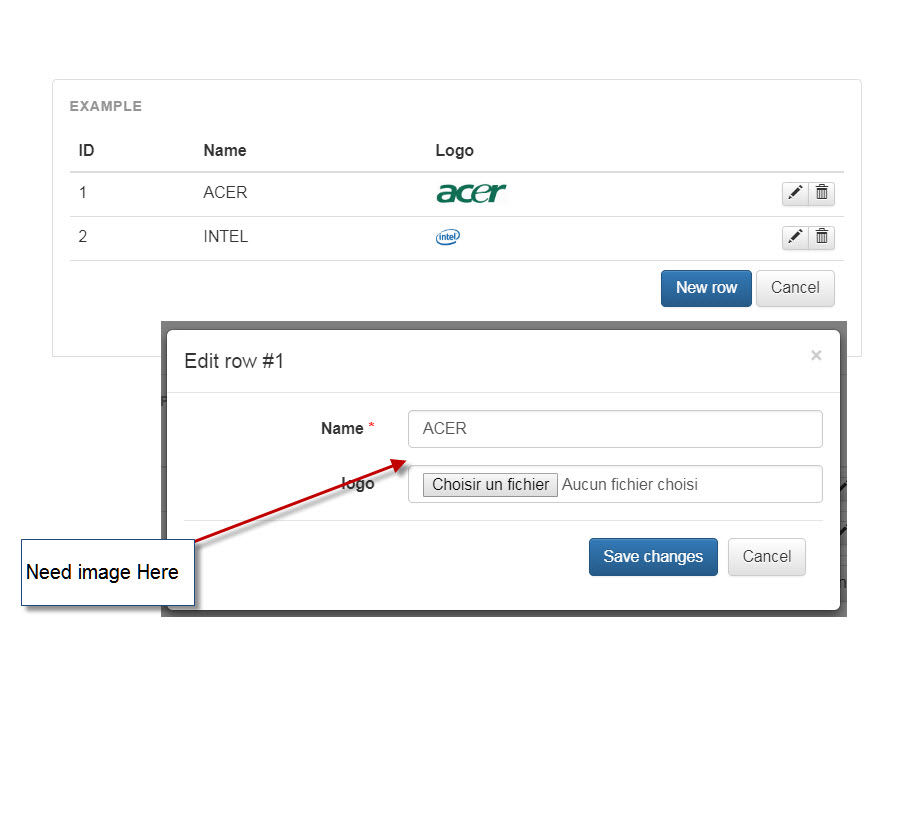
下面是我的代码:
<!DOCTYPE html>
<html lang="en">
<head>
<?php
// Create connection
include('../connection.php');
// Request
$requete = $pdo->prepare( '
SELECT *
FROM setting S;'
);
$requete->execute();
$datas = $requete->fetchAll();
?>
<!-- Bootstrap core CSS -->
<link href="//maxcdn.bootstrapcdn.com/bootstrap/3.3.6/css/bootstrap.min.css" rel="stylesheet">
<link href="//maxcdn.bootstrapcdn.com/bootstrap/3.3.6/css/bootstrap-theme.min.css" rel="stylesheet">
<!-- FooTable Bootstrap CSS -->
<link href="https://fooplugins.github.io/FooTable/compiled/footable.bootstrap.min.css" rel="stylesheet">
<!-- Custom styles -->
<link href="https://fooplugins.github.io/FooTable/docs/css/docs.css" rel="stylesheet">
<script src="https://fooplugins.github.io/FooTable/docs/js/demo-rows.js"></script>
</head>
<body class="docs">
<!-- Header -->
<!-- Content -->
<div class="container">
<div class="docs-section">
<div class="example">
<table id="editing-example" class="table" data-paging="true" data-filtering="false" data-sorting="false">
<thead>
<tr>
<th data-name="id" data-breakpoints="xs" data-type="number">ID</th>
<th data-name="nom_config">Name</th>
<th data-name="img_logo_content">Logo</th>
</tr>
</thead>
<tbody>
<?php foreach( $datas as $data ) { ?>
<tr data-expanded="true">
<td>
<?php echo $data->id; ?></td>
<td>
<?php echo $data->nom_config; ?></td>
<td>
<?php echo '<img height="20" src="data:image;base64,' . $data->img_logo_content . '">' ?></td>
</tr>
<?php } ?>
</tbody>
</table>
<!-- Modal -->
<div class="modal fade" id="editor-modal" tabindex="-1" role="dialog" aria-labelledby="editor-title">
<style scoped>
.form-group.required .control-label:after {
content: "*";
color: red;
margin-left: 4px;
}
</style>
<div class="modal-dialog" role="document">
<form class="modal-content form-horizontal" id="editor">
<div class="modal-header">
<button type="button" class="close" data-dismiss="modal" aria-label="Close"><span aria-hidden="true">×</span>
</button>
<h4 class="modal-title" id="editor-title">Add Row</h4>
</div>
<div class="modal-body">
<input type="number" id="id" name="id" class="hidden" />
<div class="form-group required">
<label for="nom_config" class="col-sm-4 control-label">Name</label>
<div class="col-sm-8">
<input type="text" class="form-control" id="nom_config" name="nom_config" required>
</div>
</div>
<?php
//*************************************************************
// PROBLEME HERE !!! Find the logo picture from sql database
$sql = "select * from setting WHERE id='" . $id . "'";
$result = mysqli_query($conn, $sql);
while ($row = mysqli_fetch_array($result)) {
$img_logo= '<img height="50" src="data:image;base64,' . $row[22] . '">';
}
//*************************************************************
?>
<div class="form-group">
<label for="img_logo_content" class="col-sm-4 control-label">logo</label>
<div class="col-sm-8">
<?php // Display Logo
echo $img_logo;
?>
<input type="file" class="form-control" id="img_logo_content" name="img_logo_content" placeholder="Votre Logo">
</div>
</div>
<div class="modal-footer">
<button type="submit" class="btn btn-primary">Save changes</button>
<button type="button" class="btn btn-default" data-dismiss="modal">Cancel</button>
</div>
</form>
</div>
</div>
</div>
<script src="//ajax.googleapis.com/ajax/libs/jquery/1.11.3/jquery.min.js"></script>
<script src="//maxcdn.bootstrapcdn.com/bootstrap/3.3.6/js/bootstrap.min.js"></script>
<script src="https://fooplugins.github.io/FooTable/docs/js/prism.js"></script>
<script src="https://fooplugins.github.io/FooTable/docs/js/ie10-viewport-bug-workaround.js"></script>
<script src="//cdnjs.cloudflare.com/ajax/libs/moment.js/2.10.3/moment.min.js"></script>
<script src="https://fooplugins.github.io/FooTable/compiled/footable.js"></script>
<!-- Initialize FooTable -->
<script>
jQuery(function($) {
var $modal = $('#editor-modal'),
$editor = $('#editor'),
$editorTitle = $('#editor-title'),
ft = FooTable.init('#editing-example', {
editing: {
enabled: true,
addRow: function() {
$modal.removeData('row');
$editor[0].reset();
$editorTitle.text('Add a new row');
$modal.modal('show');
},
editRow: function(row) {
var values = row.val();
$editor.find('#id').val(values.id);
$editor.find('#nom_config').val(values.nom_config);
$editor.find('#img_logo_name').val(values.img_logo_name);
$modal.data('row', row);
$editorTitle.text('Edit row #' + values.id);
$modal.modal('show');
},
deleteRow: function(row) {
if (confirm('Are you sure you want to delete the row?')) {
row.delete();
}
}
}
}),
uid = 10;
$editor.on('submit', function(e) {
if (this.checkValidity && !this.checkValidity()) return;
e.preventDefault();
var row = $modal.data('row'),
values = {
id: $editor.find('#id').val(),
nom_config: $editor.find('#nom_config').val(),
img_logo_name: $editor.find('#img_logo_name').val()
};
if (row instanceof FooTable.Row) {
$.ajax({
url: 'update.php',
dataType: "json",
cache: false,
data: {
id: values['id'],
nom_config: values['nom_config'],
img_logo_content: values['img_logo_content']
},
success: function(data) {
if (data.return) {
alert("Success");
row.val(values);
} else {
alert("No modifications!");
}
},
});
} else {
$.ajax({
url: 'insert.php',
data: {
id: values['id'],
nom_config: values['nom_config'],
img_logo_content: values['img_logo_content']
},
success: function(data) {
if (data.return) {
alert("Success");
ft.rows.add(values);
location.reload();
} else {
alert("Already used!");
}
},
});
}
$modal.modal('hide');
});
});
</script>
</body>
</html>回答 3
Stack Overflow用户
回答已采纳
发布于 2019-03-14 11:42:51
我想我终于找到了第二个选项(API)的解决方案。
添加以下代码
 $('#editor-modal').on('show.bs.modal', function (e) {
        var productID= $( "#id" ).val();
        $.ajax({
            url:"test_api.php",
            method: "POST",
            data:{productID:productID},
            dataType:"JSON",
            success:function(data)
            {
                $('#logo-preview').html(data);
            }
        })
     });
创建以下文件: test_api.php
<?php
include('../connection.php');

if (isset($_POST['productID'])) {
$productID = $_POST['productID'];

$sql = "select * from setting WHERE id='" . $productID . "'";
$result = mysqli_query($conn, $sql);
if(isset($result)){
    $row=mysqli_fetch_assoc($result);
    if (count($row) > 0) {
        $data = '<img height="50" src="data:image;base64,' . $row['img_logo_content'] . '">';
    }
}
echo json_encode($data);
}
?>
谢谢thaihoc06!
你觉得呢?
Stack Overflow用户
发布于 2019-03-12 10:29:46
确保$row[22]包含您所期望的确切值。
尝试以下代码:
$sql = "select * from setting WHERE id='" . $id . "'";
$result = mysqli_query($conn, $sql);
if(isset($result)){
    $row=mysqli_fetch_assoc($result);
    if (count($row) > 0) {
        //use proper array key name
        //if db column name name is logo then you can access it like $row['logo']
        $img_logo = '<img height="50" src="data:image;base64,' . $row['logo'] . '">';
    } else {
        //count is zero
        echo 'count is zero';
    }
} else {
    //result is empty
    echo 'result is empty';
}
?>Stack Overflow用户
发布于 2019-03-12 10:35:32
这样做有两种选择:
- 在打开模型时调用API获取行详细信息,然后使用img_logo_content从API响应显示。如果尝试显示表中未显示的值,则此选项将非常有用。
- 从表中获取img_logo_content并显示到模式(参见下面的示例)
如果您选择第二个选项,您可以这样做:
- 删除以下代码:
                <?php
                //*************************************************************
                // PROBLEME HERE !!! Find the logo picture from sql database
                $sql = "select * from setting WHERE id='" . $id . "'";
                $result = mysqli_query($conn, $sql);
                while ($row = mysqli_fetch_array($result)) {
                    $img_logo=  '<img height="50" src="data:image;base64,' . $row[22] . '">';
                }
                //*************************************************************
?>- 更改代码如下:
                   <?php // Display Logo
                    echo $img_logo;
                    ?>
至下:
                    <!-- Display logo -->
                    <div id="logo-preview"></div>
另外,请更改以下代码:
$editor.find('#img_logo_name').val(values.img_logo_name);至下:
$editor.find('#logo-preview').html(values.img_logo_content);以下是body的完整代码
<body class="docs">
<!-- Header -->
<!-- Content -->
<div class="container">
<div class="docs-section">
<div class="example">
<table id="editing-example" class="table" data-paging="true" data-filtering="false" data-sorting="false">
<thead>
<tr>
<th data-name="id" data-breakpoints="xs" data-type="number">ID</th>
<th data-name="nom_config">Name</th>
<th data-name="img_logo_content">Logo</th>
</tr>
</thead>
<tbody>
<?php foreach( $datas as $data ) { ?>
<tr data-expanded="true">
<td>
<?php echo $data->id; ?></td>
<td>
<?php echo $data->nom_config; ?></td>
<td>
<?php echo '<img height="20" src="data:image;base64,' . $data->img_logo_content . '">' ?></td>
</tr>
<?php } ?>
</tbody>
</table>
<!-- Modal -->
<div class="modal fade" id="editor-modal" tabindex="-1" role="dialog" aria-labelledby="editor-title">
<style scoped>
.form-group.required .control-label:after {
content: "*";
color: red;
margin-left: 4px;
}
</style>
<div class="modal-dialog" role="document">
<form class="modal-content form-horizontal" id="editor">
<div class="modal-header">
<button type="button" class="close" data-dismiss="modal" aria-label="Close"><span aria-hidden="true">×</span>
</button>
<h4 class="modal-title" id="editor-title">Add Row</h4>
</div>
<div class="modal-body">
<input type="number" id="id" name="id" class="hidden" />
<div class="form-group required">
<label for="nom_config" class="col-sm-4 control-label">Name</label>
<div class="col-sm-8">
<input type="text" class="form-control" id="nom_config" name="nom_config" required>
</div>
</div>
<div class="form-group">
<label for="img_logo_content" class="col-sm-4 control-label">logo</label>
<div class="col-sm-8">
<!-- Display logo -->
<div id="logo-preview"></div>
<input type="file" class="form-control" id="img_logo_content" name="img_logo_content" placeholder="Votre Logo">
</div>
</div>
<div class="modal-footer">
<button type="submit" class="btn btn-primary">Save changes</button>
<button type="button" class="btn btn-default" data-dismiss="modal">Cancel</button>
</div>
</form>
</div>
</div>
</div>
<script src="//ajax.googleapis.com/ajax/libs/jquery/1.11.3/jquery.min.js"></script>
<script src="//maxcdn.bootstrapcdn.com/bootstrap/3.3.6/js/bootstrap.min.js"></script>
<script src="https://fooplugins.github.io/FooTable/docs/js/prism.js"></script>
<script src="https://fooplugins.github.io/FooTable/docs/js/ie10-viewport-bug-workaround.js"></script>
<script src="//cdnjs.cloudflare.com/ajax/libs/moment.js/2.10.3/moment.min.js"></script>
<script src="https://fooplugins.github.io/FooTable/compiled/footable.js"></script>
<!-- Initialize FooTable -->
<script>
jQuery(function($) {
var $modal = $('#editor-modal'),
$editor = $('#editor'),
$editorTitle = $('#editor-title'),
ft = FooTable.init('#editing-example', {
editing: {
enabled: true,
addRow: function() {
$modal.removeData('row');
$editor[0].reset();
$editorTitle.text('Add a new row');
$modal.modal('show');
},
editRow: function(row) {
var values = row.val();
$editor.find('#id').val(values.id);
$editor.find('#nom_config').val(values.nom_config);
$editor.find('#logo-preview').html(values.img_logo_content);
$modal.data('row', row);
$editorTitle.text('Edit row #' + values.id);
$modal.modal('show');
},
deleteRow: function(row) {
if (confirm('Are you sure you want to delete the row?')) {
row.delete();
}
}
}
}),
uid = 10;
$editor.on('submit', function(e) {
if (this.checkValidity && !this.checkValidity()) return;
e.preventDefault();
var row = $modal.data('row'),
values = {
id: $editor.find('#id').val(),
nom_config: $editor.find('#nom_config').val(),
img_logo_name: $editor.find('#img_logo_name').val()
};
if (row instanceof FooTable.Row) {
$.ajax({
url: 'update.php',
dataType: "json",
cache: false,
data: {
id: values['id'],
nom_config: values['nom_config'],
img_logo_content: values['img_logo_content']
},
success: function(data) {
if (data.return) {
alert("Success");
row.val(values);
} else {
alert("No modifications!");
}
},
});
} else {
$.ajax({
url: 'insert.php',
data: {
id: values['id'],
nom_config: values['nom_config'],
img_logo_content: values['img_logo_content']
},
success: function(data) {
if (data.return) {
alert("Success");
ft.rows.add(values);
location.reload();
} else {
alert("Already used!");
}
},
});
}
$modal.modal('hide');
});
});
</script>
</body>对不起,我的英语很差:)希望能帮上忙!
页面原文内容由Stack Overflow提供。腾讯云小微IT领域专用引擎提供翻译支持
原文链接:
https://stackoverflow.com/questions/55118653
复制相关文章
相似问题
腾讯云开发者

Copyright © 2013 - 2026 Tencent Cloud. All Rights Reserved. 腾讯云 版权所有
深圳市腾讯计算机系统有限公司 ICP备案/许可证号:粤B2-20090059  粤公网安备44030502008569号
腾讯云计算(北京)有限责任公司 京ICP证150476号 | 京ICP备11018762号