
圆角材质图标边框和颜色问题
我已经在我的网页上加入了这样的材料图标:
<link href="https://fonts.googleapis.com/icon?family=Material+Icons|Material+Icons+Round" rel="stylesheet">我有圆角类的css代码
.material-icons.material-icons--rounded {
  font-family: 'Material Icons Round';
}
在页面中,星星图标如下所示:

如果我增加字体大小,就会变成这样:
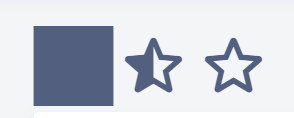
这条边界是从哪里来的,如何移除呢?
编辑:我创建了一支笔来重现问题https://codepen.io/anon/pen/wOJdMZ
@import "https://fonts.googleapis.com/icon?family=Material+Icons|Material+Icons+Round";
.material-icons--rounded {
  font-family: "Material Icons Round";
}
i {
   color: red;
}

.material-icons {
  font-size: 60px;
}

.size--2 {
  font-size: 90px;
}<table>
<tr>
<th>Rounded</th>
<td><i class="material-icons material-icons--rounded">star</i></td>
<td><i class="material-icons material-icons--rounded size--2">star</i></td>
<td><i class="material-icons material-icons--rounded">star_half</i></td>
<td><i class="material-icons material-icons--rounded size--2">star_half</i></td>
<td><i class="material-icons material-icons--rounded">star_border</i></td>
<td><i class="material-icons material-icons--rounded size--2">star_border</i></td>
</tr>
<tr>
<th>Not Rounded<br>
<td><i class="material-icons">star</i></td>
<td><i class="material-icons size--2">star</i></td>
<td><i class="material-icons">star_half</i></td>
<td><i class="material-icons size--2">star_half</i></td>
<td><i class="material-icons">star_border</i></td>
<td><i class="material-icons size--2">star_border</i></td>
</tr>
</table>
更新:圆角图标颜色在某些屏幕大小上没有变化。
我已经更新了附加在这个问题上的代码片段。
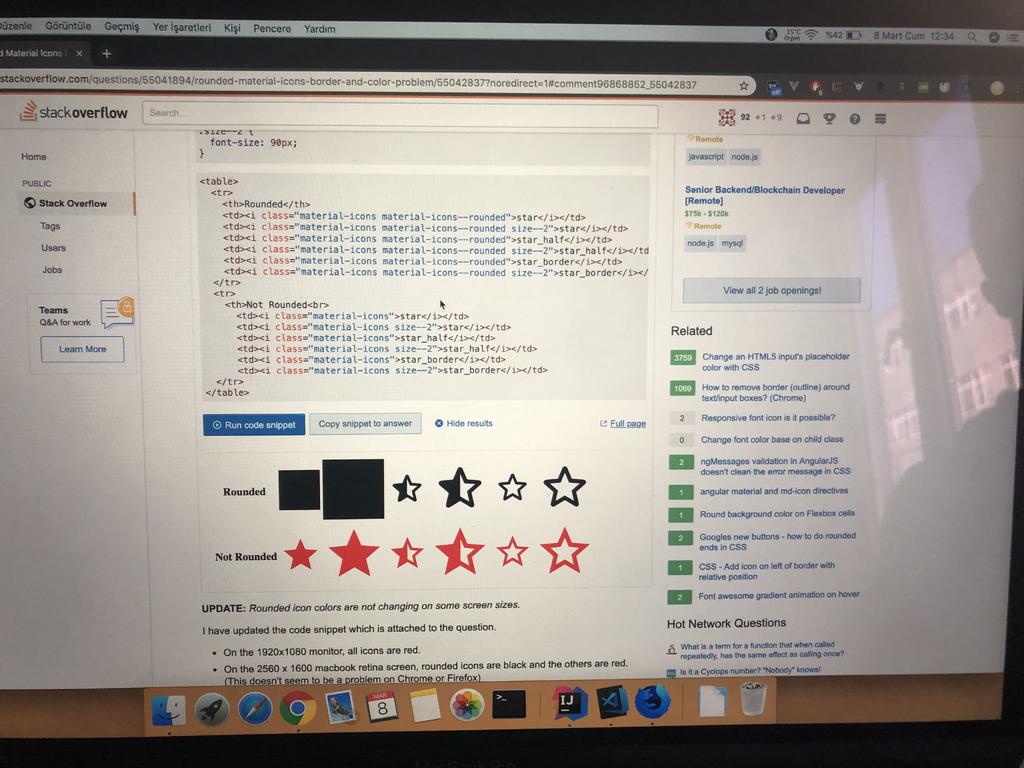
- 在1920x1080监视器上,所有图标都是红色的。
- 在2560x1600 macbook视网膜屏幕上,圆形图标是黑色的,其他图标是红色的。(这似乎不是Chrome或Firefox上的问题)
更新2
颜色问题没有得到解决。视网膜屏幕上的图标没有任何颜色。他们总是黑色的。
在这方面需要帮助。
回答 2
Stack Overflow用户
发布于 2019-03-07 11:35:22
字形本身似乎有问题。
如果您从这里下载SVG字形
https://material.io/tools/icons/?icon=star&style=round
这里是https://material.io/tools/icons/?icon=star&style=round


您应该将一个问题提交给https://github.com/material-components
给材料组的一些信息
路径是path("M 0 0 h 24 v 24 H 0 V 0 Z m 0 0 h 24 v 24 H 0 V 0 Z m 12 17.27 l 4.15 2.51 c 0.76 0.46 1.69 -0.22 1.49 -1.08 l -1.1 -4.72 l 3.67 -3.18 c 0.67 -0.58 0.31 -1.68 -0.57 -1.75 l -4.83 -0.41 l -1.89 -4.46 c -0.34 -0.81 -1.5 -0.81 -1.84 0 L 9.19 8.63 l -4.83 0.41 c -0.88 0.07 -1.24 1.17 -0.57 1.75 l 3.67 3.18 l -1.1 4.72 c -0.2 0.86 0.73 1.54 1.49 1.08 l 4.15 -2.5 Z");
<svg xmlns="http://www.w3.org/2000/svg" width="120" height="120" viewBox="0 0 24 24" wtx-context="97FAD225-6CA6-4D16-A578-52C0523A648F"><path d="M0 0h24v24H0V0zm0 0h24v24H0V0zm12 17.27l4.15 2.51c.76.46 1.69-.22 1.49-1.08l-1.1-4.72 3.67-3.18c.67-.58.31-1.68-.57-1.75l-4.83-.41-1.89-4.46c-.34-.81-1.5-.81-1.84 0L9.19 8.63l-4.83.41c-.88.07-1.24 1.17-.57 1.75l3.67 3.18-1.1 4.72c-.2.86.73 1.54 1.49 1.08l4.15-2.5z"/></svg>
但应该是path("M 12 17.27 l 4.15 2.51 c 0.76 0.46 1.69 -0.22 1.49 -1.08 l -1.1 -4.72 l 3.67 -3.18 c 0.67 -0.58 0.31 -1.68 -0.57 -1.75 l -4.83 -0.41 l -1.89 -4.46 c -0.34 -0.81 -1.5 -0.81 -1.84 0 L 9.19 8.63 l -4.83 0.41 c -0.88 0.07 -1.24 1.17 -0.57 1.75 l 3.67 3.18 l -1.1 4.72 c -0.2 0.86 0.73 1.54 1.49 1.08 l 4.15 -2.5 Z")
<svg xmlns="http://www.w3.org/2000/svg" width="120" height="120" viewBox="0 0 24 24" wtx-context="97FAD225-6CA6-4D16-A578-52C0523A648F"><path d="M 12 17.27 l 4.15 2.51 c 0.76 0.46 1.69 -0.22 1.49 -1.08 l -1.1 -4.72 l 3.67 -3.18 c 0.67 -0.58 0.31 -1.68 -0.57 -1.75 l -4.83 -0.41 l -1.89 -4.46 c -0.34 -0.81 -1.5 -0.81 -1.84 0 L 9.19 8.63 l -4.83 0.41 c -0.88 0.07 -1.24 1.17 -0.57 1.75 l 3.67 3.18 l -1.1 4.72 c -0.2 0.86 0.73 1.54 1.49 1.08 l 4.15 -2.5 Z"/></svg>
Stack Overflow用户
发布于 2019-03-07 11:12:39
问题是..。你在两个类中都增加了字体大小。我用一个新的size--1类替换了它
.size--1 {
  font-size: 60px;
}
.size--2 {
  font-size: 90px;
}
.material-icons--rounded {
  font-family: 'Material Icons Round;
}
材料图标类不需要那种风格.(如果我理解得对的话,他正在应用这个图标)
HTML:
<i class="material-icons material-icons--rounded size--1">star</i>
<i class="material-icons material-icons--rounded size--2">star</i>
看到更新的钢笔..。我试过了
outline: none !important;
border: none !important;
box-shadow: none !important;
这些都不管用..。
星星变成正方形,从字体大小开始:67便士.就连transform: scale(2,2)也没帮上忙。( rounded类有问题))
https://stackoverflow.com/questions/55041894
复制相似问题
腾讯云开发者

Copyright © 2013 - 2026 Tencent Cloud. All Rights Reserved. 腾讯云 版权所有
深圳市腾讯计算机系统有限公司 ICP备案/许可证号:粤B2-20090059  粤公网安备44030502008569号
腾讯云计算(北京)有限责任公司 京ICP证150476号 | 京ICP备11018762号