
TabPy: Python将Json返回到Tableau,“错误解析号”
我正在尝试使用Tableau计算字段来使用我的python脚本,该脚本获取JSON数据。我的最终目标是以表格格式将这些数据转换成表格。
我读过JSON更容易进入tableau而不是dataframe对象。
我现在在Spyder程序中使用它。执行这个来获取我的数据。
print (get1D ("2019-02-02", "2019-02-05", "Tableau", "Limits"))
在我的计算字段中,我得到了错误:“错误解析号”
.format(status_code))
错误信息:
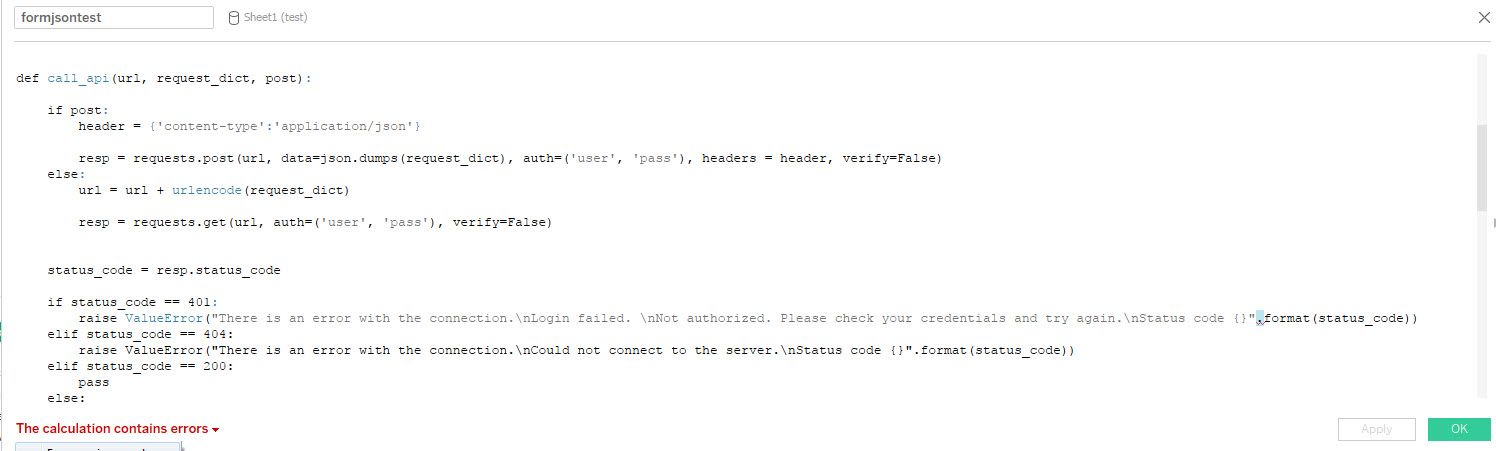
任何帮助将这些数据纳入图表将不胜感激。这是我的完整剧本。
SCRIPT_INT(

import time
import requests
import json
import pandas as pd
import re
import urllib3
import math

from io import StringIO

from datetime import datetime, date,timedelta
from pandas.tseries.offsets import BDay
from urllib.parse import urlencode
from flask import json


def call_api(url, request_dict, post):


    if post:
        header = {'content-type':'application/json'}

        resp = requests.post(url, data=json.dumps(request_dict), auth=('user', 'pass'), headers = header, verify=False)
    else:
        url = url + urlencode(request_dict)


        resp = requests.get(url, auth=('user', 'pass'), verify=False)


    status_code = resp.status_code

    if status_code == 401:
        raise ValueError("There is an error with the connection.\nLogin failed. \nNot authorized. Please check your credentials and try again.\nStatus code {}".format(status_code))
    elif status_code == 404:
        raise ValueError("There is an error with the connection.\nCould not connect to the server.\nStatus code {}".format(status_code))
    elif status_code == 200:
        pass
    else:
        raise ValueError("There is an error with the connection.\nStatus code {}".format(status_code))

    return resp


def getData (startDate, endDate, nodeName, Type, Id):


    request_dict = [{
        "hierarchy": "Tableau",
        "nodeName": nodeName,
        "FilterId": Type,
        "Id": Id ,
    }]


    url = "https://sampleurl/startDate={0}&endDate={1}"


    startDate = datetime.strptime(startDate, '%Y-%m-%d')
    startDate = startDate.strftime ('%Y%m%d')

    endDate = datetime.strptime(endDate, '%Y-%m-%d')
    endDate = endDate.strftime ('%Y%m%d')


    url = url.format(startDate, endDate)


    resp = call_api(url, request_dict, True)

    return resp.json ()

def get1D(startDate, endDate, nodeName, Type):
    return getData (startDate, endDate, nodeName, Type, 1)
) 回答 2
Stack Overflow用户
发布于 2019-03-07 05:58:42
看看Tableau的用Tableau编写Python计算指南。
一般来说,格式必须是这样的:
SCRIPT_INT("import xyz foo=_arg1+_arg2 return foo", SUM([A number]), SUM([Another Number])正如我所看到的,您将需要向计算字段添加引号,替换任何需要用_argX传递的字段变量,在计算字段中添加逗号,然后作为这些args传递的字段列表。
请注意,每当您看到错误,“计算包含错误”,在Tableau计算字段窗口中,问题出现在Tableau计算字段(格式化/编译)中,而不一定是底层Python。(你看到的错误是一条红鲱鱼。Tableau计算的字段解释器正在看到“。)作为小数点,并期望在后面接收一个数字。)在计算字段窗口中,Tableau将无法检查底层Python -它只将其作为字符串传递给TabPy。相反,在Tableau计算字段窗口中看到“此计算是有效的”并不一定意味着Python脚本将正确返回。
希望这能有所帮助。
编辑回复评论:
下面是一个使用您在问题中提供的代码的示例。
- 将Python脚本中的双引号替换为单个引号。这样,Tableau就能区分出自己的双引语。(Tableau与Python相同,因为它对双引号和单引号的处理方式相同。)
- 通过getData()将_arg1 ()的输入参数替换为_arg4。
- 在Python脚本作为字符串传递后传递开始日期、结束日期、节点名称和类型为args。(这些被植入字符串作为_arg1通过_arg4。(ATTR()可能不是这里正确的聚合方法--您必须进行实验。)
- 然而,计算出的字段现在至少将编译,但是,我不能保证它将在Python端执行,或者它将完成您想要做的事情。
- 我不知道get1D()在这里会有什么反应。您可能也必须将_arg1通过_arg4作为参数。有些工作需要完成--甚至需要重新格式化代码才能接受Tableau args。
请阅读TabPy文档,以获得更多关于其使用的说明,而不是我在这里能够提供的。另外,这里有一篇很好的博客文章。如果使用得当,它会非常强大。
祝好运!
SCRIPT_INT(

"import time
import requests
import json
import pandas as pd
import re
import urllib3
import math

from io import StringIO

from datetime import datetime, date,timedelta
from pandas.tseries.offsets import BDay
from urllib.parse import urlencode
from flask import json


def call_api(url, request_dict, post):


    if post:
        header = {'content-type':'application/json'}

        resp = requests.post(url, data=json.dumps(request_dict), auth=('user', 'pass'), headers = header, verify=False)
    else:
        url = url + urlencode(request_dict)


        resp = requests.get(url, auth=('user', 'pass'), verify=False)


    status_code = resp.status_code

    if status_code == 401:
        raise ValueError('There is an error with the connection.\nLogin
        failed. \nNot authorized. Please check your credentials and try
    again.\nStatus code {}'.format(status_code))
    elif status_code == 404:
        raise ValueError('There is an error with the connection.\nCould not
        connect to the server.\nStatus code {}'.format(status_code))
    elif status_code == 200:
        pass
    else:
        raise ValueError('There is an error with the connection.\nStatus
    code {}'.format(status_code))

    return resp


def getData (startDate, endDate, nodeName, Type, Id):


    request_dict = [{
        'hierarchy': 'Tableau',
        'nodeName': nodeName,
        'FilterId': Type,
        'Id': Id ,
    }]


    url = 'https://sampleurl/startDate={0}&endDate={1}'


    startDate = datetime.strptime(startDate, '%Y-%m-%d')
    startDate = startDate.strftime ('%Y%m%d')

    endDate = datetime.strptime(endDate, '%Y-%m-%d')
    endDate = endDate.strftime ('%Y%m%d')


    url = url.format(startDate, endDate)


    resp = call_api(url, request_dict, True)

    return resp.json ()

def get1D(startDate, endDate, nodeName, Type):
    return getData (_arg1, _arg2, _arg3, _arg4, 1)"
,
ATTR([Start Date]),ATTR([End Date]),ATTR([Node Name], ATTR([Type]
) Stack Overflow用户
发布于 2019-03-08 01:29:25
为后代添加了这个答案,并简化了我以前的答案和由此产生的线程.
问题中提供的Python脚本打算直接将数据加载到Tableau。TabPy的目的是对Tableau中已经存在的数据进行操作,而不是在摄入时作为源。
这里需要将Python脚本的输出放在中间位置,然后由Tableau连接到那里。
https://stackoverflow.com/questions/55029491
复制相似问题
腾讯云开发者

Copyright © 2013 - 2026 Tencent Cloud. All Rights Reserved. 腾讯云 版权所有
深圳市腾讯计算机系统有限公司 ICP备案/许可证号:粤B2-20090059  粤公网安备44030502008569号
腾讯云计算(北京)有限责任公司 京ICP证150476号 | 京ICP备11018762号