
使用react-rails宝石时未呈现的React组件
我遵循了反应轨中的“webpacker入门”,但在运行rails服务器时,我没有看到hello组件。
app/javascript/components/HelloWorld.js
import React from "react"
import PropTypes from "prop-types"
class HelloWorld extends React.Component {
  render () {
    return (
      <React.Fragment>
        Greeting: {this.props.greeting}
      </React.Fragment>
    );
  }
}

HelloWorld.propTypes = {
  greeting: PropTypes.string
};
export default HelloWorld
views/layout/application.html.erb
<!DOCTYPE html>
<html>
  <head>
    <title>MyApp</title>
    <%= csrf_meta_tags %>
    <%= csp_meta_tag %>

    <%= stylesheet_link_tag    'application', media: 'all', 'data-turbolinks-track': 'reload' %>
    <%= javascript_include_tag 'application', 'data-turbolinks-track': 'reload' %>
    <%= javascript_pack_tag 'application' %>
  </head>

  <body>
    <%= yield %>
  </body>
</html>
views/home/index.html.erb
<!DOCTYPE html>
    <html>
        <body>
            <p>Heloo</p>
            <%= react_component("HelloWorld", { greeting: "Hello from react-rails." }) %>
        </body>
    </html>
app/javascript/packs/application.js
/* eslint no-console:0 */
// This file is automatically compiled by Webpack, along with any other files
// present in this directory. You're encouraged to place your actual application logic in
// a relevant structure within app/javascript and only use these pack files to reference
// that code so it'll be compiled.
//
// To reference this file, add <%= javascript_pack_tag 'application' %> to the appropriate
// layout file, like app/views/layouts/application.html.erb


// Uncomment to copy all static images under ../images to the output folder and reference
// them with the image_pack_tag helper in views (e.g <%= image_pack_tag 'rails.png' %>)
// or the `imagePath` JavaScript helper below.
//
// const images = require.context('../images', true)
// const imagePath = (name) => images(name, true)

console.log('Hello World from Webpacker')
// Support component names relative to this directory:
var componentRequireContext = require.context("components", true)
var ReactRailsUJS = require("react_ujs")
ReactRailsUJS.useContext(componentRequireContext)
当我试图访问网页时,这就是我所得到的。
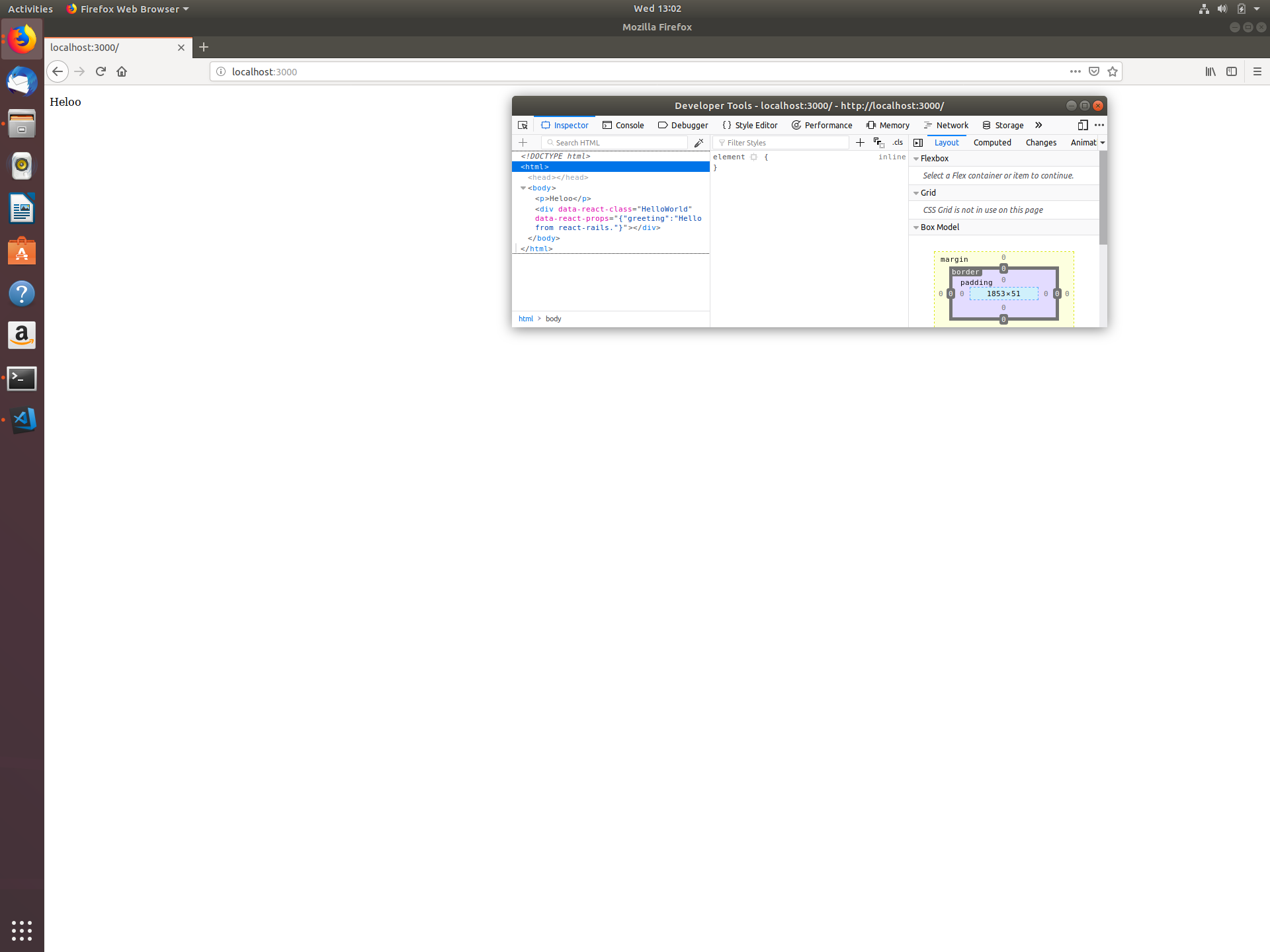
编辑:在视图中添加prerender: true (服务器端呈现),它工作得非常完美。
<%= react_component("HelloWorld", { greeting: "Hello from react-rails." }, prerender: true) %>但是为什么客户端不能提供服务呢?
回答 2
Stack Overflow用户
发布于 2019-10-27 09:11:41
试着添加
<%= javascript_pack_tag 'application' %>在你的index.html.erb里
Stack Overflow用户
发布于 2019-05-12 14:10:00
此问题与如何设置视图有关。
您的视图呈现的是一个完整的HTML,忽略了布局,因此JavaScript根本没有加载到页面上。这就解释了为什么窗口上的所有东西都是未定义的。
在问题中的截图中,您可以看到HTML头部是空的。将视图替换为以下内容。
views/home/index.html.erb
<p>Heloo</p>
<%= react_component("HelloWorld", { greeting: "Hello from react-rails." }) %>
另外,通过在布局文件中放置一些临时可见的内容,确保其呈现正确。您可以暂时将视图内容放入模板,以确保这两件事同时发生!
希望这能有所帮助。
https://stackoverflow.com/questions/55017836
复制相似问题
腾讯云开发者

Copyright © 2013 - 2026 Tencent Cloud. All Rights Reserved. 腾讯云 版权所有
深圳市腾讯计算机系统有限公司 ICP备案/许可证号:粤B2-20090059  粤公网安备44030502008569号
腾讯云计算(北京)有限责任公司 京ICP证150476号 | 京ICP备11018762号