
用VisualStudio2017构建open62541 DLL
你好,社区,我想用open62541库为OPC服务器编写UI。输入的软件应该读取文本文件,并将数据转换为服务器已经可用的客户端。
停留在需要编译dll文件的阶段,以便在windows窗体项目中进一步使用它。
有一些信息提到,Davy是用VisualC++ 2013 https://github.com/open62541/open62541/wiki/Using-open62541-from-C%23编译的
但我对VS 2017没有任何运气。
我的进展顺序如下:
- 已经从.h下载了https://open62541.org/和.c windows 64位文件
- 创建动态链接库(DLL)项目。
- 将.h和.c文件附加到项目中,选择64个编译器:
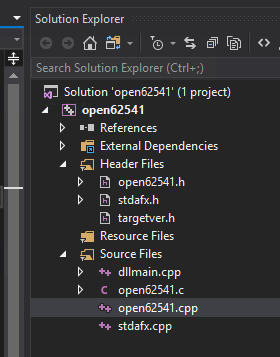
在构建中获取大量警告和错误:
Severity    Code    Description Project File    Line    Suppression State
Warning C4005   'CLOSESOCKET': macro redefinition   open62541   c:\users\scadaadmin\desktop\open62541-win64\open62541.c 39113
Warning C4005   '_Q_INVALIDATE': macro redefinition open62541   c:\users\scadaadmin\desktop\open62541-win64\open62541.c 130
Warning C4005   'UA_atomic_sync': macro redefinition    open62541   c:\users\scadaadmin\desktop\open62541-win64\open62541.c 813
Warning C4005   'UA_atomic_sync': macro redefinition    open62541   c:\users\scadaadmin\desktop\open62541-win64\open62541.c 815
Warning C4005   'CLOSESOCKET': macro redefinition   open62541   c:\users\scadaadmin\desktop\open62541-win64\open62541.c 35386
Warning C4005   'errno__': macro redefinition   open62541   c:\users\scadaadmin\desktop\open62541-win64\open62541.c 35387
Warning C4005   'CLOSESOCKET': macro redefinition   open62541   c:\users\scadaadmin\desktop\open62541-win64\open62541.c 39088
Warning C4005   'CLOSESOCKET': macro redefinition   open62541   c:\users\scadaadmin\desktop\open62541-win64\open62541.c 39106
Warning C4005   'UA_sleep_ms': macro redefinition   open62541   c:\users\scadaadmin\desktop\open62541-win64\open62541.c 39111
Warning C4005   'UA_sleep_ms': macro redefinition   open62541   c:\users\scadaadmin\desktop\open62541-win64\open62541.c 39127
Warning C4005   'UA_sleep_ms': macro redefinition   open62541   c:\users\scadaadmin\desktop\open62541-win64\open62541.c 39130
Warning C4005   'WIN32_INT': macro redefinition open62541   c:\users\scadaadmin\desktop\open62541-win64\open62541.c 39135
Warning C4005   'OPTVAL_TYPE': macro redefinition   open62541   c:\users\scadaadmin\desktop\open62541-win64\open62541.c 39136
Warning C4005   'ERR_CONNECTION_PROGRESS': macro redefinition   open62541   c:\users\scadaadmin\desktop\open62541-win64\open62541.c 39137
Warning C4005   'UA_fd_set': macro redefinition open62541   c:\users\scadaadmin\desktop\open62541-win64\open62541.c 39167
Warning C4005   'UA_fd_isset': macro redefinition   open62541   c:\users\scadaadmin\desktop\open62541-win64\open62541.c 39168
Warning C4005   'errno__': macro redefinition   open62541   c:\users\scadaadmin\desktop\open62541-win64\open62541.c 39176
Warning C4005   'errno__': macro redefinition   open62541   c:\users\scadaadmin\desktop\open62541-win64\open62541.c 39181
Warning C4005   'INTERRUPTED': macro redefinition   open62541   c:\users\scadaadmin\desktop\open62541-win64\open62541.c 39182
Warning C4005   'WOULDBLOCK': macro redefinition    open62541   c:\users\scadaadmin\desktop\open62541-win64\open62541.c 39183
Warning C4005   'AGAIN': macro redefinition open62541   c:\users\scadaadmin\desktop\open62541-win64\open62541.c 39184
Warning C4005   'ANSI_COLOR_RED': macro redefinition    open62541   c:\users\scadaadmin\desktop\open62541-win64\open62541.c 40158
Warning C4005   'ANSI_COLOR_GREEN': macro redefinition  open62541   c:\users\scadaadmin\desktop\open62541-win64\open62541.c 40159
Warning C4005   'ANSI_COLOR_YELLOW': macro redefinition open62541   c:\users\scadaadmin\desktop\open62541-win64\open62541.c 40160
Warning C4005   'ANSI_COLOR_BLUE': macro redefinition   open62541   c:\users\scadaadmin\desktop\open62541-win64\open62541.c 40161
Warning C4005   'ANSI_COLOR_MAGENTA': macro redefinition    open62541   c:\users\scadaadmin\desktop\open62541-win64\open62541.c 40162
Warning C4005   'ANSI_COLOR_CYAN': macro redefinition   open62541   c:\users\scadaadmin\desktop\open62541-win64\open62541.c 40163
Warning C4005   'ANSI_COLOR_RESET': macro redefinition  open62541   c:\users\scadaadmin\desktop\open62541-win64\open62541.c 40164
Warning C4005   'BEGIN_CRITSECT': macro redefinition    open62541   c:\users\scadaadmin\desktop\open62541-win64\open62541.c 40709
Warning C4005   'END_CRITSECT': macro redefinition  open62541   c:\users\scadaadmin\desktop\open62541-win64\open62541.c 40710
Error   C1010   unexpected end of file while looking for precompiled header. Did you forget to add '#include "stdafx.h"' to your source?    open62541   c:\users\scadaadmin\desktop\open62541-win64\open62541.c 43979
问题是,如何使用VisualStudio2017编译open62541 c代码dll文件,以便在windows窗体C#应用程序中使用它作为服务器?
回答 1
Stack Overflow用户
发布于 2019-03-06 12:59:26
由于项目open62541已经更新,我建议您直接获取源的当前状态。这样,您将能够更好地使用他们提供的例子。下面是如何建设这个项目。也许可以更简单一些,但是我遇到了很多问题,所以我给出了我所做的所有步骤。
准备环境
- 安装cmake (使用路径更新)
- 安装python的最新版本(通过路径更新)
https://www.python.org/downloads/
- 重新打开会话,以便考虑到新的路径变量。
- 安装python模块“6”
pip安装6
建筑MBEDTLS
- 下载库的源代码(apache许可证)
- 在源中运行cmake
cmake . -DUSE_SHARED_MBEDTLS_LIBRARY=ON -D CMAKE_BUILD_TYPE=Release- 用Visual打开"mbed TLS.sln“(我正在使用Community2015),并以”发布“模式生成所有内容
- 复制下列文件
- libraries .lib from "library\Release" to "Path\To\OpcUa\_lib"
- binaries .dll from "library\Release" to "Path\To\OpcUa\_bin"
- the folder "mbedtls" in "include" to "Path\To\OpcUa\_include"
构建OPEN62541
- 克隆open62541存储库以获取源代码(使用GitHub桌面或命令行)
https://github.com/open62541/open62541
- 在源代码中创建一个文件夹"build“(例如,C:\Users\Davy\Documents\GitHub\open62541\build) )
- 打开"build“文件夹中的终端并运行cmake (适配\path\To.(第一)
cmake .. -G "Visual Studio 14 2015" -DUA_ENABLE_ENCRYPTION=ON -DUA_ENABLE_AMALGAMATION=ON -DMBEDTLS_INCLUDE_DIRS="Path\To\OpcUa_include" -DMBEDTLS_LIBRARY="Path\To\OpcUa_lib" -DMBEDX509_LIBRARY="Path\To\OpcUa_lib" -DMBEDCRYPTO_LIBRARY="Path\To\OpcUa_lib" -DBUILD_SHARED_LIBS=ON -D CMAKE_BUILD_TYPE=Release -DUA_LOGLEVEL=100- 使用Visual (Community2015)打开解决方案"build\open62541.sln“,并添加"mbedcrypto.lib”、"mbedtls.lib“和"mbedx509.lib”作为项目"open62541/lib/open62541“中链接器的资源。
- right click on "open62541/lib/open62541", select "properties"
- go to "Linker" => "General"
- add "Path\To\OpcUa\_lib" as additional directory for the dependencies
- go to "Linker" => "Entry"
- add three lines with "mbedcrypto.lib", "mbedtls.lib" and "mbedx509.lib" in "Additional dependencies"
- 在“释放”模式下生成"open62541/lib/open62541“
- 现在可以使用以下文件
- the library "build\bin\Release\open62541.lib"
- the binary "build\bin\Release\open62541.dll"
- the file "build\open62541.h"
在另一个项目中的集成
您需要引用合并后的.h of open62541,并在链接器中添加这些依赖项: open62541.lib、mbedcrypto.lib、mbedtls.lib、mbedx509.lib、Ws2_32.lib。我还必须在项目属性中指定platform Visual 2013 (v120)。
https://stackoverflow.com/questions/54985518
复制相似问题
腾讯云开发者

Copyright © 2013 - 2026 Tencent Cloud. All Rights Reserved. 腾讯云 版权所有
深圳市腾讯计算机系统有限公司 ICP备案/许可证号:粤B2-20090059  粤公网安备44030502008569号
腾讯云计算(北京)有限责任公司 京ICP证150476号 | 京ICP备11018762号