
没有OnAuthorization证书(HttpActionContext actionContext)
我从这个例子中创建了CertificateTestController和ValuesController,How to use a client certificate to authenticate and authorize in a Web API。如果你向下滚动到“更新”从用户Ogglas。我以他为例,让"CertificateTestController“开始工作,我可以从我的商店获取证书并将它添加到”处理程序“中。当我调用"ValuesController“时,没有由
X509Certificate2 cert = actionContext.Request.GetClientCertificate();这是我有的完整代码
ValuesController
{
    [RequireSpecificCert]
    public class ValuesController : ApiController
    {
        // GET api/values
        public IHttpActionResult Get()
        {
            return Ok("It works!");
        }

        public class RequireSpecificCertAttribute : AuthorizationFilterAttribute
        {
            public override void OnAuthorization(HttpActionContext actionContext)
            {

                if (actionContext.Request.RequestUri.Scheme != Uri.UriSchemeHttps)
                {
                    actionContext.Response = new HttpResponseMessage(System.Net.HttpStatusCode.Forbidden)
                    {
                        ReasonPhrase = "HTTPS Required"
                    };
                }
                else
                {
                    X509Certificate2 cert = actionContext.Request.GetClientCertificate();
                    X509Certificate2 cert2 = actionContext.RequestContext.ClientCertificate;

                    if (cert == null)
                    {
                        actionContext.Response = new HttpResponseMessage(System.Net.HttpStatusCode.Forbidden)
                        {
                            ReasonPhrase = "Client Certificate Required"
                        };
                    }
                    else
                    {
                        X509Chain chain = new X509Chain();

                        //Needed because the error "The revocation function was unable to check revocation for the certificate" happened to me otherwise
                        chain.ChainPolicy = new X509ChainPolicy()
                        {
                            RevocationMode = X509RevocationMode.NoCheck,
                        };
                        try
                        {
                            var chainBuilt = chain.Build(cert);
                            Debug.WriteLine(string.Format("Chain building status: {0}", chainBuilt));

                            var validCert = CheckCertificate(chain, cert);

                            if (chainBuilt == false || validCert == false)
                            {
                                actionContext.Response = new HttpResponseMessage(System.Net.HttpStatusCode.Forbidden)
                                {
                                    ReasonPhrase = "Client Certificate not valid"
                                };
                                foreach (X509ChainStatus chainStatus in chain.ChainStatus)
                                {
                                    Debug.WriteLine(string.Format("Chain error: {0} {1}", chainStatus.Status, chainStatus.StatusInformation));
                                }
                            }
                        }
                        catch (Exception ex)
                        {
                            Debug.WriteLine(ex.ToString());
                        }
                    }

                    base.OnAuthorization(actionContext);
                }
            }

            private bool CheckCertificate(X509Chain chain, X509Certificate2 cert)
            {
                var rootThumbprint = WebConfigurationManager.AppSettings["rootThumbprint"].ToUpper().Replace(" ", string.Empty);

                var clientThumbprint = WebConfigurationManager.AppSettings["clientThumbprint"].ToUpper().Replace(" ", string.Empty);

                //Check that the certificate have been issued by a specific Root Certificate
                var validRoot = chain.ChainElements.Cast<X509ChainElement>().Any(x => x.Certificate.Thumbprint.Equals(rootThumbprint, StringComparison.InvariantCultureIgnoreCase));

                //Check that the certificate thumbprint matches our expected thumbprint
                var validCert = cert.Thumbprint.Equals(clientThumbprint, StringComparison.InvariantCultureIgnoreCase);

                return validRoot && validCert;
            }
        }
以低于ValuesController的方式调用CertificateTestController
{
    [RoutePrefix("api/certificatetest")]
    public class CertificateTestController : ApiController
    {
        public IHttpActionResult Get()
        {
            var handler = new WebRequestHandler();
            handler.ClientCertificateOptions = ClientCertificateOption.Manual;
            handler.ClientCertificates.Add(GetClientCert());
            handler.UseProxy = false;
            var client = new HttpClient(handler);
            var result = client.GetAsync("https://localhost:44301//values").GetAwaiter().GetResult();
            var resultString = result.Content.ReadAsStringAsync().GetAwaiter().GetResult();
            return Ok(resultString);
        }

        private static X509Certificate GetClientCert()
        {
            X509Store store = null;
            try
            {
                store = new X509Store(StoreName.My, StoreLocation.LocalMachine);
                store.Open(OpenFlags.OpenExistingOnly | OpenFlags.ReadOnly);

                var certificateSerialNumber = "2bc034466b6960d2fee84d86e6c2532a".ToUpper().Replace(" ", string.Empty);

                var cert = store.Certificates.Cast<X509Certificate>().FirstOrDefault(x => x.GetSerialNumberString().Equals(certificateSerialNumber, StringComparison.InvariantCultureIgnoreCase));
                return cert;
            }
            finally
            {
                store.Close();
            }
        }
    }
}
请帮帮我!
回答 1
Stack Overflow用户
发布于 2019-06-03 21:02:51
以下是我在试图解决这个问题时所回答的问题/问题。
Q1。
为什么我的证书没有到达客户端(代码)?
A1。
VS会在OnAuthorization(HttpActionContext actionContext)被击中之前进行初始SSL协商。此时,服务器在证书存储区中搜索安装了要验证的私钥的客户端证书。如果没有私钥,则会失败。我开着长篇大论,发现了这个问题。请看下面的内容。
以下是需要更改的配置,以使其正常工作。
1. Web文件更改
·SSL协商
下面的配置告诉visual,对于“api/values”URL,需要进行ssl协商。这有助于我们限制何时何地需要证书协商。位置路径属性
<location path="api/values">
  <system.webServer>
     <security>
        <access sslFlags="SslNegotiateCert" />
        <authentication>
          <iisClientCertificateMappingAuthentication enabled="true">
          </iisClientCertificateMappingAuthentication>
        </authentication>
      </security>
    </system.webServer>
  </location>
·详细的证书
下面的诊断帮助我们在故障排除过程中排除证书验证可能导致的任何问题。
<system.diagnostics>
    <trace autoflush="true" />
    <sources>
      <source name="System.Net">
        <listeners>
          <add name="System.Net"/>
        </listeners>
      </source>
      <source name="System.Net.HttpListener">
        <listeners>
          <add name="System.Net"/>
        </listeners>
      </source>
      <source name="System.Net.Sockets">
        <listeners>
          <add name="System.Net"/>
        </listeners>
      </source>
      <source name="System.Net.Cache">
        <listeners>
          <add name="System.Net"/>
        </listeners>
      </source>
    </sources>
    <sharedListeners>
      <add name="System.Net"
       type="System.Diagnostics.TextWriterTraceListener"
       initializeData="System.Net.trace.log"
       traceOutputOptions = "ProcessId, DateTime"/>
    </sharedListeners>
    <switches>
      <add name="System.Net" value="Verbose" />
      <add name="System.Net.Sockets" value="Verbose" />
      <add name="System.Net.Cache" value="Verbose" />
      <add name="System.Net.HttpListener" value="Verbose" />
    </switches>
  </system.diagnostics>
·应用程序设置
将rootThumbprint值更改为任何服务器证书的拇指打印,clientThumprint将是任何客户端证书拇指打印。ceritificateSerialNumber应该是传出证书序列号。
<appSettings>
            <add key="webpages:Version" value="3.0.0.0" />
            <add key="webpages:Enabled" value="false" />
            <add key="ClientValidationEnabled" value="true" />
            <add key="UnobtrusiveJavaScriptEnabled" value="true" />
            <add key="rootThumbprint" value="change"/>
            <add key="clientThumbprint" value="change"/>
<add key="certificateSerialNumber" value="change"/>
</appSettings>
2.本地Visual和IIS表达式
1) Applicationhost.config
c:\Users\e#\Documents\IISExpress\Config路径Visual早于2015年但在2008年之后-c:\Users\e#\Documents\IISExpress\Config Visual 2015 & 2017 {project_name}.vs\config\config.host.config
更改请确保以下属性设置为“允许”
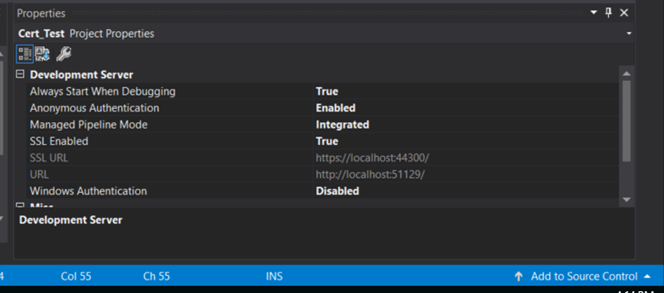
2)启用SSL
在visual studio属性窗口中启用SSL。这一点很重要,因为URL从http更改为https。
3) WebApiConfig.cs
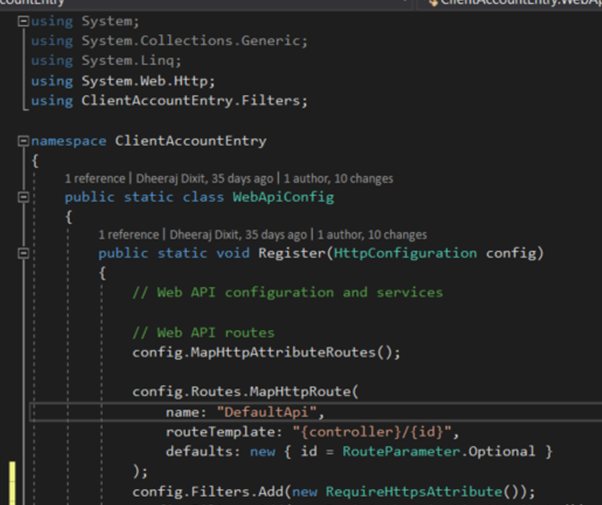
创建类筛选器文件夹。给它取个合适的名字。证书验证需要是运行任何其他代码之前的第一次检查。这就是WebApiConfig.cs派上用场的地方。例如,我调用了我的类RequireHttpsAttribute。为了运行检查,只需将下面的行放在WebApiConfig.cs config.Filters.Add(新的RequireHttpsAttribute())中;
4) CertificateTestController.cs
这是类作为客户端的行为。此类用于将证书与请求一起附加并发送出去。这门课有一个变化。这只在计算机上进行了本地测试。var =更改URL.我们将根据下面的序列号附加证书。证书也可以附加基于图明图,主题,过期/撤销,链验证等。
var certificateSerialNumber = WebConfigurationManager.AppSettings["certificateSerialNumber"].ToUpper().Replace(" ", string.Empty);5) ValueController.cs
这个类充当服务器。这就是证书验证发生的地方。“CheckCertificate”方法/函数中有两个引用webApiConfig.cs的更改。如果您遵循的应用程序设置更改从上面在WebApiConfig.cs下,那么你是好的去。
3.档案
1) CertificateTestController.cs
2) ValuesController.cs
https://stackoverflow.com/questions/54948695
复制相似问题
腾讯云开发者

Copyright © 2013 - 2026 Tencent Cloud. All Rights Reserved. 腾讯云 版权所有
深圳市腾讯计算机系统有限公司 ICP备案/许可证号:粤B2-20090059  粤公网安备44030502008569号
腾讯云计算(北京)有限责任公司 京ICP证150476号 | 京ICP备11018762号