
Java标准输入编码Windows,Netbeans
如您所知,InputStreamReader将读取提供的InputStream并将其字节解码为字符。如果没有指定charset,它将使用默认字符集。
我们可以用java.nio.charset.Charset.defaultCharset().displayName()检查这个默认字符集。
案例1。我的Windows使用cp850,但Java报告windows-1252。可以证明输入字符ó和System.in.read()将报告162,就像预期的那样。不过,InputStreamReader将无法解码它,因为它希望运行windows-1252,显示¢ (这是第162 windows-1252字符)。
病例2。在Windows中,我的Netbeans集成终端使用windows-1252,但Java报告UTF-8。同样,可以证明输入字符ó和System.in.read()会像预期的那样报告243。不过,InputStreamReader将无法对其进行解码,因为它希望运行UTF-8,显示� (代码65533)。
病例3。我的Debian机器在任何地方都使用UTF-8,无论是GNOME还是Netbeans终端。键入字符ó时,System.in.read()将报告两个字节,195和161,它们对应于该字符的UTF-8表示。InputStreamReader将像预期的那样显示ó。
我想要什么?是否有一种方法可以正确地检测实际使用的字符集,这样我就可以从命令行(在Windows和Netbeans中)读取字符,而不需要任何特殊情况?
非常感谢。
B计划:案例2可以由将Netbeans文件编码更改为UTF-8解决(它也将处理UTF-8文件,这是IDE在2019年应该做的)。案例1可以通过将代码页更改为UTF-8来解决,但我一直无法做到这一点。
您可以使用以下程序来测试这些情况。输入相同的字符两次并比较输出。
import java.io.*;
import java.nio.charset.Charset;

public class Prova2 {
    public static void main(String[] args) throws Exception {
        int b;

        System.out.println("Charset.defaultCharset: " + Charset.defaultCharset().displayName());
        System.out.println("I will read the next bytes: ");
        while ((b = System.in.read()) != '\n') {
            System.out.println("I have read this byte: " + b + " (" + (char) b + ")");
        }
        System.out.println("I will read the next chars: ");
        BufferedReader br = new BufferedReader(new InputStreamReader(System.in));
        while ((b = br.read()) != '\n') {
            System.out.println("I have read this char: " + b + " (" + (char) b + ")");
        }
        System.out.println("Thank you.");
    }

}回答 1
Stack Overflow用户
发布于 2019-02-25 07:26:12
是否有一种方法可以正确地检测实际使用的字符集,这样我就可以从命令行读取字符,而不需要任何特殊情况。
在检测(甚至设置)使用的代码页上,当从命令行使用JNA读取字符时,可以使用使用JNA。但是,如果使用替代方法获取控制台输入,则不需要这样做:
- 而不是从
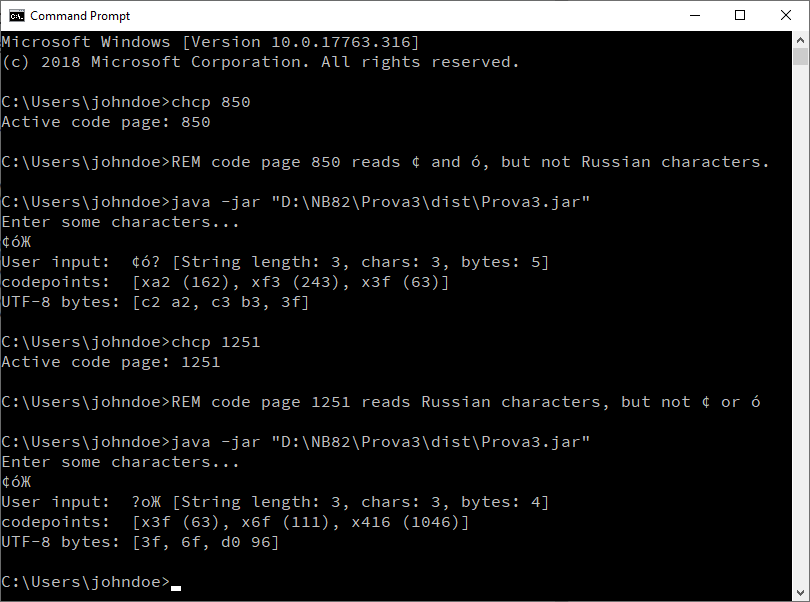
System.in读取,而是使用System.console来捕获用户输入。这允许将提交的文本处理为String,而不是byte或char。这提供了对所有String方法的访问,以将控制台输入解释为字节、字符或UTF-8数据。 - 使用这种方法,在从命令行提交输入之前,必须设置一个合适的代码页。例如,如果提交俄文字符,则使用
chcp 1251将代码页设置为1251。
使用这种方法,只需两行代码就可以获得用户输入:
Console console = System.console();
String userInput = console.readLine();
例2.在Windows中,我的Netbeans集成终端使用的是windows-1252.
不要浪费时间让控制台输入在NetBeans中工作。System.console()将返回null,其控制台无法配置。我怀疑在其他IDE中也存在类似的限制。无论如何,在NetBeans中进行测试并没有带来任何有意义的好处。只需专注于从命令行进行测试。
案例2可以通过将Netbeans文件编码更改为UTF-8来解决.
使用下面的方法,项目的编码设置并不重要。无论编码设置为Windows-1252还是UTF-8,它都可以工作。
备注:
- 我只在Windows上进行测试,但是只要控制台环境设置正确,代码就应该在其他平台上工作。(据我所知,使用
chcp是特定于Windows的。) - 与您一样,我无法让
chcp 65001为Unicode输入工作。只需专注于确保输入可以使用适当的代码页成功读取。例如,当使用OP中提到的字符(ó和¢)进行测试时,使用任何支持这两个字符的代码页都可以。例如: 437,850,1252等等。如果应用程序显示正确提交的字符,那么一切都会很好(反之亦然)。
下面是代码,主要包括显示控制台输入:
package prova3;

import java.io.Console;
import java.io.UnsupportedEncodingException;
import java.nio.charset.StandardCharsets;
import java.util.stream.Collectors;

public class Prova3 {

    public static void main(String[] args) throws UnsupportedEncodingException {

        Console console = System.console();
        if (console == null) {
            System.out.println("System.console() return null.");
            System.out.println("If you are trying to run from within your IDE, use the command line instead.");
            return;
        }
        System.out.println("Enter some characters...");
        String userInput = console.readLine();
        System.out.println("User input:  " + userInput + " [String length: " + userInput.length() + ", chars: " + userInput.toCharArray().length + ", bytes: " + userInput.getBytes(StandardCharsets.UTF_8).length + "]");
        System.out.println("codepoints:  " + userInput.codePoints().boxed().map(n -> "x" + Integer.toHexString(n) + " (" + n + ")").collect(Collectors.toList()).toString());
        System.out.println("UTF-8 bytes: " + getBytesList(userInput));
    }

    static String getBytesList(String userInput) throws UnsupportedEncodingException {
        StringBuilder byteList = new StringBuilder("[");
        for (int i = 0; i < userInput.length(); i++) {
            byte[] bytes = userInput.substring(i, i + 1).getBytes(StandardCharsets.UTF_8);
            for (int j = 0; j < bytes.length; j++) {
                byteList.append(Character.forDigit((bytes[j] >> 4) & 0xF, 16))
                        .append(Character.forDigit((bytes[j] & 0xF), 16));
                if (j < bytes.length - 1) {
                    byteList.append(" ");
                }
            }
            if (i < userInput.length() - 1) {
                byteList.append(", ");
            }
        }
        byteList.append("]");
        return byteList.toString();
    }
}
https://stackoverflow.com/questions/54794272
复制相似问题
腾讯云开发者

Copyright © 2013 - 2026 Tencent Cloud. All Rights Reserved. 腾讯云 版权所有
深圳市腾讯计算机系统有限公司 ICP备案/许可证号:粤B2-20090059  粤公网安备44030502008569号
腾讯云计算(北京)有限责任公司 京ICP证150476号 | 京ICP备11018762号