
安装错误目录?尖角水疗
使用新的Visual更新,我相信它破坏了npm的连接。
我知道这个错误:
npm警告saveError ENOENT:没有这样的文件或目录,打开'C:\DDD_OneSystem\Presentation\Supply Chain\package.json‘
如何让它指向客户端应用程序,package.json实际上需要在哪里呢?看看.csproj -它似乎是指向那里。
关于还原包
PATH=C:\Program Files\nodejs;.\node_modules\.bin;C:\Program Files (x86)\Microsoft Visual Studio\2017\Enterprise\MSBuild\Microsoft\VisualStudio\NodeJs\win-x64;C:\Program Files (x86)\Microsoft Visual Studio\2017\Enterprise\MSBuild\Microsoft\VisualStudio\NodeJs;C:\Program Files (x86)\Microsoft Visual Studio\2017\Enterprise\Web\External;%PATH%;C:\Program Files (x86)\Microsoft Visual Studio\2017\Enterprise\Common7\IDE\CommonExtensions\Microsoft\TeamFoundation\Team Explorer\Git\cmd;C:\Program Files (x86)\Microsoft Visual Studio\2017\Enterprise\Common7\IDE\CommonExtensions\Microsoft\TeamFoundation\Team Explorer\Git\mingw32\bin
"C:\Program Files\nodejs\npm.CMD" install
npm警告saveError ENOENT:没有这样的文件或目录,打开'C:\DDD_OneSystem\Presentation\Supply Chain\package.json‘ npm通知创建了一个锁文件,作为Packe-lock.json。你应该提交这个文件。 npm警告ENOENT:没有这样的文件或目录,打开'C:\DDD_OneSystem\Presentation\Supply Chain\package.json‘ npm警告供应链无描述 npm警告供应链无储存库字段。 npm警告供应链没有自述数据 npm警告供应链没有许可证字段。 最新的0.254秒 发现0个漏洞
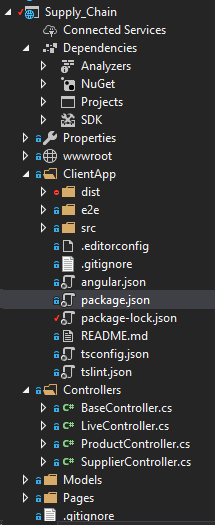
.csproj
<Project Sdk="Microsoft.NET.Sdk.Web">

  <PropertyGroup>
    <TargetFramework>netcoreapp2.2</TargetFramework>
    <TypeScriptCompileBlocked>true</TypeScriptCompileBlocked>
    <TypeScriptToolsVersion>3.1</TypeScriptToolsVersion>
    <IsPackable>false</IsPackable>
    <SpaRoot>ClientApp\</SpaRoot>
    <TypeScriptExperimentalDecorators>true</TypeScriptExperimentalDecorators>
    <DefaultItemExcludes>$(DefaultItemExcludes);$(SpaRoot)node_modules\**</DefaultItemExcludes>

    <!-- Set this to true if you enable server-side prerendering -->
    <BuildServerSideRenderer>false</BuildServerSideRenderer>
    <RootNamespace>Supply_Chain</RootNamespace>
  </PropertyGroup>

  <ItemGroup>
    <PackageReference Include="AutoMapper" Version="8.0.0" />
    <PackageReference Include="IdentityServer4.AccessTokenValidation" Version="2.7.0" />
    <PackageReference Include="MediatR.Extensions.Microsoft.DependencyInjection" Version="6.0.1" />
    <PackageReference Include="Microsoft.AspNetCore.App" />
    <PackageReference Include="Swashbuckle.AspNetCore" Version="4.0.1" />
    <PackageReference Include="Swashbuckle.AspNetCore.Swagger" Version="4.0.1" />
  </ItemGroup>

  <ItemGroup>
    <!-- Don't publish the SPA source files, but do show them in the project files list -->
    <Content Remove="$(SpaRoot)**" />
    <None Remove="$(SpaRoot)**" />
    <None Include="$(SpaRoot)**" Exclude="$(SpaRoot)node_modules\**" />
  </ItemGroup>

  <ItemGroup>
    <None Remove="ClientApp\package.json" />
    <None Remove="ClientApp\src\app\components\product\product-supplier-search.component.ts" />
    <None Remove="ClientApp\src\app\components\supplier\supplier-shipments.datatable.component.ts" />
    <None Remove="ClientApp\src\app\global.d.ts" />
    <None Remove="ClientApp\src\app\pages\product\product-search.page.ts" />
    <None Remove="ClientApp\src\app\pages\supplier\supplier-shipments.page.ts" />
    <None Remove="ClientApp\src\app\services\shared\datatable-service.ts" />
  </ItemGroup>

  <ItemGroup>
    <Content Include="ClientApp\package.json" />
  </ItemGroup>

  <ItemGroup>
    <ProjectReference Include="..\..\OneSystem.Infrastructure\OneSystem.Infrastructure.csproj" />
    <ProjectReference Include="..\..\OneSystem.Persistance\OneSystem.Persistance.csproj" />
  </ItemGroup>

  <ItemGroup>
    <TypeScriptCompile Include="ClientApp\src\app\components\product\product-supplier-search.component.ts" />
    <TypeScriptCompile Include="ClientApp\src\app\components\supplier\supplier-shipments.datatable.component.ts" />
    <TypeScriptCompile Include="ClientApp\src\app\pages\product\product-search.page.ts" />
    <TypeScriptCompile Include="ClientApp\src\app\pages\supplier\supplier-shipments.page.ts" />
    <TypeScriptCompile Include="ClientApp\src\app\services\shared\datatable-service.ts" />
  </ItemGroup>

  <Target Name="DebugEnsureNodeEnv" BeforeTargets="Build" Condition=" '$(Configuration)' == 'Debug' And !Exists('$(SpaRoot)node_modules') ">
    <!-- Ensure Node.js is installed -->
    <Exec Command="node --version" ContinueOnError="true">
      <Output TaskParameter="ExitCode" PropertyName="ErrorCode" />
    </Exec>
    <Error Condition="'$(ErrorCode)' != '0'" Text="Node.js is required to build and run this project. To continue, please install Node.js from https://nodejs.org/, and then restart your command prompt or IDE." />
    <Message Importance="high" Text="Restoring dependencies using 'npm'. This may take several minutes..." />
    <Exec WorkingDirectory="$(SpaRoot)" Command="npm install" />
  </Target>

  <Target Name="PublishRunWebpack" AfterTargets="ComputeFilesToPublish">
    <!-- As part of publishing, ensure the JS resources are freshly built in production mode -->
    <Exec WorkingDirectory="$(SpaRoot)" Command="npm install" />
    <Exec WorkingDirectory="$(SpaRoot)" Command="npm run build -- --prod" />
    <Exec WorkingDirectory="$(SpaRoot)" Command="npm run build:ssr -- --prod" Condition=" '$(BuildServerSideRenderer)' == 'true' " />

    <!-- Include the newly-built files in the publish output -->
    <ItemGroup>
      <DistFiles Include="$(SpaRoot)dist\**; $(SpaRoot)dist-server\**" />
      <DistFiles Include="$(SpaRoot)node_modules\**" Condition="'$(BuildServerSideRenderer)' == 'true'" />
      <ResolvedFileToPublish Include="@(DistFiles->'%(FullPath)')" Exclude="@(ResolvedFileToPublish)">
        <RelativePath>%(DistFiles.Identity)</RelativePath>
        <CopyToPublishDirectory>PreserveNewest</CopyToPublishDirectory>
      </ResolvedFileToPublish>
    </ItemGroup>
  </Target>

  <PropertyGroup Condition="'$(Configuration)' == 'Debug'">
    <TypeScriptTarget>ES5</TypeScriptTarget>
    <TypeScriptJSXEmit>None</TypeScriptJSXEmit>
    <TypeScriptModuleKind />
    <TypeScriptCompileOnSaveEnabled>True</TypeScriptCompileOnSaveEnabled>
    <TypeScriptNoImplicitAny>False</TypeScriptNoImplicitAny>
    <TypeScriptRemoveComments>False</TypeScriptRemoveComments>
    <TypeScriptOutFile />
    <TypeScriptOutDir />
    <TypeScriptGeneratesDeclarations>False</TypeScriptGeneratesDeclarations>
    <TypeScriptNoEmitOnError>True</TypeScriptNoEmitOnError>
    <TypeScriptSourceMap>True</TypeScriptSourceMap>
    <TypeScriptMapRoot />
    <TypeScriptSourceRoot />
  </PropertyGroup>

</Project>回答 1
Stack Overflow用户
发布于 2019-02-20 13:28:31
在调试中,您似乎不能使用还原包。由于新的角度使用angularcli处理一切,而不是视觉工作室。
记住,这是天使,不是视觉工作室,不要像我一样感到困惑!
https://stackoverflow.com/questions/54774131
复制相似问题
腾讯云开发者

Copyright © 2013 - 2026 Tencent Cloud. All Rights Reserved. 腾讯云 版权所有
深圳市腾讯计算机系统有限公司 ICP备案/许可证号:粤B2-20090059  粤公网安备44030502008569号
腾讯云计算(北京)有限责任公司 京ICP证150476号 | 京ICP备11018762号