
从输入字段读取值
从输入字段读取值
提问于 2019-02-18 10:34:22
我有一个名为customers的api,我在下拉中显示所有这些customers名称,并且在选择特定customer时,在其他字段中显示is details(selected customer object properties),如下所示:
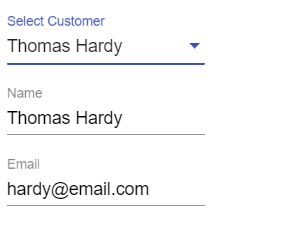
- 但是我无法读取这些值(例如名称、电子邮件)并返回这些值。
- 当我在日志中看到结果时,属性(i、e名称、电话、电子邮件)值将显示为null。
组件代码
HTML:
<div class="main-div">
<form [formGroup]="addForm">
 <mat-form-field>
   <mat-select formControlName="customer" placeholder="Select Customer" [(ngModel)]="customer">
     <mat-option *ngFor="let customer of customers" [value]="customer">
      {{customer.name}}
     </mat-option>
   </mat-select>
 </mat-form-field>
 <mat-form-field>
   <input matInputformControlName="phone" placeholder="Phone" matInput
   [value]="customer?.phone" >
 </mat-form-field>
  <mat-form-field>
    <input matInputformControlName="email" placeholder="Email" matInput
     [value]="customer?.email" >
  </mat-form-field>
    <br>
   <button mat-flat-button  color="primary" (click)="onAdd()">SAVE </button>
  </form>
</div>
TS:
import { Component, OnInit } from '@angular/core';
import { FormBuilder, FormGroup } from '@angular/forms';
import { ContactService } from '../contacts.service';
import { MatOptionSelectionChange } from '@angular/material';
import { ICustomer } from '../models';

@Component({
  selector: 'app-list',
  templateUrl: './list.component.html',
  styleUrls: ['./list.component.css']
})
export class ListComponent implements OnInit {
public addForm: FormGroup;
public customers: ICustomer;
public someCustomer: ICustomer;

  constructor(private fb: FormBuilder,
                 private myService: ContactService) { }

  public async ngOnInit(): Promise<void> {
    this.addForm = this.fb.group({
      customer: [null],
      phone: [null],
      email: [null],
    });
    this.customers = await this.myService.getCustomers('');
  }

  public onAdd(): void {
    this.someCustomer = this.addForm.value;
    console.log(this.someCustomer);
  }

}回答 1
Stack Overflow用户
回答已采纳
发布于 2019-02-18 10:40:45
要解决您的问题,您需要使用反应性表单修补值方法来解决此问题。
这是解决办法。
<div class="main-div">
    <form [formGroup]="addForm">
        <mat-form-field>
            <mat-select formControlName="customer" placeholder="Select Customer" (selectionChange)="onSelect($event.value)" [(ngModel)]="customer">
                <mat-option *ngFor="let customer of customers" [value]="customer">
                    {{customer.name}}
                </mat-option>
            </mat-select>
        </mat-form-field>
        <mat-form-field>
            <input matInputformControlName="phone" placeholder="Phone" matInput    [value]="customer?.phone" >
</mat-form-field>
<mat-form-field>
   <input matInputformControlName="email" placeholder="Email" matInput [value]="customer?.email" >
</mat-form-field>
<br>
<button mat-flat-button  color="primary" (click)="onAdd()">SAVE </button>
</form>
</div>
TS
export class ListComponent implements OnInit {
public addForm: FormGroup;
public customers: ICustomer;
public someCustomer: ICustomer;

  constructor(private fb: FormBuilder,
                 private myService: ContactService) { }

  public async ngOnInit(): Promise<void> {
    this.addForm = this.fb.group({
      customer: [''],
      phone: [''],
      email: [''],
    });
    this.customers = await this.myService.getCustomers('');
  }

  public onAdd(): void {
    this.someCustomer = this.addForm.value;
        // this.someCustomer.email = this.addForm.value.email;
    console.log(this.addForm.value);
  }

  public onSelect(value): void {
    console.log(value);
    this.addForm.patchValue(
      {
        phone:value.phone,
        email:value.email
      }
    )
    // this.addForm.patchValue
  }

}页面原文内容由Stack Overflow提供。腾讯云小微IT领域专用引擎提供翻译支持
原文链接:
https://stackoverflow.com/questions/54745274
复制相关文章
相似问题
腾讯云开发者

Copyright © 2013 - 2026 Tencent Cloud. All Rights Reserved. 腾讯云 版权所有
深圳市腾讯计算机系统有限公司 ICP备案/许可证号:粤B2-20090059  粤公网安备44030502008569号
腾讯云计算(北京)有限责任公司 京ICP证150476号 | 京ICP备11018762号