
基于OpenCV和Tesseract的摩洛哥车牌识别
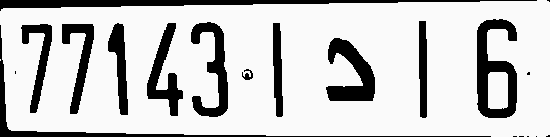
我正在做一个关于识别摩洛哥车牌的项目,这些车牌看起来像这张图片:
摩洛哥牌照
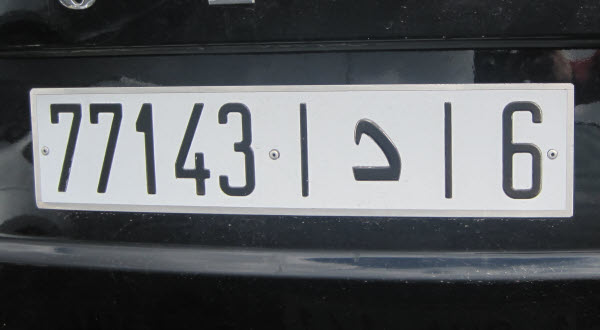
请告诉我如何使用OpenCV把车牌剪掉,用Tesseract来读取中间的数字和阿拉伯字母。
我研究过这篇研究论文:特性
我在Windows10中安装了OpenCV和Tesseract for python。当我在文本上运行tesseract时,只使用"fra"语言的一部分车牌,就可以得到7714315l Bv。我怎样才能把数据分开?
编辑:我们在摩洛哥使用的阿拉伯字母是:أبتجحدهـ预期的结果是:77143 د 6垂直线是无关的,我必须用它们分开图像和读取数据。
提前感谢!
回答 2
Stack Overflow用户
发布于 2019-02-18 09:20:19
您可以使用HoughTransform,因为这两条垂直线是无关的,可以裁剪图像:
import numpy as np
import cv2

image = cv2.imread("lines.jpg")
grayImage = cv2.cvtColor(image, cv2.COLOR_BGR2GRAY)

dst = cv2.Canny(grayImage, 0, 150)
cv2.imwrite("canny.jpg", dst)

lines = cv2.HoughLinesP(dst, 1, np.pi / 180, 50, None, 60, 20)

lines_x = []
# Get height and width to constrain detected lines
height, width, channels = image.shape
for i in range(0, len(lines)):
    l = lines[i][0]
    # Check if the lines are vertical or not
    angle = np.arctan2(l[3] - l[1], l[2] - l[0]) * 180.0 / np.pi
    if (l[2] > width / 4) and (l[0] > width / 4) and (70 < angle < 100):
        lines_x.append(l[2])
        # To draw the detected lines
        #cv2.line(image, (l[0], l[1]), (l[2], l[3]), (0, 0, 255), 3, cv2.LINE_AA)

#cv2.imwrite("lines_found.jpg", image)
# Sorting to get the line with the maximum x-coordinate for proper cropping
lines_x.sort(reverse=True)
crop_image = "cropped_lines"
for i in range(0, len(lines_x)):
    if i == 0:
        # Cropping to the end
        img = image[0:height, lines_x[i]:width]
    else:
        # Cropping from the start
        img = image[0:height, 0:lines_x[i]]
    cv2.imwrite(crop_image + str(i) + ".jpg", img)
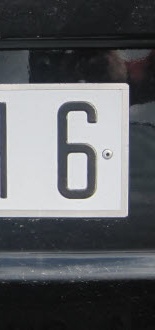
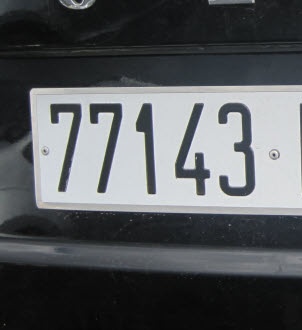
我相信你现在知道如何得到中间部分了;)希望它有帮助!
编辑
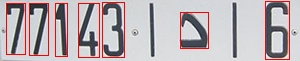
使用一些形态学操作,还可以单独提取字符:
import numpy as np
import cv2

image = cv2.imread("lines.jpg")
grayImage = cv2.cvtColor(image, cv2.COLOR_BGR2GRAY)

dst = cv2.Canny(grayImage, 50, 100)

dst = cv2.morphologyEx(dst, cv2.MORPH_RECT, np.zeros((5,5), np.uint8),
                       iterations=1)
cv2.imwrite("canny.jpg", dst)

im2, contours, heirarchy = cv2.findContours(dst, cv2.RETR_EXTERNAL,
                                            cv2.CHAIN_APPROX_NONE)

for i in range(0, len(contours)):
    if cv2.contourArea(contours[i]) > 200:
        x,y,w,h = cv2.boundingRect(contours[i])
        # The w constrain to remove the vertical lines
        if w > 10:
            cv2.rectangle(image, (x, y), (x+w, y+h), (0, 0, 255), 1)
            cv2.imwrite("contour.jpg", image)
结果:
Stack Overflow用户
发布于 2019-02-18 20:34:17
这是我现在所取得的..。
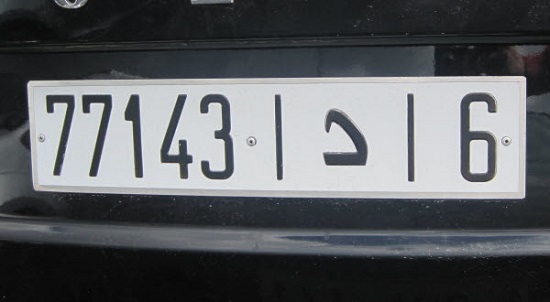
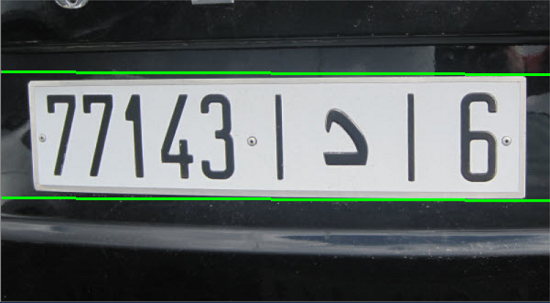
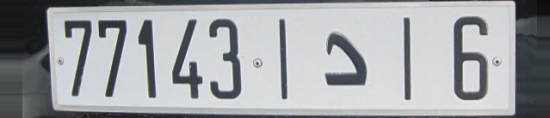
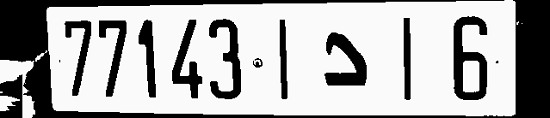
第二幅图像的检测是使用以下代码进行的:基于OpenCV和Python的车牌检测
完整的代码(从第三个图像开始工作)如下:
import cv2
import numpy as np
import tesserocr as tr
from PIL import Image

image = cv2.imread("cropped.png")

gray = cv2.cvtColor(image, cv2.COLOR_BGR2GRAY)
cv2.imshow('gray', image)

thresh = cv2.adaptiveThreshold(gray, 250, cv2.ADAPTIVE_THRESH_GAUSSIAN_C, cv2.THRESH_BINARY, 255, 1)
cv2.imshow('thresh', thresh)

kernel = np.ones((1, 1), np.uint8)
img_dilation = cv2.dilate(thresh, kernel, iterations=1)

im2, ctrs, hier = cv2.findContours(img_dilation.copy(), cv2.RETR_TREE, cv2.CHAIN_APPROX_SIMPLE)

sorted_ctrs = sorted(ctrs, key=lambda ctr: cv2.boundingRect(ctr)[0])

clean_plate = 255 * np.ones_like(img_dilation)

for i, ctr in enumerate(sorted_ctrs):
    x, y, w, h = cv2.boundingRect(ctr)

    roi = img_dilation[y:y + h, x:x + w]

    # these are very specific values made for this image only - it's not a factotum code
    if h > 70 and w > 100:
        rect = cv2.rectangle(image, (x, y), (x + w, y + h), (0, 255, 0), 2)

        clean_plate[y:y + h, x:x + w] = roi
        cv2.imshow('ROI', rect)

        cv2.imwrite('roi.png', roi)

img = cv2.imread("roi.png")

blur = cv2.medianBlur(img, 1)
cv2.imshow('4 - blur', blur)

pil_img = Image.fromarray(cv2.cvtColor(img, cv2.COLOR_BGR2RGB))

api = tr.PyTessBaseAPI()

try:
    api.SetImage(pil_img)
    boxes = api.GetComponentImages(tr.RIL.TEXTLINE, True)
    text = api.GetUTF8Text()

finally:
    api.End()

# clean the string a bit
text = str(text).strip()

plate = ""

# 77143-1916 ---> NNNNN|symbol|N
for char in text:
    firstSection = text[:5]

    # the arabic symbol is easy because it's nearly impossible for the OCR to misunderstood the last 2 digit
    # so we have that the symbol is always the third char from the end (right to left)
    symbol = text[-3]

    lastChar = text[-1]

    plate = firstSection + "[" + symbol + "]" + lastChar

print(plate)
cv2.waitKey(0)
对于阿拉伯符号,您应该从TesseractOCR安装其他语言(可能还可以使用版本4)。
输出:77143[9]6
括号之间的数字是阿拉伯语符号(未被检测到)。
希望我帮了你。
https://stackoverflow.com/questions/54728733
复制相似问题
腾讯云开发者

Copyright © 2013 - 2026 Tencent Cloud. All Rights Reserved. 腾讯云 版权所有
深圳市腾讯计算机系统有限公司 ICP备案/许可证号:粤B2-20090059  粤公网安备44030502008569号
腾讯云计算(北京)有限责任公司 京ICP证150476号 | 京ICP备11018762号