
PowerShell NotifyIcon上下文菜单
下面的NotifyIcon使用PowerShell运行:
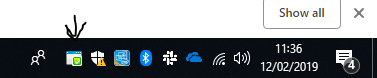
这是通过右键单击图标打开的上下文菜单,它现在只显示退出:

我想知道如何添加两个事件处理程序:
- 当图标上有一个左击事件时,运行一个函数
- 在也运行函数的右击菜单中添加另一个选项
我已经搜索了一个多小时,我尝试了大约20个不同的变体使用旧代码从5或6个不同的网站(都显示了非常不同的例子)。我除了头痛什么都没有。有人能提供任何指导/指导吗?
$ProgramDataPath = "$ENV:ProgramData\test"
$ProgramFilesPath = "${env:ProgramFiles(x86)}\test"

[void][System.Reflection.Assembly]::LoadWithPartialName("System.windows.forms")

$STForm = New-Object System.Windows.Forms.form
$NotifyIcon = New-Object System.Windows.Forms.NotifyIcon
$ContextMenu = New-Object System.Windows.Forms.ContextMenu
$MenuItem = New-Object System.Windows.Forms.MenuItem
$Timer = New-Object System.Windows.Forms.Timer
$HealthyIcon = New-Object System.Drawing.Icon("$ProgramFilesPath\icons\healthy.ico")
$UnhealthyIcon = New-Object System.Drawing.Icon("$ProgramFilesPath\icons\unhealthy.ico")

$STForm.ShowInTaskbar = $false
$STForm.WindowState = "minimized"

$NotifyIcon.Icon = $HealthyIcon
$NotifyIcon.ContextMenu = $ContextMenu
$NotifyIcon.ContextMenu.MenuItems.AddRange($MenuItem)
$NotifyIcon.Visible = $True

# We need to avoid using Start-Sleep as this freezes the GUI. Instead, we'll utilitse the .NET forms timer, it repeats a function at a set interval.
$Timer.Interval = 300000 # (5 min)
$Timer.add_Tick({ Load-Config })
$Timer.start()

# This will appear as a right click option on the system tray icon
$MenuItem.Index = 0
$MenuItem.Text = "Exit"
$MenuItem.add_Click({
        $Timer.Stop()
        $NotifyIcon.Visible = $False
        $STForm.close()
    })

function Load-Config
{
    #Get-Content some Data from a file here
    if ($warn)
    {
        $NotifyIcon.Icon = $UnhealthyIcon
        $NotifyIcon.ShowBalloonTip(30000, "Attention!", "Some data from a file here...", [system.windows.forms.ToolTipIcon]"Warning")
        Remove-Variable warn
    }
    else
    {
        $NotifyIcon.Icon = $HealthyIcon
    }
}

Load-Config
[void][System.Windows.Forms.Application]::Run($STForm)回答 1
Stack Overflow用户
发布于 2019-02-12 15:53:54
让我们谈谈你真正需要什么。看起来你有很多不需要的部件,比如计时器等等。你只需要一个跑道。Open将使运行空间保持打开,而不需要那个计时器。确保$Form.ShowDialog()是最后一次运行。
因此,让我们继续到NotifyIcon弹出窗口。使弹出发生的方法是私有的,这意味着我们需要通过反射来达到它。我们还需要设置在MouseDown上运行Notify的事件,并使按钮单击$_.button。
确保将$NotifyIcon.Icon设置为图标,否则Notify将不会出现。
工作脚本
Add-Type -AssemblyName System.Windows.Forms

$form = New-Object System.Windows.Forms.Form
$form.ShowInTaskbar = $true
$form.WindowState = [System.Windows.WindowState]::Normal

$MenuItemLeft = New-Object System.Windows.Forms.MenuItem
$MenuItemLeft.Text = "Left Exit"
$MenuItemLeft.add_Click({
   $NotifyIcon.Visible = $False
   $form.Close()
   $NotifyIcon.Dispose()
})
$ContextMenuLeft = New-Object System.Windows.Forms.ContextMenu
$ContextMenuLeft.MenuItems.Add($MenuItemLeft)


$MenuItemRight = New-Object System.Windows.Forms.MenuItem
$MenuItemRight.Text = "Right Exit"
$MenuItemRight.add_Click({
   $NotifyIcon.Visible = $False
   $form.Close()
   $NotifyIcon.Dispose()
})
$ContextMenuRight = New-Object System.Windows.Forms.ContextMenu
$ContextMenuRight.MenuItems.Add($MenuItemRight)

$NotifyIcon= New-Object System.Windows.Forms.NotifyIcon
$NotifyIcon.Icon =  "C:\Test\Test.ico"
$NotifyIcon.ContextMenu = $ContextMenuRight
$NotifyIcon.add_MouseDown({
    if ($_.Button -eq [System.Windows.Forms.MouseButtons]::left ) {
        $NotifyIcon.contextMenu = $ContextMenuLeft
    }else{
        $NotifyIcon.contextMenu = $ContextMenuRight
    }
    $NotifyIcon.GetType().GetMethod("ShowContextMenu",[System.Reflection.BindingFlags]::Instance -bor [System.Reflection.BindingFlags]::NonPublic).Invoke($NotifyIcon,$null)
})
$NotifyIcon.Visible = $True

$form.ShowDialog()
$NotifyIcon.Dispose()
我重读了你的文章,我给你提供了最重要的部分
要使Powershell运行命令,运行空间必须是活动的。Runspace使用powershell命令并将它们转化为实际的操作。
因为您使用了powershell,所以通知图标操作依赖于运行空间来解释这些操作。
NotifyIcon基本上只是角落中的一个图标,可以弹出气球通知或上下文菜单。
因此,当您查看时,您将看到$NotifyIcon.ContextMenu,它是一个包含ContextMenu对象的属性。上下文菜单对象包含菜单项。
因此,只需将MenuItems添加到ContextMenu对象,然后将该ContextMenu对象添加到$NotifyIcon.ContextMenu。现在,您可以更改和添加所有您喜欢的项目。
由于powershell在转到下一行代码之前等待表单关闭,所以$Form.ShowDialog()将使运行空间保持活跃,直到窗体退出为止。
让我们来看看这个肮脏的烂摊子:$NotifyIcon.GetType().GetMethod("ShowContextMenu",[System.Reflection.BindingFlags]::Instance -bor [System.Reflection.BindingFlags]::NonPublic).Invoke($NotifyIcon,$null)
这叫做反射。它允许您与类进行交互。用更简单的方式。ShowContextMenu方法是私有的,不能在类的内部工作之外正常运行。使用反射,你可以称之为它。
所以让我们把它再细分一点,因为这是你真正问过的。
GetType()将为您提供对象是什么。如果我做了"HEY".gettype(),它会告诉我这个对象是一个字符串。在这种情况下,$NotifyIcon.GetType()告诉我这是一个NotifyIcon。怎么回事?它把我带回了一个类型的类别。
在这里,我们看到了GetMethod("ShowContextMenu"),但让我在这里再深入一点.我们怎么知道有一种叫做ShowContextMenu.的方法我们可以通过使用NotifyIcon来查看这个GetMembers()类的所有成员。现在GetMembers()真的只是一个搜索..。默认情况下,只搜索公共成员,因此我们需要搜索所有成员。要搜索什么的参数在枚举[System.Reflection.BindingFlags]和一些按位计算中。
$BitWise
[System.Reflection.BindingFlags].GetEnumNames() | %{
    $BitWise = $BitWise -bor [System.Reflection.BindingFlags]$_
} | out-null

$NotifyIcon.GetType().GetMembers($BitWise) | ?{$_.Name -like "*Context*"} | select Name, MemberType
这表示查找名称中包含单词上下文的所有项,并显示其全名和类型。作为回应,我们得到
Name                 MemberType
----                 ----------
set_ContextMenu          Method
get_ContextMenu          Method
get_ContextMenuStrip     Method
set_ContextMenuStrip     Method
ShowContextMenu          Method
ContextMenu            Property
ContextMenuStrip       Property
contextMenu               Field
contextMenuStrip          Field
我们可以看到ShowContextMenu,也可以看到它是一种方法
所以现在我们需要直接得到这个方法。getMethod()来了,这只是另一个搜索,它带回了一个条目,而不是所有的条目。所以
GetMethod("ShowContextMenu",[System.Reflection.BindingFlags]::Instance -bor [System.Reflection.BindingFlags]::NonPublic)
Get方法ShowContextMenu它将是私有的,因此NonPublic和类的一个实例必须先创建,然后才能运行这样的实例。
.Invoke($NotifyIcon,$null)
然后,通过告诉它哪个控件有我们想要运行的方法来调用该方法,并传递任何参数,这些参数都是空的,所以是$null。
你就是这么做的。
https://stackoverflow.com/questions/54649456
复制相似问题
腾讯云开发者

Copyright © 2013 - 2026 Tencent Cloud. All Rights Reserved. 腾讯云 版权所有
深圳市腾讯计算机系统有限公司 ICP备案/许可证号:粤B2-20090059  粤公网安备44030502008569号
腾讯云计算(北京)有限责任公司 京ICP证150476号 | 京ICP备11018762号