
VSTS构建不使用.msi生成.vdproj文件。
我有VSTS,它将使用.msi生成.vdproj文件,但是我不会将.msi文件从构建中提取出来。
我要拿到Warning MSB4078: The project file "abcdSetup\abcdSetup.vdproj" is not supported by MSBuild and cannot be built了。
我使用和MS build任务来生成.msi。
我尝试了一些方法,并安装了第三部分任务,名为创建.msi文件。
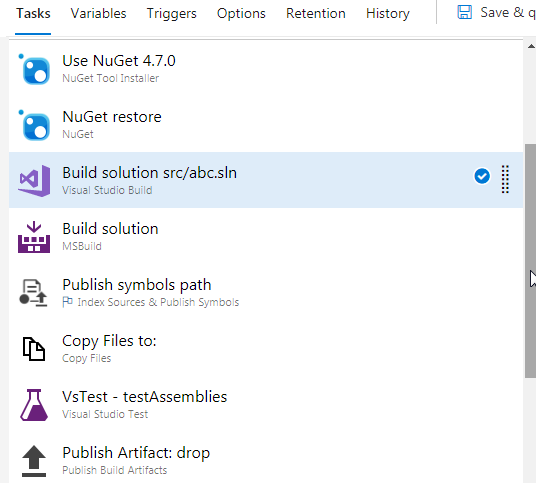
我已经附加了用于生成此.msi文件的所有任务的快照。
请看一看,并帮助我,并请告诉我们,是否有任何任务在VSTS中创建.msi文件。
回答 3
Stack Overflow用户
发布于 2019-02-14 09:07:43
我收到警告MSB4078:项目文件"abcdSetup\abcdSetup.vdproj“不受MSBuild支持,无法构建
这是因为MSBuild/Visual不支持安装项目。要与Azure DevOps集成,您必须使用devenv。
注意:从VS 2013开始,.vdproj支持由一个外接程序提供。
这也是你得到错误Warning MSB4078: The project file "abcdSetup\abcdSetup.vdproj" is not supported by MSBuild and cannot be built的原因
在VSTS中,我们可以不设置私有代理而生成.msi吗?请告诉我有什么任务可以做吗?
恐怕不需要在Azure DevOps中设置私有代理就无法生成DevOps,否则,我们将始终得到以下错误:
Some errors occurred during migration. For more information, see the migration report: C:\VSTS-vs2017-agent\_work\9\s\Setup1\UpgradeLog.htm在不安装项目扩展的情况下,我在私有代理和本地PC上测试它,得到了相同的结果。然后我在本地PC上安装了这个扩展程序,它工作得很好。因此,如果要构建安装项目,则必须安装项目扩展。
希望这能有所帮助。
Stack Overflow用户
发布于 2021-08-04 06:56:50
在代理映像Windows2019发布之前,这是不可能的。新的映像为vdproj配备了一个名为Microsoft Visual Studio Installer Projects的扩展。
步骤:
- 添加一个
Command line任务 - 添加以下行:
"C:\Program Files (x86)\Microsoft Visual Studio\2019\Enterprise\Common7\IDE\devenv.com" MyProjectDir\MySolution.sln /Rebuild Release
备注:请注意使用devenv.com (不是devenv.exe)。"com“版本将生成日志和错误输出到控制台(标准输出)。
Stack Overflow用户
发布于 2022-05-27 12:18:29
2022年的今天,看起来Azure DevOps包含了安装程序项目扩展。
我能够使用下面的管道配置获得一个构建:
trigger:
- master

pool:
  vmImage: 'windows-latest'

variables:
  BuildConfiguration: 'Release'
  BuildPlatform: 'Any CPU'
  InstallerProject: 'YourInstallerProject/YourInstallerProject.vdproj'
  Solution: 'YourSolution.sln'
  VisualStudioPath: 'C:\Program Files\Microsoft Visual Studio\2022\Enterprise'

steps:
- task: NuGetToolInstaller@1
  displayName: 'Install Nuget CLI'

- task: NuGetCommand@2
  displayName: 'Restore packages'
  inputs:
    restoreSolution: '$(Solution)'

- task: CmdLine@2
  displayName: 'Prepare for MSI build'
  inputs:
    script: 'DisableOutOfProcBuild.exe'
    workingDirectory: '$(VisualStudioPath)\Common7\IDE\CommonExtensions\Microsoft\VSI\DisableOutOfProcBuild'

- task: VSBuild@1
  displayName: 'Build primary project'
  inputs:
    solution: '$(Solution)'
    platform: '$(BuildPlatform)'
    configuration: '$(BuildConfiguration)'

- task: CmdLine@2
  displayName: 'Build installer project'
  inputs:
    script: '"$(VisualStudioPath)\Common7\IDE\devenv.com" "$(Solution)" /Project "$(InstallerProject)" /Build "$(BuildConfiguration)|$(BuildPlatform)"'

- task: CopyFiles@2
  displayName: 'Copy MSI files'
  inputs:
    sourceFolder: '$(Build.SourcesDirectory)'
    contents: '**/$(BuildConfiguration)/**/?(*.msi)'
    targetFolder: '$(Build.ArtifactStagingDirectory)'

- task: PublishBuildArtifacts@1
  displayName: 'Publish artifacts'
  inputs:
    pathToPublish: '$(Build.ArtifactStagingDirectory)'
artifactName: drop确保更新Solution和InstallerProject变量的值。如果要使用2022年以外的Visual版本进行编译,还必须编辑VisualStudioPath变量。
https://stackoverflow.com/questions/54630699
复制相似问题
腾讯云开发者

Copyright © 2013 - 2026 Tencent Cloud. All Rights Reserved. 腾讯云 版权所有
深圳市腾讯计算机系统有限公司 ICP备案/许可证号:粤B2-20090059  粤公网安备44030502008569号
腾讯云计算(北京)有限责任公司 京ICP证150476号 | 京ICP备11018762号