
如何用fitEllipse在扫描电镜图像上检测( OpenCV )物体?
我有大约30张扫描电子显微镜( SEM )的图像:
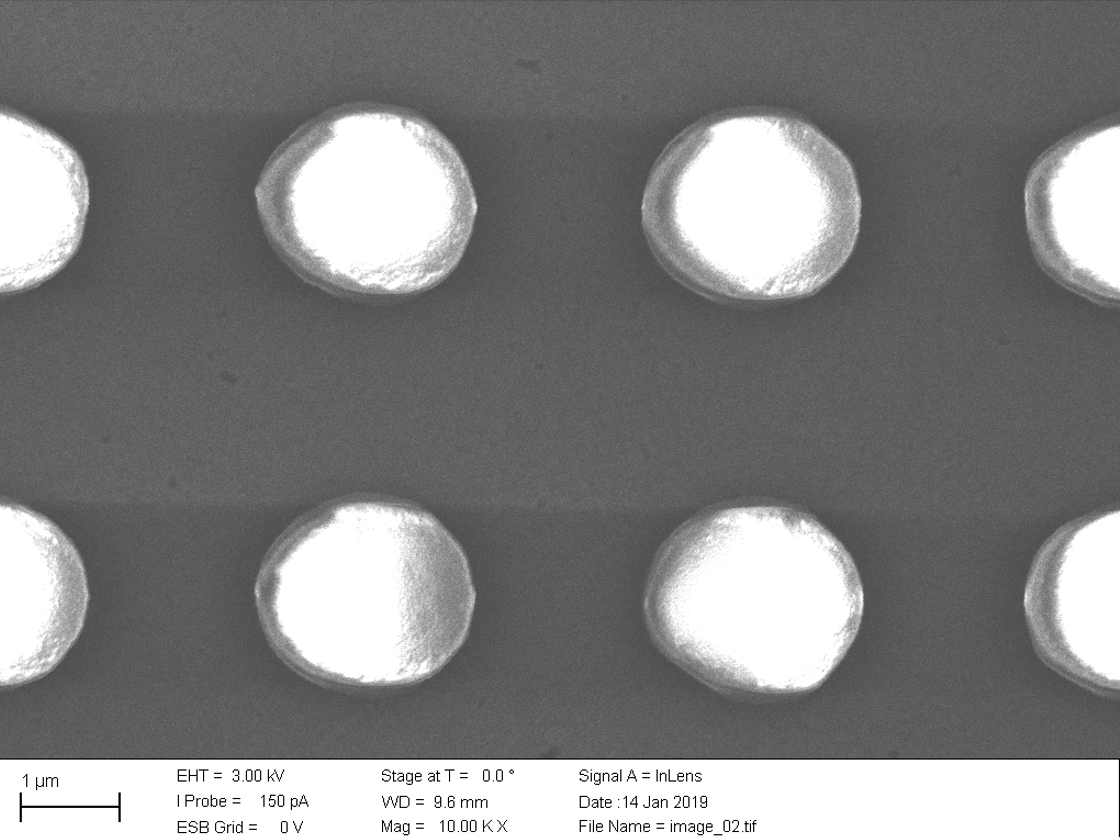
你看到的是玻璃基板上的光刻胶柱。我想做的是,得到x和y方向的平均直径,以及x和y方向的平均周期。
现在,我并不是手工完成所有的度量,而是想知道,是否有一种方法可以让使用python和opencv实现自动化呢?
编辑:我尝试了下面的代码,它似乎是用来检测圆圈的,,但是我实际上需要的是椭圆,,因为我需要x和y方向的直径。
..。我还不太明白怎样才能得到天平?
import numpy as np
import cv2
from matplotlib import pyplot as plt

img = cv2.imread("01.jpg",0)
output = img.copy()

edged = cv2.Canny(img, 10, 300)
edged = cv2.dilate(edged, None, iterations=1)
edged = cv2.erode(edged, None, iterations=1)


# detect circles in the image
circles = cv2.HoughCircles(edged, cv2.HOUGH_GRADIENT, 1.2, 100)


# ensure at least some circles were found
if circles is not None:
    # convert the (x, y) coordinates and radius of the circles to integers
    circles = np.round(circles).astype("int")

    # loop over the (x, y) coordinates and radius of the circles
    for (x, y, r) in circles[0]:
        print(x,y,r)
        # draw the circle in the output image, then draw a rectangle
        # corresponding to the center of the circle
        cv2.circle(output, (x, y), r, (0, 255, 0), 4)
        cv2.rectangle(output, (x - 5, y - 5), (x + 5, y + 5), (0, 128, 255), -1)

    # show the output image
    plt.imshow(output, cmap = 'gray', interpolation = 'bicubic')
    plt.xticks([]), plt.yticks([])  # to hide tick values on X and Y axis
    plt.figure()
    plt.show()
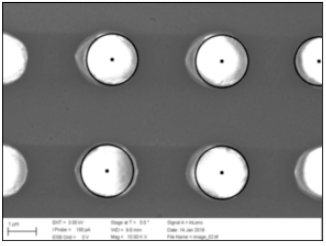
灵感来源:https://www.pyimagesearch.com/2014/07/21/detecting-circles-images-using-opencv-hough-circles/
回答 3
Stack Overflow用户
发布于 2019-02-12 23:16:03
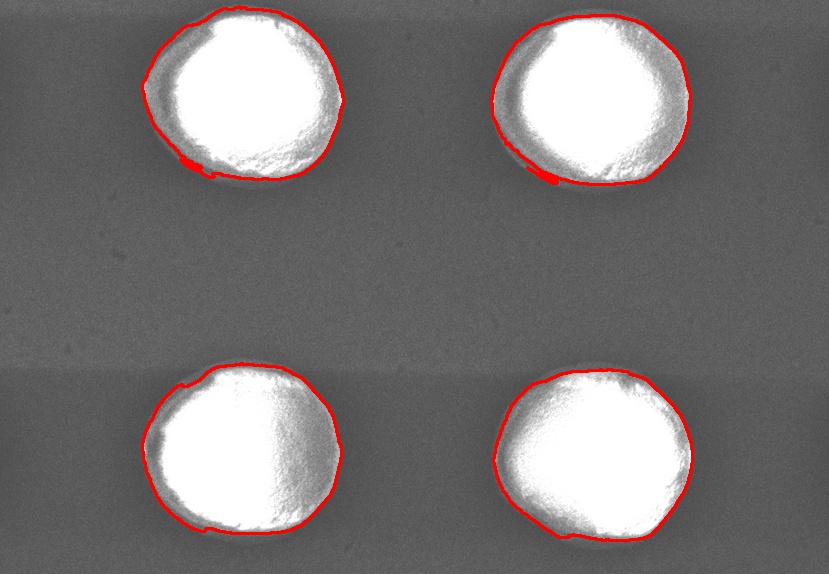
我很少发现Hough对现实世界的应用有用,因此我宁愿遵循去噪、分割和椭圆拟合的方法。
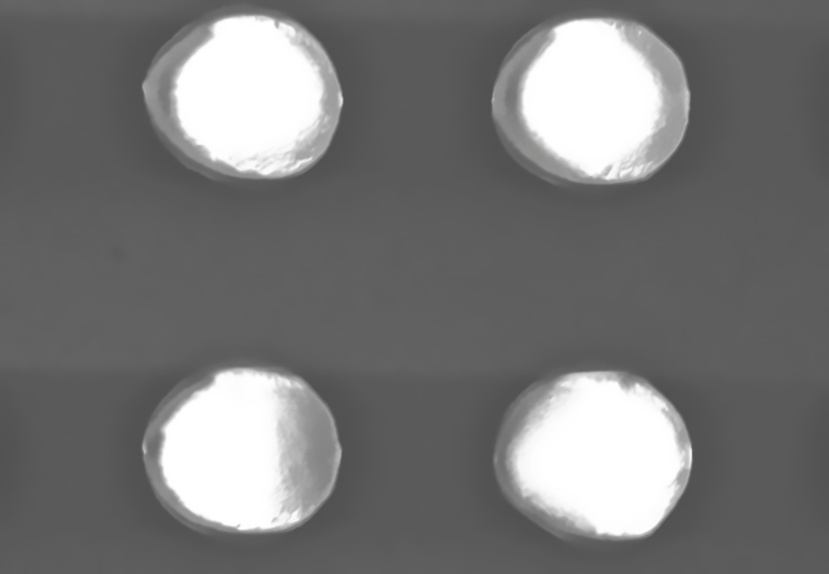
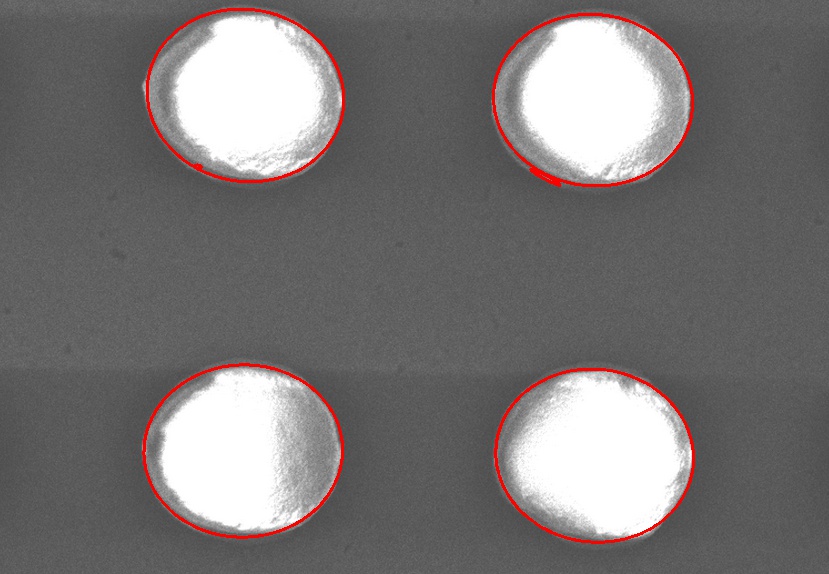
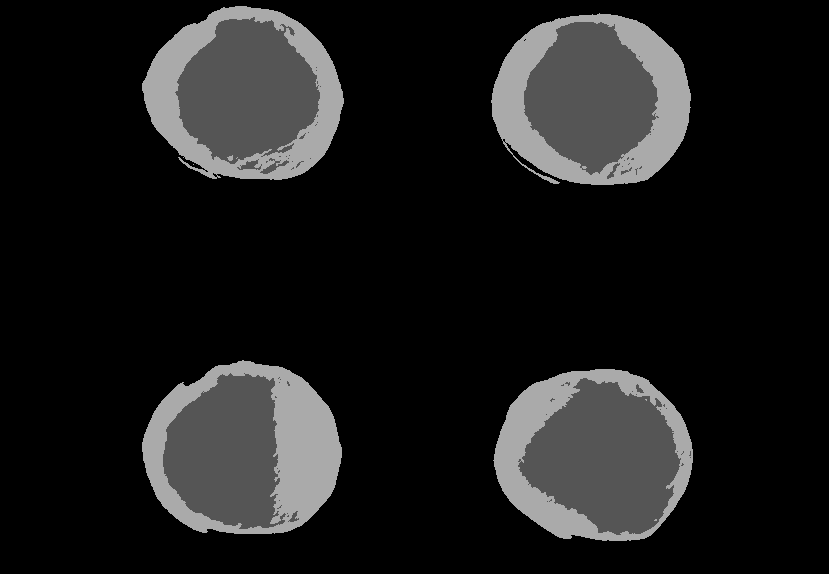
对于去噪,选择非局部均值(NLM)。对于分割--只看图像--我提出了一个高斯混合模型,包括三个类:一个是背景,两个是物体(漫射和镜面成分)。在这里,混合模型本质上是通过三个高斯函数来模拟灰度图像直方图的形状(如在Wikipedia混合-直方图gif中所示)。感兴趣的读者被重定向到维基百科文章。

椭圆拟合在最后只是一个基本的OpenCV工具。
在C++中,但类似于OpenCV-Python
#include "opencv2/ml.hpp"
#include "opencv2/photo.hpp"
#include "opencv2/highgui.hpp"
#include "opencv2/imgproc.hpp"
void gaussianMixture(const cv::Mat &src, cv::Mat &dst, int nClasses )
{
    if ( src.type()!=CV_8UC1 )
        CV_Error(CV_StsError,"src is not 8-bit grayscale");

    // reshape
    cv::Mat samples( src.rows * src.cols, 1, CV_32FC1 );
    src.convertTo( cv::Mat( src.size(), CV_32FC1, samples.data ), CV_32F );

    cv::Mat labels;
    cv::Ptr<cv::ml::EM> em = cv::ml::EM::create();
    em->setClustersNumber( nClasses );
    em->setTermCriteria( cv::TermCriteria(CV_TERMCRIT_ITER, 4, 0.0 ) );
    em->trainEM( samples );

    if ( dst.type()!=CV_8UC1 || dst.size()!=src.size() )
        dst = cv::Mat( src.size(),CV_8UC1 );
    for(int y=0;y<src.rows;++y)
    {
        for(int x=0;x<src.cols;++x)
        {
            dst.at<unsigned char>(y,x) = em->predict( src.at<unsigned char>(y,x) );
        }
    }
}
void automate()
{
    cv::Mat input = cv::imread( /* input image in color */,cv::IMREAD_COLOR);
    cv::Mat inputDenoised;
    cv::fastNlMeansDenoising( input, inputDenoised, 8.0, 5, 17 );
    cv::Mat gray;
    cv::cvtColor(inputDenoised,gray,cv::COLOR_BGR2GRAY );
    gaussianMixture(gray,gray,3 );

    typedef std::vector< std::vector< cv::Point > >  VecOfVec;
    VecOfVec contours;
    cv::Mat objectPixels = gray>0;
    cv::findContours( objectPixels, contours, cv::RETR_LIST, cv::CHAIN_APPROX_NONE );
    cv::Mat inputcopy; // for drawing of ellipses
    input.copyTo( inputcopy );
    for ( size_t i=0;i<contours.size();++i )
    {
        if ( contours[i].size() < 5 )
            continue;
        cv::drawContours( input, VecOfVec{contours[i]}, -1, cv::Scalar(0,0,255), 2 );
        cv::RotatedRect rect = cv::fitEllipse( contours[i] );
        cv::ellipse( inputcopy, rect, cv::Scalar(0,0,255), 2 );
    }
}
在绘制椭圆之前,我应该清理非常小的等高线(在第二行上)(大于最小5点)。
*编辑*添加了Python预测器,没有去噪和查找-轮廓部分。在学习了模型之后,预测的时间约为1.1秒
img = cv.imread('D:/tmp/8b3Lm.jpg', cv.IMREAD_GRAYSCALE )

class Predictor :
    def train( self, img ):
        self.em = cv.ml.EM_create()
        self.em.setClustersNumber( 3 )
        self.em.setTermCriteria( ( cv.TERM_CRITERIA_COUNT,4,0 ) )
        samples = np.reshape( img, (img.shape[0]*img.shape[1], -1) ).astype('float')
        self.em.trainEM( samples )

    def predict( self, img ):
        samples = np.reshape( img, (img.shape[0]*img.shape[1], -1) ).astype('float')
        labels = np.zeros( samples.shape, 'uint8' )
        for i in range ( samples.shape[0] ):
            retval, probs = self.em.predict2( samples[i] )
            labels[i] = retval[1] * (255/3) # make it [0,255] for imshow
        return np.reshape( labels, img.shape )

predictor = Predictor()

predictor.train( img )
t = time.perf_counter()
predictor.train( img )
t = time.perf_counter() - t
print ( "train %s s" %t )

t = time.perf_counter()
labels = predictor.predict( img )
t = time.perf_counter() - t
print ( "predict %s s" %t )

cv.imshow( "prediction", labels  )
cv.waitKey( 0 )
Stack Overflow用户
发布于 2019-02-09 08:47:29
我会使用HoughCircles方法,来自openCV。它会给你图像中的所有圆圈。这样就可以很容易地计算出每个圆的半径和位置。
Stack Overflow用户
发布于 2019-02-13 03:18:50
我使用cv2.ml.EM首先在OpenCV (Python)中分割图像,它需要使用13 s。如果仅在阈值图像的轮廓上进行fitEllipse,则代价是5 ms,结果可能不那么准确。只是个交换。
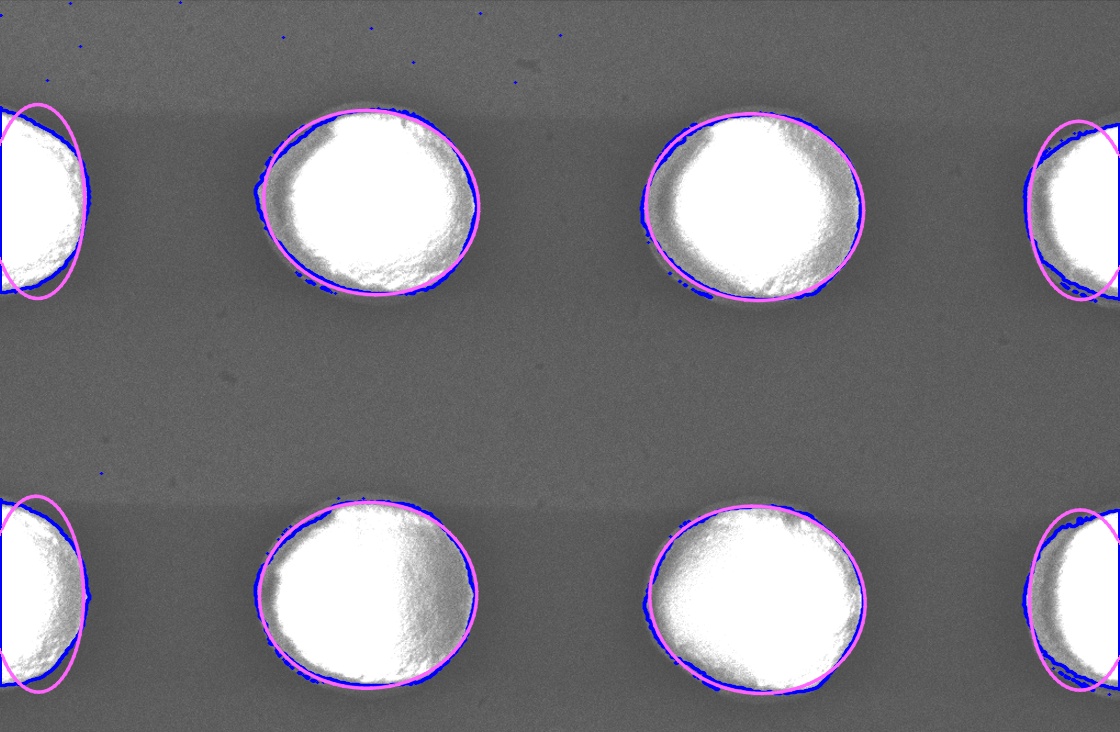
详细信息:
- 转换成灰阶并打掉它
- 变形至去噪
- 寻找外部轮廓
- 拟合椭圆
代码:
#!/usr/bin/python3
# 2019/02/13
# https://stackoverflow.com/a/54604608/54661984

import cv2
import numpy as np

fpath = "sem.png"
img = cv2.imread(fpath)

## Convert into grayscale and threshed it
gray = cv2.cvtColor(img, cv2.COLOR_BGR2GRAY)
th, threshed = cv2.threshold(gray, 120, 255, cv2.THRESH_BINARY)

## Morph to denoise
threshed = cv2.dilate(threshed, None)
threshed = cv2.erode(threshed, None)

## Find the external contours
cnts = cv2.findContours(threshed, cv2.RETR_EXTERNAL, cv2.CHAIN_APPROX_NONE)[-2]
cv2.drawContours(img, cnts, -1, (255, 0, 0), 2, cv2.LINE_AA)

## Fit ellipses
for cnt in cnts:
    if cnt.size < 10 or cv2.contourArea(cnt) < 100:
        continue

    rbox = cv2.fitEllipse(cnt)
    cv2.ellipse(img, rbox, (255, 100, 255), 2, cv2.LINE_AA)

## This it
cv2.imwrite("dst.jpg", img)https://stackoverflow.com/questions/54604608
复制相似问题
腾讯云开发者

Copyright © 2013 - 2026 Tencent Cloud. All Rights Reserved. 腾讯云 版权所有
深圳市腾讯计算机系统有限公司 ICP备案/许可证号:粤B2-20090059  粤公网安备44030502008569号
腾讯云计算(北京)有限责任公司 京ICP证150476号 | 京ICP备11018762号