
Excel条码库存
我试图制作一个Excel工作簿来跟踪股票余额。现在,我的工作簿上有一份库存、存款和提款单。库存单包含库存中每一项的代码和数量。
我想要在存款或提款单上的A1单元格中输入项目代码,然后程序应该获取该数字并查看它是否与库存表中的任何内容相匹配,如果符合,则应该将该项目的数量增加1,或删除取决于输入输入的存款或提款单。如果无法找到匹配项,则应在库存表中创建一个新项目。在此之后,应清除A1细胞。
我有一个数据快速扫描条形码扫描仪,我将创建一个条形码的每一个项目在库存,并使用扫描仪输入条形码到工作表。当我扫描条形码时,它只输出一个数字,因为它是在连接到PC的常规键盘上输入的。
我被困在VBA代码,这将更新库存表。我有下面的代码,在库存表中我可以扫描条形码,然后把它添加到列表中,但是如果我需要另一个可以扫描的单元格,然后从数量中减去它,我会怎么做?
Private Sub Worksheet_Change(ByVal Target As Range)

    Const SCAN_CELL As String = "F7"
    Const RANGE_BC As String = "A1:A500"
    Dim val, f As Range, rngCodes As Range

    If Target.Cells.Count > 1 Then Exit Sub
    If Intersect(Target, Me.Range(SCAN_CELL)) Is Nothing Then Exit Sub

    val = Trim(Target.Value)
    If Len(val) = 0 Then Exit Sub

    Set rngCodes = Me.Range(RANGE_BC)

    Set f = rngCodes.Find(val, , xlValues, xlWhole)
    If Not f Is Nothing Then
        With f.Offset(0, 2)
            .Value = .Value + 1
        End With
    Else
        Set f = rngCodes.Cells(rngCodes.Cells.Count).End(xlUp).Offset(1, 0)
        f.Value = val
        f.Offset(0, 1).Value = "enter description"
        f.Offset(0, 2).Value = 1
    End If

    Application.EnableEvents = False
    Target.Value = ""
    Application.EnableEvents = True

    Target.Select

End Sub回答 1
Stack Overflow用户
发布于 2019-02-05 19:35:23
下面是使用userform的解决方案。
创建新工作表或重命名为Inventory。
创建一个userform UserForm1,如下所示:
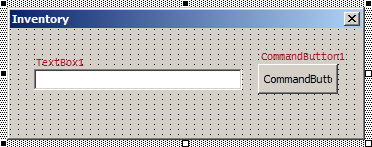
将代码放入UserForm1模块:
Option Explicit

Private pbModeDeposit As Boolean

Private Sub UserForm_Initialize()

    ' Setup header
    ThisWorkbook.Sheets("Inventory").Range("A1:C1").Value = Array("Item Code", "Description", "Quantity")
    ' Set Deposit mode
    pbModeDeposit = True
    ' Indicate current mode
    ShowMode

End Sub

Private Sub TextBox1_KeyDown(ByVal KeyCode As MSForms.ReturnInteger, ByVal Shift As Integer)

    Dim sItemCode As String
    Dim n As Long
    Dim i As Long
    Dim bExists As Boolean

    ' Check if enter key pressed
    If KeyCode = KeyCodeConstants.vbKeyReturn Then
        ' Cancel key to keep textbox in focus
        KeyCode = 0
        ' Check entire input code
        sItemCode = Me.TextBox1.Value
        Me.TextBox1.Value = ""
        Select Case True
            Case Not IsNumeric(sItemCode)
                ' Skip non-numeric values
                Exit Sub
            Case sItemCode = "10001990"
                ' Service code to switch to Deposit mode
                pbModeDeposit = True
                ShowMode
            Case sItemCode = "10000991"
                ' Service code to switch to Withdrawal mode
                pbModeDeposit = False
                ShowMode
            Case Else
                With ThisWorkbook.Sheets("Inventory")
                    .Range("A1:C1").Value = Array("Item Code", "Description", "Quantity")
                    ' Get last filled row number
                    n = .Cells(Rows.Count, 1).End(xlUp).Row
                    ' Check if scanned code exists
                    For i = 2 To n
                        bExists = .Cells(i, 1).Value = sItemCode
                        If bExists Then Exit For
                    Next
                    If bExists Then
                        ' Change quantity of existing item
                        .Cells(i, 3).Value = .Cells(i, 3).Value + IIf(pbModeDeposit, 1, -1)
                    Else
                        ' Add new item
                        .Cells(n + 1, 1).NumberFormat = "@"
                        .Cells(n + 1, 1).Value = sItemCode
                        .Cells(n + 1, 3).Value = IIf(pbModeDeposit, 1, -1)
                    End If
                End With
        End Select
    End If

End Sub

Private Sub CommandButton1_Click()

    ' Change mode
    pbModeDeposit = Not pbModeDeposit
    ' Indicate current mode
    ShowMode
    ' Keep textbox in focus
    Me.TextBox1.SetFocus

End Sub

Private Sub ShowMode()

    Me.CommandButton1.Caption = IIf(pbModeDeposit, "Deposit", "Withdrawal")

End Sub将代码放入ThisWorkbook模块:
Private Sub Workbook_SheetSelectionChange(ByVal Sh As Object, ByVal Target As Range)

    With UserForm1
        .Show
        .CommandButton1.SetFocus
        .TextBox1.SetFocus
    End With

End Sub此外,还可以将UserForm1属性ShowModal更改为False。
当你扫描一个代码时,它被输入到TextBox1中。如果代码是10001990,则存款模式切换,如果10000991然后退出模式,则在文本框旁边的按钮上指示。10001990和10000991只是作为例子,可以更改。任何其他数字输入都会计算和更新库存清单。注意,代码存储为文本,以避免溢出或自动转换为工程符号E的大数字。
https://stackoverflow.com/questions/54531202
复制相似问题
腾讯云开发者

Copyright © 2013 - 2026 Tencent Cloud. All Rights Reserved. 腾讯云 版权所有
深圳市腾讯计算机系统有限公司 ICP备案/许可证号:粤B2-20090059  粤公网安备44030502008569号
腾讯云计算(北京)有限责任公司 京ICP证150476号 | 京ICP备11018762号