
离子cordova构建-驱动-释放失败并产生错误。
我正在尝试为android平台构建我的离子型3项目。我正在运行windows 10。当我运行以下命令时:离子型cordova构建android发布时,我会得到以下错误:
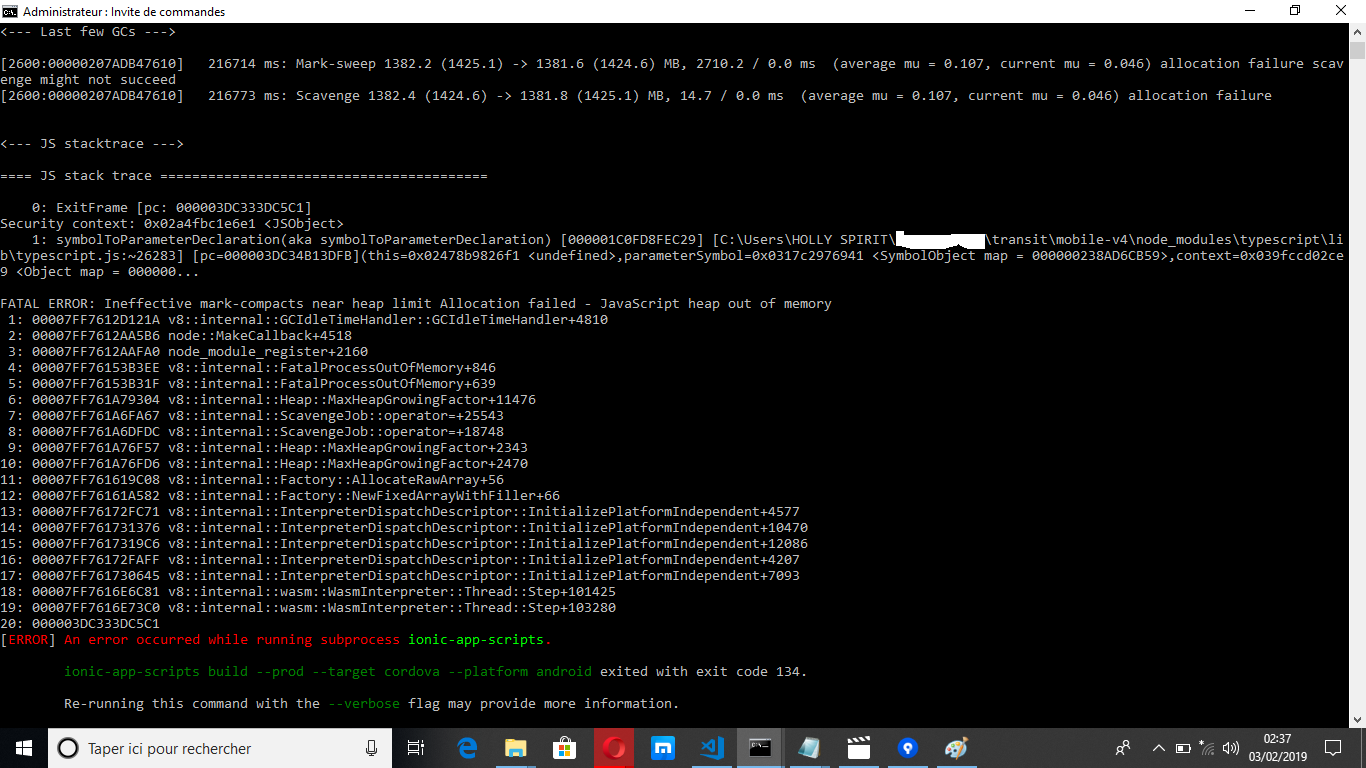
无效标记-接近堆限制分配的契约失败-内存中的JavaScript堆
下面是与错误对应的屏幕截图
以下是离子型信息命令的结果
Ionic:

   ionic (Ionic CLI)  : 4.7.0 (C:\Users\HOLLY SPIRIT\AppData\Roaming\npm\node_modules\ionic)    Ionic Framework    : ionic-angular 3.9.2    @ionic/app-scripts : 3.2.1

Cordova:

   cordova (Cordova CLI) : 7.1.0    Cordova Platforms     : android
6.4.0    Cordova Plugins       : cordova-plugin-ionic-keyboard 2.1.3, cordova-plugin-ionic-webview 1.2.1, (and 22 other plugins)

System:

   NodeJS : v10.15.0 (C:\Program Files\nodejs\node.exe)    npm    :
6.4.1 OS : Windows 10这是package.json的内容
{
"name": "app name",
  "version": "2.0.1",
  "author": "auhtors name",
  "homepage": "website url",
  "private": true,
  "scripts": {
    "clean": "ionic-app-scripts clean",
    "build": "ionic-app-scripts build",
    "lint": "ionic-app-scripts lint",
    "ionic:build": "ionic-app-scripts build",
    "ionic:serve": "ionic-app-scripts serve"
  },
  "dependencies": {
    "@angular/animations": "5.2.10",
    "@angular/common": "5.2.10",
    "@angular/compiler": "5.2.10",
    "@angular/compiler-cli": "5.2.10",
    "@angular/core": "5.2.10",
    "@angular/fire": "^5.0.0",
    "@angular/forms": "5.2.10",
    "@angular/http": "5.2.10",
    "@angular/platform-browser": "5.2.10",
    "@angular/platform-browser-dynamic": "5.2.10",
    "@ionic-native/admob-free": "^4.7.0",
    "@ionic-native/admob-pro": "^4.19.0",
    "@ionic-native/app-version": "^4.8.0",
    "@ionic-native/barcode-scanner": "^4.19.0",
    "@ionic-native/browser-tab": "^4.19.0",
    "@ionic-native/camera": "^4.7.0",
    "@ionic-native/core": "4.7.0",
    "@ionic-native/facebook": "^4.19.0",
    "@ionic-native/file": "^4.8.0",
    "@ionic-native/file-transfer": "^4.7.0",
    "@ionic-native/firebase": "^4.13.0",
    "@ionic-native/google-plus": "^5.0.0",
    "@ionic-native/in-app-browser": "^4.7.0",
    "@ionic-native/instagram": "^4.19.0",
    "@ionic-native/local-notifications": "^4.13.0",
    "@ionic-native/network": "^4.7.0",
    "@ionic-native/open-native-settings": "^4.7.0",
    "@ionic-native/social-sharing": "^4.7.0",
    "@ionic-native/splash-screen": "4.7.0",
    "@ionic-native/status-bar": "^4.7.0",
    "@ionic-native/youtube-video-player": "^4.7.0",
    "@ionic/storage": "2.1.3",
    "angular-pipes": "^8.0.0",
    "angularfire2": "^5.1.1",
    "cordova-admob-sdk": "^0.17.0",
    "cordova-android": "^7.1.4",
    "cordova-instagram-plugin": "^0.5.7",
    "cordova-ios": "^4.5.5",
    "cordova-open-native-settings": "^1.5.2",
    "cordova-plugin-add-swift-support": "^1.7.2",
    "cordova-plugin-admob-free": "^0.17.4",
    "cordova-plugin-admobpro": "^2.37.1",
    "cordova-plugin-app-version": "^0.1.9",
    "cordova-plugin-badge": "^0.8.7",
    "cordova-plugin-camera": "^4.0.3",
    "cordova-plugin-device": "^2.0.2",
    "cordova-plugin-document-viewer": "^0.9.10",
    "cordova-plugin-extension": "^1.5.4",
    "cordova-plugin-facebook4": "^4.1.0",
    "cordova-plugin-file": "^6.0.1",
    "cordova-plugin-file-transfer": "^1.7.1",
    "cordova-plugin-firebase": "^2.0.2",
    "cordova-plugin-inappbrowser": "^3.0.0",
    "cordova-plugin-ionic-keyboard": "^2.1.3",
    "cordova-plugin-ionic-webview": "^3.1.0",
    "cordova-plugin-local-notification": "^0.9.0-beta.2",
    "cordova-plugin-network-information": "^2.0.1",
    "cordova-plugin-splashscreen": "^5.0.2",
    "cordova-plugin-statusbar": "^2.4.2",
    "cordova-plugin-whitelist": "^1.3.3",
    "cordova-plugin-x-socialsharing": "^5.4.4",
    "cordova-plugin-youtube-video-player": "^1.0.6",
    "cordova-promise-polyfill": "0.0.2",
    "cordova-universal-clipboard": "git+https://github.com/Visigo/CordovaClipboard.git",
    "es6-promise-plugin": "^4.2.2",
    "firebase": "^5.8.2",
    "ionic-angular": "3.9.2",
    "ionic-img-viewer": "^2.9.0",
    "ionicons": "3.0.0",
    "moment": "^2.22.2",
    "ng2-pdf-viewer": "^5.1.0",
    "ng2-simple-timer": "^1.3.3",
    "ngx-moment": "^3.1.0",
    "phonegap-plugin-barcodescanner": "^8.0.0",
    "rxjs": "5.5.11",
    "sw-toolbox": "3.6.0",
    "zone.js": "0.8.26"
  },
  "devDependencies": {
    "@ionic/app-scripts": "^3.2.1",
    "@ionic/lab": "1.0.18",
    "typescript": "~2.6.2"
  },
  "description": "app description",
  "cordova": {
    "plugins": {
      "cordova-plugin-admob-free": {},
      "cordova-plugin-x-socialsharing": {
        "ANDROID_SUPPORT_V4_VERSION": "24.1.1+"
      },
      "cordova-instagram-plugin": {},
      "cordova-plugin-network-information": {},
      "cordova-plugin-camera": {},
      "cordova-plugin-file-transfer": {},
      "cordova-open-native-settings": {},
      "cordova-plugin-inappbrowser": {},
      "cordova-plugin-youtube-video-player": {},
      "cordova-plugin-app-version": {},
      "cordova-plugin-whitelist": {},
      "cordova-plugin-device": {},
      "cordova-plugin-splashscreen": {},
      "cordova-plugin-ionic-webview": {},
      "cordova-plugin-ionic-keyboard": {},
      "phonegap-plugin-barcodescanner": {
        "ANDROID_SUPPORT_V4_VERSION": "27.+"
      },
      "cordova-plugin-file": {},
      "cordova-plugin-document-viewer": {},
      "cordova-plugin-statusbar": {},
      "cordova-plugin-local-notification": {},
      "cordova-plugin-firebase": {},
      "cordova-universal-clipboard": {},
      "cordova-plugin-admobpro": {
        "PLAY_SERVICES_VERSION": "16.0.0"
      },
      "cordova-plugin-facebook4": {
        "APP_ID": "appid",
        "APP_NAME": "237actu",
        "FACEBOOK_HYBRID_APP_EVENTS": "false",
        "FACEBOOK_ANDROID_SDK_VERSION": "4.38.1"
      },
      "cordova-plugin-googleplus": {
        "REVERSED_CLIENT_ID": "app reverse client id"
      }
    },
    "platforms": [
      "android",
      "ios"
    ]
  }
}
为了解决这个问题,我尝试了两件事:
- 我将节点-最大旧空间大小=2048添加到package.json的脚本部分,如下所示: “脚本”:{“干净”:“离子-应用-脚本清洁”,“构建”:“节点-最大-旧空间-大小=2048年离子-应用-脚本构建”," lint“:”离子-应用-脚本林特“,”离子:构建“:”离子-应用-脚本构建“,”离子:服务“:”离子-应用-脚本服务“},
它不起作用。
- 我编辑了计算机的ionic.cmd文件如下: @如果存在"%~dp0\node.exe“( "%~dp0\node.exe”"%~dp0\node_modules\ionic\bin\ionic“%*),则为其他( @SETLOCAL @SET PATHEXT=%PATHEXT:;.JS;=;% **节点--最大旧空间大小=2048** "%~dp0\node_modules\ionic\bin\ionic”%* )
正如您所注意到的,我刚刚添加了--max-old-space-size=2048,,但是它没有工作。我的计算机内存是3 984 MB
- 我还试图在构建之前将firebase降级到4版本,但它没有工作。
- 我使用以下命令更新了项目的所有依赖项:npm更新-f
- 我从我的项目nodes_modules插件、平台、中删除了文件夹,我还从项目中删除了package-lock.json。在构建之前,我运行了项目中的命令:npm安装,离子型cordova平台添加android。
这些解决方案对我都没有用。
有什么帮助吗?
回答 2
Stack Overflow用户
发布于 2019-02-08 19:56:52
终于找到了对我有用的解决方案.
使用以下命令将android平台从项目中删除:
ionic cordova platform rm android
将android平台添加到项目中:在我的例子中,我使用了最新版本的android平台。
在项目中添加@angular-devkit/build-optimizer@0.6.8:
npm install @angular-devkit/build-optimizer@0.6.8 --save
这个角度的插件将优化项目的构建。
在项目中运行此命令:cordova clean
现在,当我运行ionic cordova build android --prod --release时,它成功了。
Stack Overflow用户
发布于 2019-02-06 12:29:21
尝尝这个
* add this to the package.json scripts
  `"ionic:build": "node --max-old-space-size=8192 ./node_modules/@ionic/app-scripts/bin/ionic-app-scripts.js build",`
* run the command:
  `npm run ionic:build --prod`
* run the commands:
  `cordova build android --release`
`cordova build ios --release`https://stackoverflow.com/questions/54499388
复制相似问题
腾讯云开发者

Copyright © 2013 - 2026 Tencent Cloud. All Rights Reserved. 腾讯云 版权所有
深圳市腾讯计算机系统有限公司 ICP备案/许可证号:粤B2-20090059  粤公网安备44030502008569号
腾讯云计算(北京)有限责任公司 京ICP证150476号 | 京ICP备11018762号