
在两个地方有相同的单选按钮
在两个地方有相同的单选按钮
提问于 2019-02-01 22:37:11
我想要一组单选按钮,这样其中一个就会出现两次。结果如下所示:
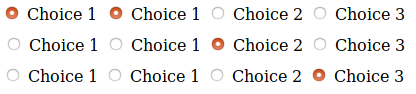
棘手的一点是,我希望在纯/ CSS中实现这一点(尽管我怀疑CSS在这里会有所帮助)。
下面是我编写的代码,用于生成上面的四个单选按钮:
<input type="radio" name="buttons" value="choice1" id="button1"/>
<label for="button1">Choice 1</label>

<input type="radio" name="buttons" value="choice1" id="button1"/>
<label for="button">Choice 1</label>

<input type="radio" name="buttons" value="choice2" id="button3"/>
<label for="button3">Choice 2</label>

<input type="radio" name="buttons" value="choice3" id="button4"/>
<label for="button4">Choice 3</label>
我天真地认为,将相同的值归于第一个按钮会使它们成为一个整体,但它当然不是。
有没有可能在没有任何JS的情况下实现这种行为?
编辑
这听起来可能很奇怪,这是我的用法。我最终想要的是拥有一个保存全局状态的单选按钮,并能够在多个地方访问它。
例如,假设下面的片段:
.state-repeater {
    visibility: hidden;
}


#button.state-repeater:checked > p {
    color: blue;
}<input type="radio" id="button" />
<label for="button">Button</label>
<!--
Lots of blocks; the two parts are totally uncorrelated;
so the classical sibling selector tricks do not work
-->
<input class="state-repeater" type=radio id="button" />
<p>The button is checked</p>
当选中单选按钮时,我希望<p>标签文本变成蓝色;但是,由于单选按钮离它很远,我需要某种中继器。显然,这个片段的方法不起作用。
是否可以“重复”检查单选按钮的信息?
回答 1
Stack Overflow用户
发布于 2019-02-01 22:42:08
你需要用JS。没有纯粹的方法。也许把收音机包在一个看起来像两个单选按钮的元素中,当点击它们时,它们看起来都是被选中的。但是,如果你需要两个实际的单选按钮一起工作,你就倒霉了。无论如何,与使用JS相比,我之前描述的事情将是一个巨大的头痛。
页面原文内容由Stack Overflow提供。腾讯云小微IT领域专用引擎提供翻译支持
原文链接:
https://stackoverflow.com/questions/54488027
复制相关文章
相似问题
腾讯云开发者

Copyright © 2013 - 2026 Tencent Cloud. All Rights Reserved. 腾讯云 版权所有
深圳市腾讯计算机系统有限公司 ICP备案/许可证号:粤B2-20090059  粤公网安备44030502008569号
腾讯云计算(北京)有限责任公司 京ICP证150476号 | 京ICP备11018762号