
安卓工作室对新项目的启动与c++的支持给出了多重错误?
安卓工作室对新项目的启动与c++的支持给出了多重错误?
提问于 2019-02-01 06:43:52
当我使用c++支持启动一个新项目时,新创建的项目无法识别主活动中的本机Jni函数。打开本机lib.cpp时,这些错误如图像所示
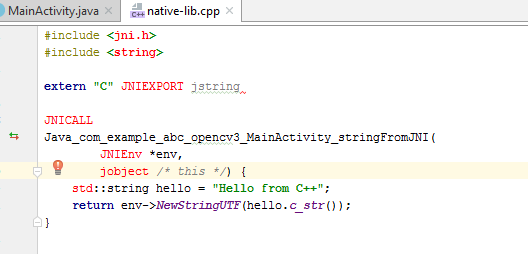
在运行该项目时,我会得到以下错误
 Build command failed.
Error while executing process C:\Users\abc\AppData\Local\Android\Sdk\cmake\3.10.2.4988404\bin\cmake.exe with arguments {--build D:\2019 android\OPENCV3\app\.externalNativeBuild\cmake\debug\x86 --target native-lib}
Unknown argument android\OPENCV3\app\.externalNativeBuild\cmake\debug\x86
Usage: cmake --build <dir> [options] [-- [native-options]]
Options:
  <dir>          = Project binary directory to be built.
  --target <tgt> = Build <tgt> instead of default targets.
                   May only be specified once.
  --config <cfg> = For multi-configuration tools, choose <cfg>.
  --clean-first  = Build target 'clean' first, then build.
                   (To clean only, use --target 'clean'.)
  --use-stderr   = Ignored.  Behavior is default in CMake >= 3.0.
-- = Pass remaining options to the native tool.回答 1
Stack Overflow用户
回答已采纳
发布于 2019-02-01 07:43:59
只要将D:\2019 android重命名为D:\2019_android,那么所有的麻烦都会得到解决。
页面原文内容由Stack Overflow提供。腾讯云小微IT领域专用引擎提供翻译支持
原文链接:
https://stackoverflow.com/questions/54474230
复制相关文章
相似问题
腾讯云开发者

Copyright © 2013 - 2026 Tencent Cloud. All Rights Reserved. 腾讯云 版权所有
深圳市腾讯计算机系统有限公司 ICP备案/许可证号:粤B2-20090059  粤公网安备44030502008569号
腾讯云计算(北京)有限责任公司 京ICP证150476号 | 京ICP备11018762号