
使用Nginx访问WSO2-APIM
我正在访问我的wso2 apim,商店和出版商使用Nginx。并希望使用以下方法进行访问:
- 使用nginx访问wso2 api管理器:https://nginx-ip/wso2am/carbon
- 使用nginx访问的wso2存储区:https://nginx-ip/wso2am/store
- 使用nginx访问的wso2存储区:https://nginx-ip/wso2am/publisher
我尝试在location块中使用嵌套位置块,但没有成功。所以,现在我工作的方法是为所有这些都分别设置一个位置块,但同样的也不起作用。
以下是我的nginx存储配置文件:
location /wso2am/store/
   {
     proxy_set_header   Host                $host;
     proxy_set_header   X-Real-IP           $remote_addr;
     proxy_set_header   X-Forwarded-Host    $host;
     proxy_set_header   X-Forwarded-For     $proxy_add_x_forwarded_for;

     proxy_pass https://wso2-ip:9443/store/;

     proxy_redirect https://$http_host/store/ /wso2am/store/;

     proxy_cookie_path / /wso2am/;

     limit_rate 25M;
     #limit_req zone=wso2am burst=100 nodelay;
   }
对于上述配置,用于存储的GUI没有正确显示。
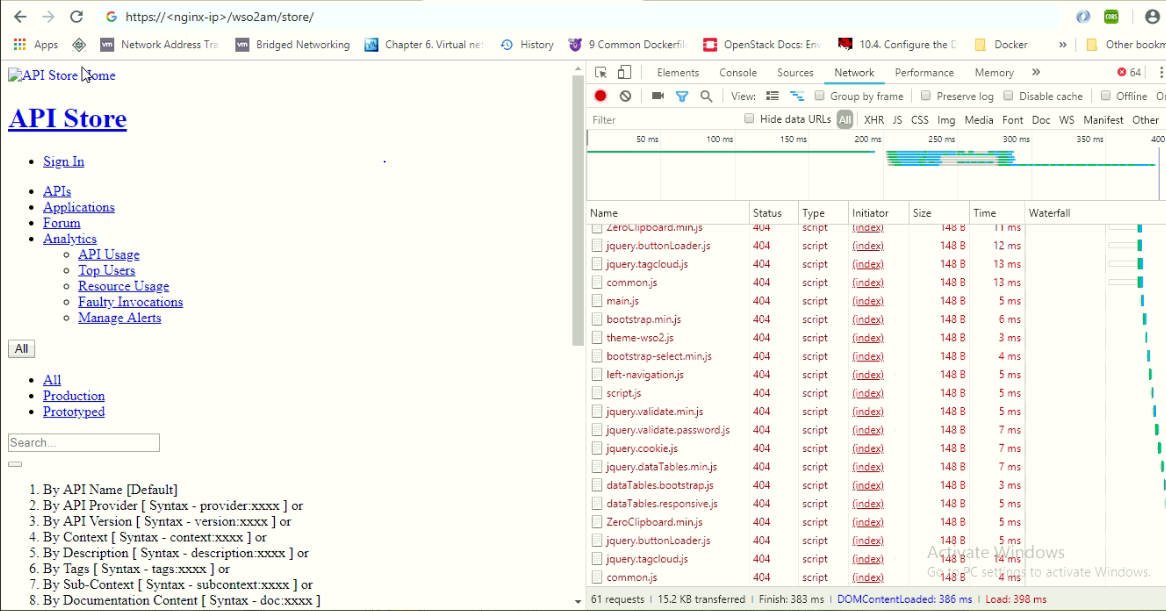
对于publisher和carbon(对于apim管理控制台)也是类似的。嵌套的nginx配置如下:
   location /wso2am/ {
         location /wso2am/store/
            {
            proxy_set_header   Host                $host;
            proxy_set_header   X-Real-IP           $remote_addr;
            proxy_set_header   X-Forwarded-Host    $host;
            proxy_set_header   X-Forwarded-For     $proxy_add_x_forwarded_for;

            proxy_pass https://wso2-ip:9443/store/;

            proxy_redirect https://$http_host/oauth2/callback /oauth2/callback;
            proxy_redirect https://$http_host/ /wso2am/store/;
            proxy_redirect https://$http_host/wso2am/ /wso2am/store/;


            proxy_redirect https://$http_host/store/ /wso2am/store/;

            proxy_cookie_path / /wso2am/;

            limit_rate 25M;

         }
   }
在哪里我必须更改标题或任何其他位置去正确?
更新1:
我的wso2am存储和发行者在合并注释并使用以下nginx之后正在工作:
   location /wso2am/ {

            proxy_set_header   Host                $host;
            proxy_set_header   X-Real-IP           $remote_addr;
            proxy_set_header   X-Forwarded-Host    $host;
            proxy_set_header   X-Forwarded-For     $proxy_add_x_forwarded_for;

            proxy_pass https://wso2-apim-ip:9443/;
            proxy_redirect https://$http_host/carbon/ /wso2am/carbon/;
            proxy_redirect https://$http_host/store/ /wso2am/store/;
            proxy_redirect https://$http_host/publisher/ /wso2am/publisher/;


            proxy_cookie_path / /wso2am/;

           }
注意:但是使用上面的配置,我登录到apim-carbon,然后登录,然后如果我点击主页上的任何选项,比如list,add.I,我被注销了,原因是在使用Nginx访问请求时,没有在请求中发送CSRF令牌。
如何才能解决csrfprevention.js问题,使其保持真实?
回答 2
Stack Overflow用户
发布于 2019-10-30 14:19:04
Disclamer:,这是一个不完整的答案,因为我自己正在研究这个问题。
wso2am和wso2ei都面临着同样的问题。我非常肯定,我们需要在本节中编辑/repository/conf/carbon.xml (我必须承认,这些评论并不十分清楚):
<!--
       Webapp context root of WSO2 Carbon management console.
    -->
    <WebContextRoot>/wso2am</WebContextRoot>

<!--
        Proxy context path is a useful parameter to add a proxy path when a Carbon server is fronted by reverse proxy. In addition
        to the proxy host and proxy port this parameter allows you add a path component to external URLs. e.g.
            URL of the Carbon server -> https://10.100.1.1:9443/carbon
        URL of the reverse proxy -> https://prod.abc.com/appserver/carbon

    appserver - proxy context path. This specially required whenever you are generating URLs to displace in
    Carbon UI components.
    -->

        <MgtProxyContextPath>/</MgtProxyContextPath>
        <ProxyContextPath>/wso2am</ProxyContextPath>
如果您的Nginx在SSL模式下侦听443 (由于重定向,->无法使用它,如果您计划在本地网络上使用它,则可以制作一个自签名证书)
    location /wso2am {
        proxy_pass https://wso2_apimanager_container:9443;
        proxy_set_header   Host                $host;
        proxy_set_header   X-Real-IP           $remote_addr;
        proxy_set_header   X-Forwarded-Host    $host;
        proxy_ssl_verify   off;
        proxy_set_header   X-Forwarded-For     $proxy_add_x_forwarded_for;
        }

        location /wso2am/store {
            proxy_pass https://wso2_apimanager:9443/store;
        }
        location /wso2am/publisher {
            proxy_pass https://wso2_apimanager:9443/publisher;
        }
        location /wso2am/admin {
            proxy_pass https://wso2_apimanager:9443/admin;
        }
}它起作用了,但我不完全确定为什么。有人能向我解释<MgtProxyContextPath>与</MgtProxyContextPath>和<WebContextRoot>在哪一方面的不同吗?
允许管理发布服务器和存储的代理:要使/publisher、/store和/admin可访问,您需要编辑位于/repository/deployment/server/jaggeryapps/name_of_the_service/site/conf/site.json中的各自site.json的末尾。对于/publisher,您可以这样写:
"reverseProxy" : {
        "enabled" : "auto",    // values true , false , "auto" - will look for  X-Forwarded-* headers
        "host" : "some.ip.or.domain", // If reverse proxy do not have a domain name use IP
        "context":"/wso2am/publisher",
      //"regContext":"" // Use only if different path is used for registry
    },
不过,登录仍然有问题。
Stack Overflow用户
发布于 2019-01-25 05:03:19
您可以按照本指南1使用Nginx配置WSO2 API管理器。
1- https://docs.wso2.com/display/AM260/Configuring+the+Proxy+Server+and+the+Load+Balancer
https://stackoverflow.com/questions/54350884
复制相似问题
腾讯云开发者

Copyright © 2013 - 2026 Tencent Cloud. All Rights Reserved. 腾讯云 版权所有
深圳市腾讯计算机系统有限公司 ICP备案/许可证号:粤B2-20090059  粤公网安备44030502008569号
腾讯云计算(北京)有限责任公司 京ICP证150476号 | 京ICP备11018762号