
未能使用Maven构建应用程序,我可以在本地运行代码,但无法在heroku上部署
这是我在github:https://github.com/q463746583/CS4500-Assignment2中的代码,我可以在本地成功地运行它,但是当我试图在heroku上部署代码时,有错误描述:
       [INFO] Downloaded from central: https://repo.maven.apache.org/maven2/com/thoughtworks/qdox/qdox/2.0-M9/qdox-2.0-M9.jar (317 kB at 6.0 MB/s)
       [INFO] Changes detected - recompiling the module!
       [INFO] Compiling 4 source files to /tmp/build_3c4f3b86a26f6e3ae1cbe89639f79f26/target/classes
       [INFO] ------------------------------------------------------------------------
       [INFO] BUILD FAILURE
       [INFO] ------------------------------------------------------------------------
       [INFO] Total time: 13.261 s
       [INFO] Finished at: 2019-01-24T00:47:07Z
       [INFO] ------------------------------------------------------------------------
       [ERROR] Failed to execute goal org.apache.maven.plugins:maven-compiler-plugin:3.8.0:compile (default-compile) on project myapp: Fatal error compiling: invalid target release: 11 -> [Help 1]
       [ERROR]
       [ERROR] To see the full stack trace of the errors, re-run Maven with the -e switch.
       [ERROR] Re-run Maven using the -X switch to enable full debug logging.
       [ERROR]
       [ERROR] For more information about the errors and possible solutions, please read the following articles:
       [ERROR] [Help 1] http://cwiki.apache.org/confluence/display/MAVEN/MojoExecutionException
 !     ERROR: Failed to build app with Maven
       We're sorry this build is failing! If you can't find the issue in application code,
       please submit a ticket so we can help: https://help.heroku.com/
 !     Push rejected, failed to compile Java app.
! Push failed回答 5
Stack Overflow用户
发布于 2019-01-24 01:32:54
TLDR:
- 确保您是,使用适当的JAVA
- 检查来自Maven编译器的目标环境是否与目标Heroku运行时相同。
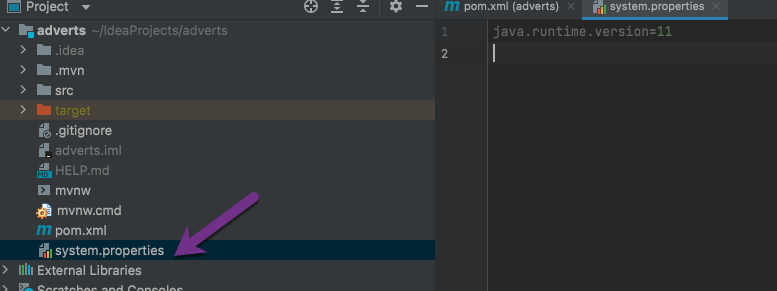
- 如果您是,则不使用默认的Java8JDK运行时环境环境在您的项目中创建一个system.properties文件,指定一个不同的受支持的JAVA运行时环境,如Heroku的JAVA文档中所列。
我认为这与您的不匹配有关,您的目标是Heroku上的Java运行时环境,而您的本地编译代码是由Maven编译器生成的,您正试图将它们推送到Heroku。
根据Heroku的https://devcenter.heroku.com/articles/java-support#supported-java-versions
Heroku目前使用OpenJDK 8在默认情况下运行应用程序。OpenJDK版本9和7也是可用的。
其他受支持的默认版本包括:
- Java 7- 1.7.0_181
- Java 8- 1.8.0_191
- Java 9- 9.0.4
- Java 10 - 10.0.2
- Java 11-11
因此,您应该确保在您的pom.xml文件中,您的maven编译器正在将您的JAVA代码编译到您针对Heroku的适当的JAVA中。例如,下面我们针对的是Java 7运行时环境:
pom.xml:
<plugin>
    <groupId>org.apache.maven.plugins</groupId>
    <artifactId>maven-compiler-plugin</artifactId>
    <version>3.1</version>
    <configuration>
        <source>1.7</source>
        <target>1.7</target>
    </configuration>
</plugin>然后,如果您针对的是Heroku默认的JDK1.8运行时环境以外的运行时环境,则应该在项目中创建一个system.properties 文件。您可以通过指定所需的java运行时环境来做到这一点:
system.properties
java.runtime.version=11Stack Overflow用户
发布于 2020-11-17 10:53:19
在Heroku部署git项目时,我也遇到了同样的错误。我刚把java.version从11在pom.xml改成了8,它对我很有用:
<properties>
    <java.version>8</java.version>
</properties>Stack Overflow用户
发布于 2021-11-01 12:59:10
按照前面的答案,创建一个system.properties文件,使用该更改进行新的提交并重新运行heroku命令,为我解决了这个问题。
此外,如果您是,不使用main作为您的主分支,请注意您的分支的名称,因为这需要匹配,例如。
git push heroku master:main或
git push heroku develop:mainhttps://stackoverflow.com/questions/54337999
复制相似问题
腾讯云开发者

Copyright © 2013 - 2026 Tencent Cloud. All Rights Reserved. 腾讯云 版权所有
深圳市腾讯计算机系统有限公司 ICP备案/许可证号:粤B2-20090059  粤公网安备44030502008569号
腾讯云计算(北京)有限责任公司 京ICP证150476号 | 京ICP备11018762号