
测试在JUnit 4下运行,但不是JUnit 5- Compiles干净,而是执行0次测试。
任何人都可以轻松地在几分钟内重现这个问题。
基本Maven quickstart项目
使用IntelliJ 2018.3和Maven 3.6.0,我使用Maven原型maven-archetype-quickstart 1.4创建了一个全新的项目。
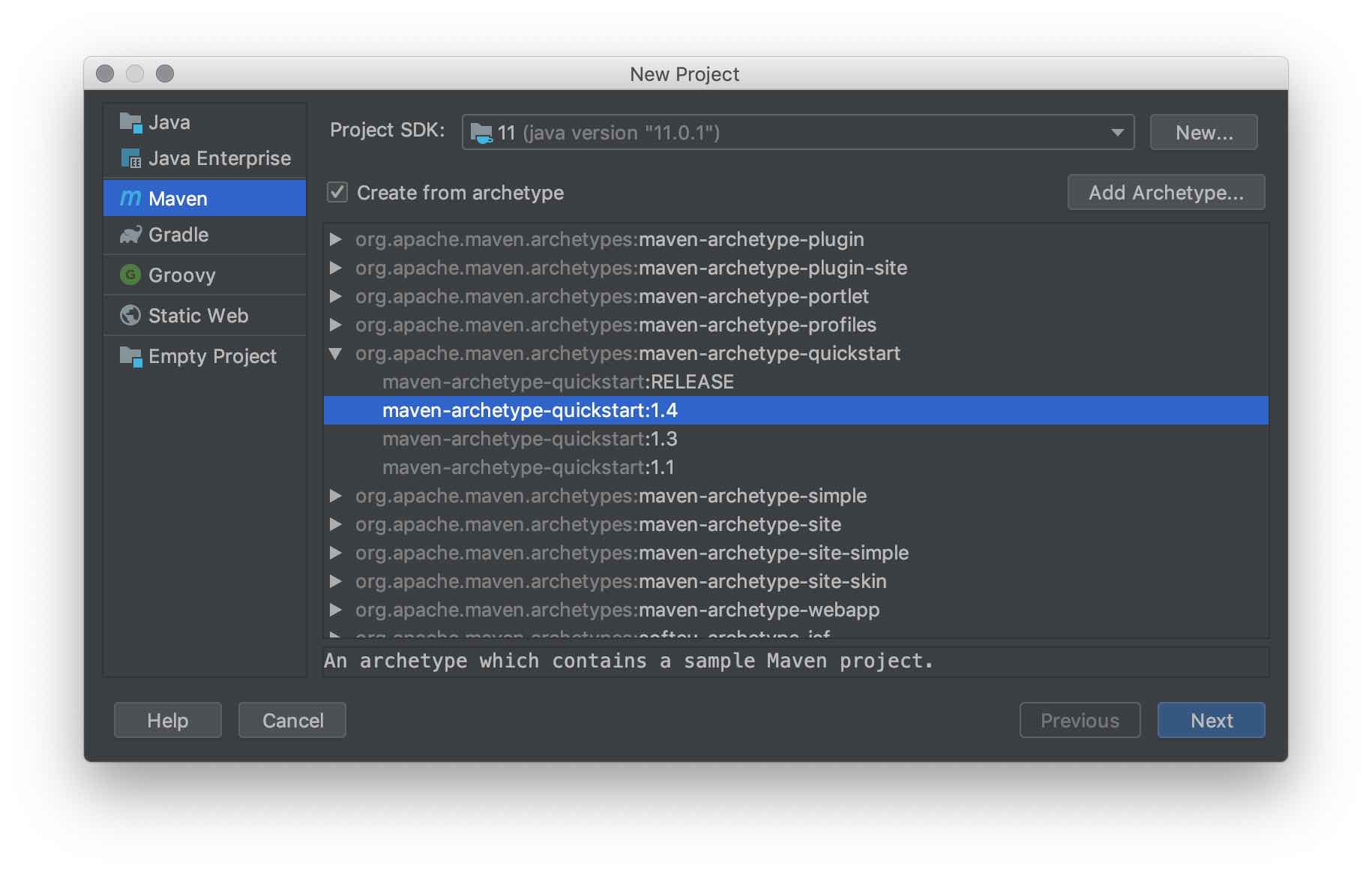
Java 11
在新项目的POM文件中,我将maven.compiler.source和maven.compiler.target的属性从1.7更改为11,对于当前使用的Java11.0.2,从Azul系统更改为祖鲁语。
<properties>
  <project.build.sourceEncoding>UTF-8</project.build.sourceEncoding>
  <maven.compiler.source>11</maven.compiler.source>
  <maven.compiler.target>11</maven.compiler.target>
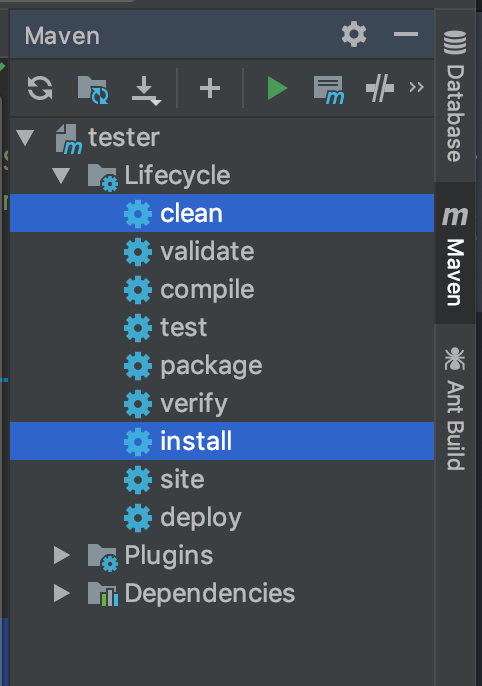
</properties>在IntelliJ的Maven面板上,我运行clean和install生命周期事件。
在JUnit 4中运行测试
作为install的一部分,测试将运行。这个quickstart原型附带了一个断言true的测试。
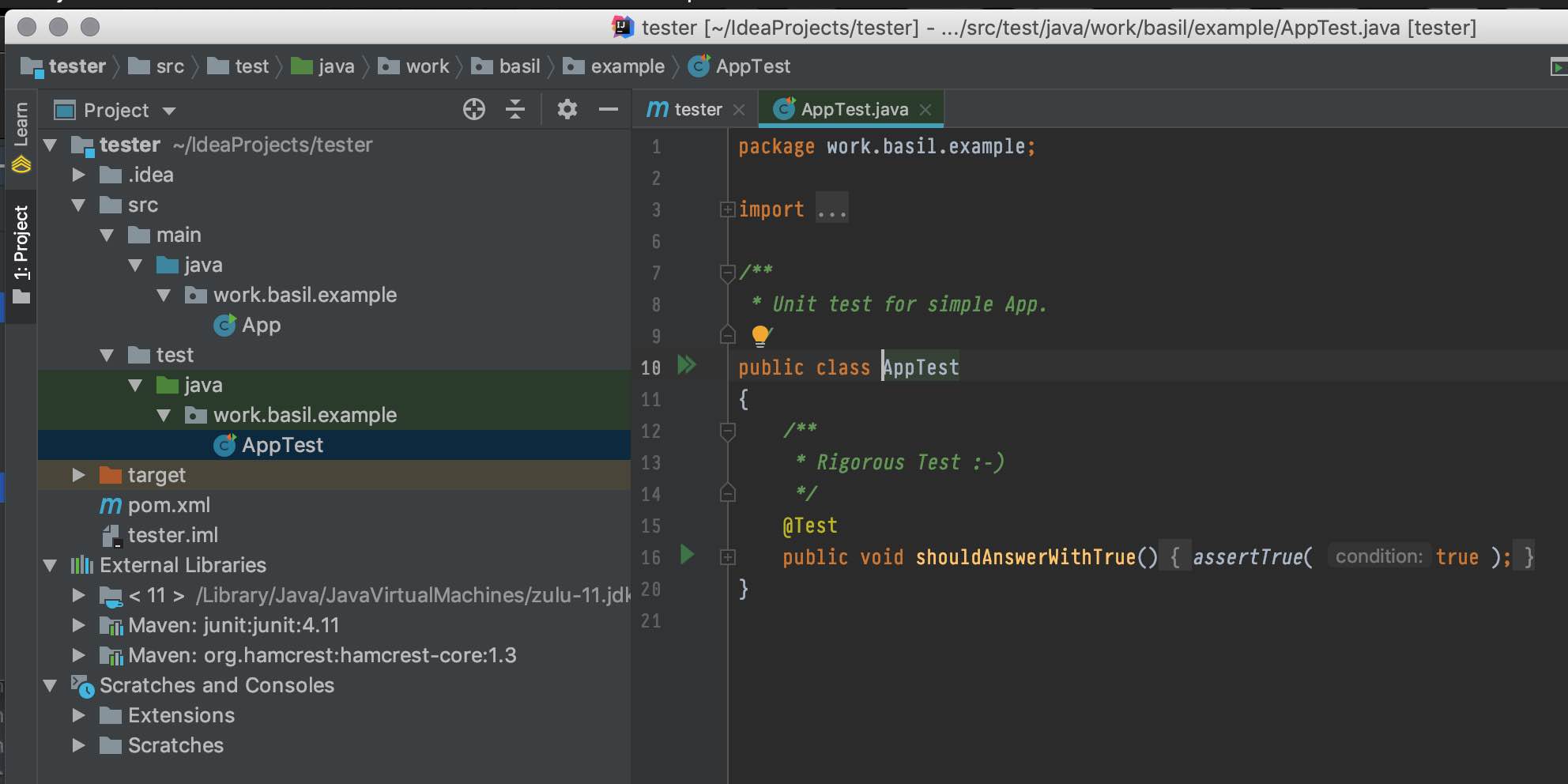
结果出现在Run面板的IntelliJ中。
运行work.basil.example.AppTest的信息 信息测试运行: 1,失败: 0,错误: 0,跳过: 0,运行时间: 0.026 s-在work.basil.example.AppTest中
所以我知道测试是执行的。
JUnit 5,而不是4
一切都很好。现在让我们升级到JUnit 5,看看问题所在。
在POM中,我从下面更改JUnit依赖项:
<dependencies>
  <dependency>
    <groupId>junit</groupId>
    <artifactId>junit</artifactId>
    <version>4.11</version>
    <scope>test</scope>
  </dependency>
</dependencies>
…对此:
<dependencies>
  <!--JUnit 5-->
  <dependency>
    <groupId>org.junit.jupiter</groupId>
    <artifactId>junit-jupiter-api</artifactId>
    <version>5.3.2</version>
    <scope>test</scope>
  </dependency>
</dependencies>
木星进口(没有古董测试)
编译器抱怨我的AppTest.java文件。因此,我将import语句更改为使用jupiter包。我只想在我的新greedfield项目中运行JUnit 5测试,而不需要老式的JUnit 4测试。所以进口的变化是这样的:
import static org.junit.Assert.assertTrue;
import org.junit.Test;
…对此:
import org.junit.jupiter.api.Test;
import static org.junit.jupiter.api.Assertions.assertTrue;然后执行Maven > Lifecycle > clean & install。
…问题是:我们的测试没有执行。在Run IntelliJ面板中看到的报告:
运行work.basil.example.AppTest的信息 信息测试运行: 0,失败: 0,错误: 0,跳过: 0,运行时间: 0.003 s-在work.basil.example.AppTest中
JUnit 5为什么不能运行与JUnit 4完全相同的测试呢?
更新surefire插件
我怀疑Maven插件需要更新。因此,在POM中,我改变了这一点:
<plugin>
  <artifactId>maven-surefire-plugin</artifactId>
  <version>2.22.1</version>
</plugin>
…对此:
<plugin>
  <artifactId>maven-surefire-plugin</artifactId>
  <version>3.0.0-M3</version>
</plugin>另一个clean & install。但没有更好的,仍然运行0测试。
运行work.basil.example.AppTest的信息 信息测试运行: 0,失败: 0,错误: 0,跳过: 0,运行时间: 0.004 s-在work.basil.example.AppTest中
全POM
这是我的整个POM文件。
<?xml version="1.0" encoding="UTF-8"?>

<project xmlns="http://maven.apache.org/POM/4.0.0" xmlns:xsi="http://www.w3.org/2001/XMLSchema-instance"
  xsi:schemaLocation="http://maven.apache.org/POM/4.0.0 http://maven.apache.org/xsd/maven-4.0.0.xsd">
  <modelVersion>4.0.0</modelVersion>

  <groupId>work.basil.example</groupId>
  <artifactId>tester</artifactId>
  <version>1.0-SNAPSHOT</version>

  <name>tester</name>
  <!-- FIXME change it to the project's website -->
  <url>http://www.example.com</url>

  <properties>
    <project.build.sourceEncoding>UTF-8</project.build.sourceEncoding>
    <maven.compiler.source>11</maven.compiler.source>
    <maven.compiler.target>11</maven.compiler.target>
  </properties>

  <dependencies>
    <!--JUnit 5-->
    <dependency>
      <groupId>org.junit.jupiter</groupId>
      <artifactId>junit-jupiter-api</artifactId>
      <version>5.3.2</version>
      <scope>test</scope>
    </dependency>
  </dependencies>

  <build>
    <pluginManagement><!-- lock down plugins versions to avoid using Maven defaults (may be moved to parent pom) -->
      <plugins>
        <!-- clean lifecycle, see https://maven.apache.org/ref/current/maven-core/lifecycles.html#clean_Lifecycle -->
        <plugin>
          <artifactId>maven-clean-plugin</artifactId>
          <version>3.1.0</version>
        </plugin>
        <!-- default lifecycle, jar packaging: see https://maven.apache.org/ref/current/maven-core/default-bindings.html#Plugin_bindings_for_jar_packaging -->
        <plugin>
          <artifactId>maven-resources-plugin</artifactId>
          <version>3.0.2</version>
        </plugin>
        <plugin>
          <artifactId>maven-compiler-plugin</artifactId>
          <version>3.8.0</version>
        </plugin>
        <plugin>
          <artifactId>maven-surefire-plugin</artifactId>
          <version>3.0.0-M3</version>
        </plugin>
        <plugin>
          <artifactId>maven-jar-plugin</artifactId>
          <version>3.0.2</version>
        </plugin>
        <plugin>
          <artifactId>maven-install-plugin</artifactId>
          <version>2.5.2</version>
        </plugin>
        <plugin>
          <artifactId>maven-deploy-plugin</artifactId>
          <version>2.8.2</version>
        </plugin>
        <!-- site lifecycle, see https://maven.apache.org/ref/current/maven-core/lifecycles.html#site_Lifecycle -->
        <plugin>
          <artifactId>maven-site-plugin</artifactId>
          <version>3.7.1</version>
        </plugin>
        <plugin>
          <artifactId>maven-project-info-reports-plugin</artifactId>
          <version>3.0.0</version>
        </plugin>
      </plugins>
    </pluginManagement>
  </build>
</project>
JUnit库
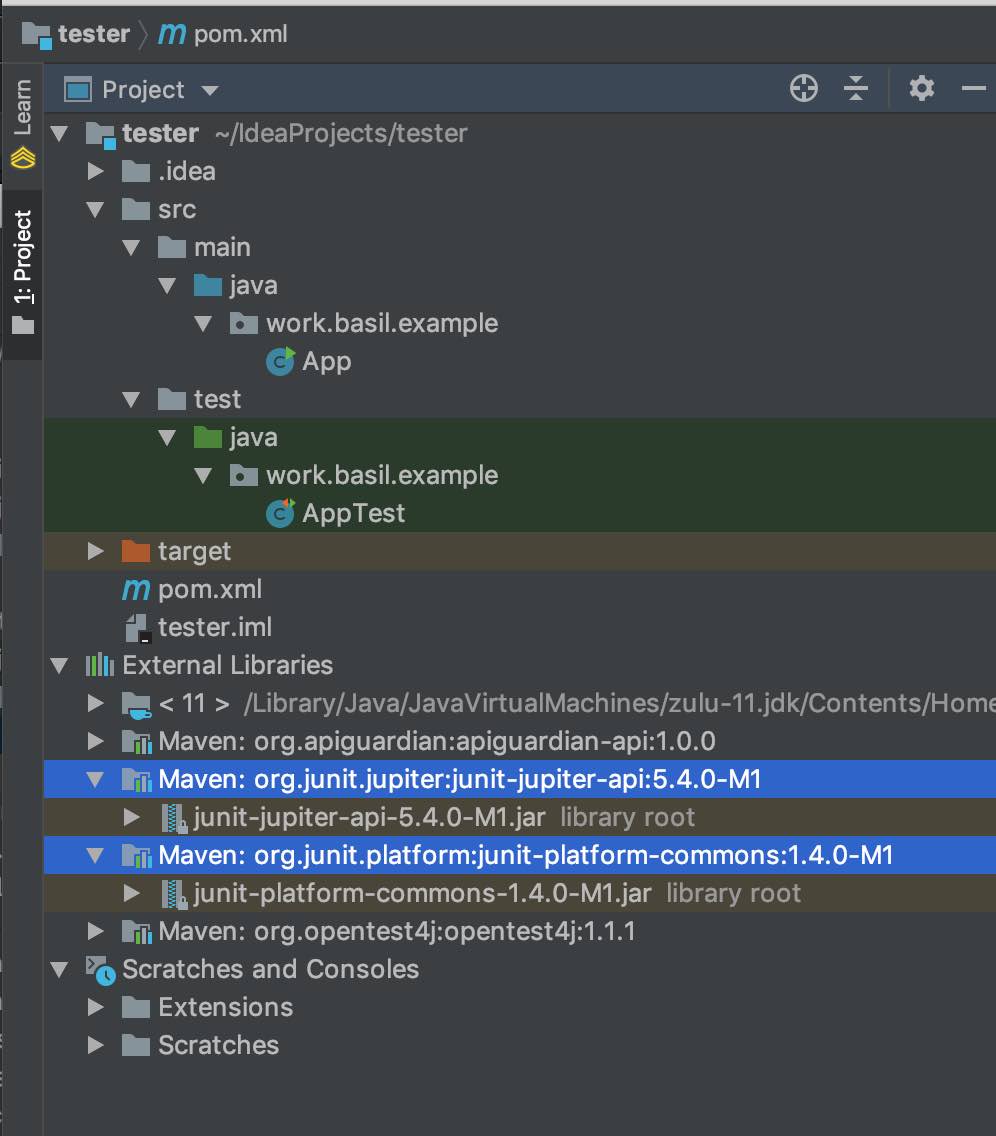
执行Maven clean & install之后,将出现两个JUnit库:junit-jupiter-api和junit-platform-commons。
JUnit 5的其他版本
我在我的junit-jupiter-api依赖项中尝试了以下版本:
- 5.0.0-M1
- 5.1.1
- 5.3.0
- 5.3.2
- 5.4.0-M1
在每次尝试中,我都运行了一个Maven clean & install。没有更好的。每个版本都报告了Tests run: 0。
不要责怪maven-archetype-quickstart
实际上,我使用完全不同的Maven原型在一个非常不同的项目中发现了这个问题。
为了确定这个错误的JUnit 5行为,我使用非常简单的maven-archetype-quickstart尝试了一个新的项目。我发现了同样的行为:所有的东西都编译,运行中的测试工具,但是没有在JUnit 5下执行测试。
回答 1
Stack Overflow用户
发布于 2019-01-23 06:34:19
tl;dr
对于JUnit 5版本5.4.0-M1或更高版本,请在POM中指定新的单个Maven工件junit-jupiter“聚合器”。
<!--JUnit 5-->
<!-- https://mvnrepository.com/artifact/org.junit.jupiter/junit-jupiter -->
<dependency>
    <groupId>org.junit.jupiter</groupId>
    <artifactId>junit-jupiter</artifactId>
    <version>5.4.0-M1</version>
</dependency>对于早期版本,至少指定这两个构件:junit-jupiter-api和junit-jupiter-engine。
JUnit 5使用多个测试框架
据我所知,JUnit 5已经被重新设计成多个测试框架的枷锁。这些测试系统包括JUnit 4“老式”测试、新的JUnit 5测试(用于测试的新语法,以及新的注释和方法),以及其他诸如斯佩西、斯派克、黄瓜、Drools场景、约克维克和更多的实现 更多的实现 TestEngine接口。
显然,junit-jupiter-api人造物只是外轭。还必须指定一个或多个TestEngine实现来实际运行测试。例如,要运行老式的JUnit 4测试,需要VintageTestEngine实现,或者要运行JUNit 5测试,则需要JupiterTestEngine实现。
因此,要运行JUnit 5测试,必须在Maven POM中使用junit-jupiter-engine工件指定一个junit-jupiter-engine实现。
请参阅JUnit 5手册,特别是https://junit.org/junit5/docs/current/user-guide/#running-tests-build-maven部分。
参见Marc编写的这份报告,其中有一个图表显示JUnit 5是一个平台,它(A)是IDE/build工具的核心,(B)用于编写测试的程序员的可插拔测试编写框架。
junit-jupiter-engine
正如在这个样本上看到的,为https://mvnrepository.com/artifact/org.junit.jupiter/junit-jupiter-engine添加第二个与JUnit相关的依赖项。此工件的文档简单地说:“JUnit木星测试引擎实现,只在运行时才需要。”
<dependency>
    <groupId>org.junit.jupiter</groupId>
    <artifactId>junit-jupiter-engine</artifactId>
    <version>5.4.0-M1</version>
    <scope>test</scope>
</dependency>
只需将一个依赖项添加到问题中显示的项目中,就可以运行测试。
运行work.basil.example.AppTest的信息 信息测试运行: 1,失败: 0,错误: 0,跳过: 0,运行时间: 0.004 s-在work.basil.example.AppTest中
junit-jupiter-params
该示例还显示了第三个JUnit依赖项,用于https://mvnrepository.com/artifact/org.junit.jupiter/junit-jupiter-params。虽然不需要让您的示例测试运行,但它可能有其他用途。显然与https://junit.org/junit5/docs/current/user-guide/#writing-tests-parameterized-tests有关。
<dependency>
    <groupId>org.junit.jupiter</groupId>
    <artifactId>junit-jupiter-params</artifactId>
    <version>5.4.0-M1</version>
    <scope>test</scope>
</dependency>
这使得总共有3个JUnit依赖项。
<!--JUnit 5-->
<dependency>
    <groupId>org.junit.jupiter</groupId>
    <artifactId>junit-jupiter-api</artifactId>
    <version>5.4.0-M1</version>
    <scope>test</scope>
</dependency>

<dependency>
    <groupId>org.junit.jupiter</groupId>
    <artifactId>junit-jupiter-params</artifactId>
    <version>5.4.0-M1</version>
    <scope>test</scope>
</dependency>

<dependency>
    <groupId>org.junit.jupiter</groupId>
    <artifactId>junit-jupiter-engine</artifactId>
    <version>5.4.0-M1</version>
    <scope>test</scope>
</dependency>
您的同一个POM文件,现在更新为所有3个JUnit依赖项。
<?xml version="1.0" encoding="UTF-8"?>

<project xmlns = "http://maven.apache.org/POM/4.0.0"
         xmlns:xsi = "http://www.w3.org/2001/XMLSchema-instance"
         xsi:schemaLocation = "http://maven.apache.org/POM/4.0.0 http://maven.apache.org/xsd/maven-4.0.0.xsd">
    <modelVersion>4.0.0</modelVersion>

    <groupId>work.basil.example</groupId>
    <artifactId>tester</artifactId>
    <version>1.0-SNAPSHOT</version>

    <name>tester</name>
    <!-- FIXME change it to the project's website -->
    <url>http://www.example.com</url>

    <properties>
        <project.build.sourceEncoding>UTF-8</project.build.sourceEncoding>
        <maven.compiler.source>11</maven.compiler.source>
        <maven.compiler.target>11</maven.compiler.target>
    </properties>

    <dependencies>

        <!--JUnit 5-->
        <dependency>
            <groupId>org.junit.jupiter</groupId>
            <artifactId>junit-jupiter-api</artifactId>
            <version>5.4.0-M1</version>
            <scope>test</scope>
        </dependency>

        <dependency>
            <groupId>org.junit.jupiter</groupId>
            <artifactId>junit-jupiter-params</artifactId>
            <version>5.4.0-M1</version>
            <scope>test</scope>
        </dependency>

        <dependency>
            <groupId>org.junit.jupiter</groupId>
            <artifactId>junit-jupiter-engine</artifactId>
            <version>5.4.0-M1</version>
            <scope>test</scope>
        </dependency>

    </dependencies>

    <build>
        <pluginManagement><!-- lock down plugins versions to avoid using Maven defaults (may be moved to parent pom) -->
            <plugins>
                <!-- clean lifecycle, see https://maven.apache.org/ref/current/maven-core/lifecycles.html#clean_Lifecycle -->
                <plugin>
                    <artifactId>maven-clean-plugin</artifactId>
                    <version>3.1.0</version>
                </plugin>
                <!-- default lifecycle, jar packaging: see https://maven.apache.org/ref/current/maven-core/default-bindings.html#Plugin_bindings_for_jar_packaging -->
                <plugin>
                    <artifactId>maven-resources-plugin</artifactId>
                    <version>3.0.2</version>
                </plugin>
                <plugin>
                    <artifactId>maven-compiler-plugin</artifactId>
                    <version>3.8.0</version>
                </plugin>
                <plugin>
                    <artifactId>maven-surefire-plugin</artifactId>
                    <version>3.0.0-M3</version>
                </plugin>
                <plugin>
                    <artifactId>maven-jar-plugin</artifactId>
                    <version>3.0.2</version>
                </plugin>
                <plugin>
                    <artifactId>maven-install-plugin</artifactId>
                    <version>2.5.2</version>
                </plugin>
                <plugin>
                    <artifactId>maven-deploy-plugin</artifactId>
                    <version>2.8.2</version>
                </plugin>
                <!-- site lifecycle, see https://maven.apache.org/ref/current/maven-core/lifecycles.html#site_Lifecycle -->
                <plugin>
                    <artifactId>maven-site-plugin</artifactId>
                    <version>3.7.1</version>
                </plugin>
                <plugin>
                    <artifactId>maven-project-info-reports-plugin</artifactId>
                    <version>3.0.0</version>
                </plugin>
            </plugins>
        </pluginManagement>
    </build>
</project>junit-jupiter伪影
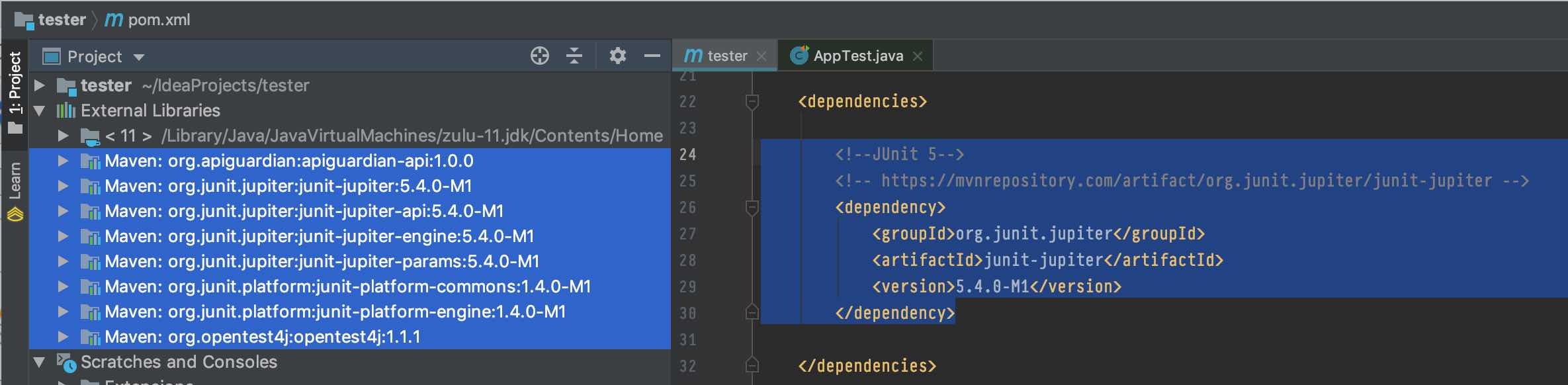
JUnit 5的5.4.0版带来了一个新的Maven工件,名为JUnit木星(聚合器)。“聚合器”这个词显然是指它捆绑了Maven中几个常用的JUnit 5工件,以方便我们的编程。
在POM中添加这一个dependency可以在项目中获得8个库。
<!--JUnit 5-->
<!-- https://mvnrepository.com/artifact/org.junit.jupiter/junit-jupiter -->
<dependency>
    <groupId>org.junit.jupiter</groupId>
    <artifactId>junit-jupiter</artifactId>
    <version>5.4.0-M1</version>
</dependency>
https://stackoverflow.com/questions/54320502
复制相似问题
腾讯云开发者

Copyright © 2013 - 2026 Tencent Cloud. All Rights Reserved. 腾讯云 版权所有
深圳市腾讯计算机系统有限公司 ICP备案/许可证号:粤B2-20090059  粤公网安备44030502008569号
腾讯云计算(北京)有限责任公司 京ICP证150476号 | 京ICP备11018762号