
如何将x-Axis名称标签对齐到x-Axis的末尾
如何将x-Axis名称标签对齐到x-Axis的末尾
提问于 2019-01-19 09:26:33
我在为x轴标签的对齐而挣扎.
- 我目前拥有的是x轴末尾右侧的标签:参见(1)
- 我希望这个标签位于x轴下面,并对齐到x轴的末尾:也就是说,标签的右侧总是在x轴的末尾:见(2)。
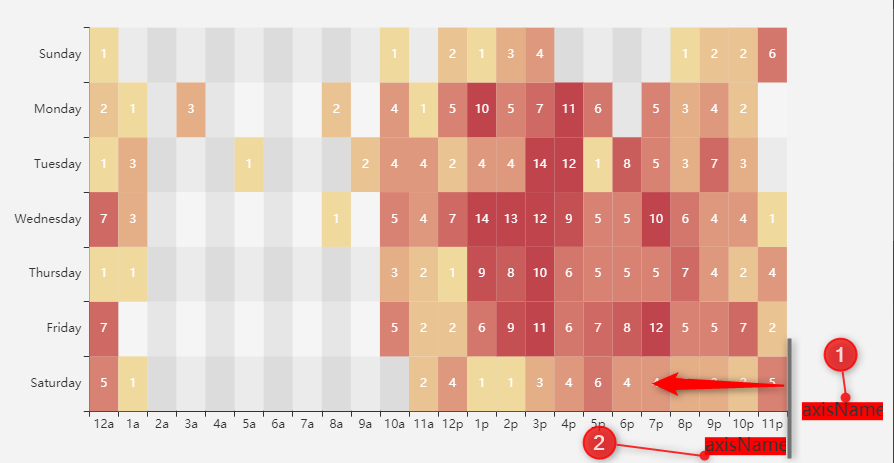
我正在使用这个示例 -并为这个轴添加了一些代码-名称:
xAxis: {
    name: 'axisName',
    //nameGap: -100,
    nameTextStyle: {
        fontSize: 18,
        backgroundColor: 'red',
        rich: {
            //position: 'right',
            //verticalAlign: 'bottom',
            //textVerticalAlign: 'bottom'

        }
    }
我不知道从哪里开始。我尝试过多个对齐/nameGap/富选项,但没有找到解决方案。
相关信息:
回答 2
Stack Overflow用户
回答已采纳
发布于 2021-09-10 08:24:51
既然echarts bug #8444:忽略轴对齐选项已经修复(从4.3.0开始),我们就可以让它工作了。
水平的扩展非常简单,并且可以按照预期工作:
nameLocation: 'end'nameTextStyle.align: 'right'- 设置
nameGap=0:默认值为15,将标签移向右太远
这些垂直对齐设置按预期工作。
verticalAlign: 'top'padding: [30, 0, 0, 0]:设置顶部填充以向下移动文本
  xAxis: {
    name: '123456789123456789',
    nameLocation: 'end',
    // the default nameGap=15 would move the text to the right
    nameGap: 0,
    nameTextStyle: {
      align: 'right',
      verticalAlign: 'top',
      /**
       * the top padding will shift the name down so that it does not overlap with the axis-labels
       * t-l-b-r
       */
      padding: [30, 0, 0, 0],
    }
}Stack Overflow用户
发布于 2019-01-19 11:01:11
您可以使用nameGap,右边距为负值,顶部边距为nameTextStyle.padding属性。
xAxis: {
    type: 'category',
    data: hours,
    splitArea: {
        show: true
    },
    name: 'x-axis',
    nameGap: -30,
    nameTextStyle: {
        padding: [50,0,0,0]
    }
}页面原文内容由Stack Overflow提供。腾讯云小微IT领域专用引擎提供翻译支持
原文链接:
https://stackoverflow.com/questions/54265699
复制相关文章
相似问题
腾讯云开发者

Copyright © 2013 - 2026 Tencent Cloud. All Rights Reserved. 腾讯云 版权所有
深圳市腾讯计算机系统有限公司 ICP备案/许可证号:粤B2-20090059  粤公网安备44030502008569号
腾讯云计算(北京)有限责任公司 京ICP证150476号 | 京ICP备11018762号