
验证Azure网站对Google Play的所有权
回答 1
Stack Overflow用户
发布于 2019-01-16 05:43:32
首先,关于如何验证您的Azure网站所有权,您可以参考这些Google文档如下。
- 处理Android应用程序链接 安全和具体: Android应用程序链接使用HTTP链接到您拥有的网站域,因此没有其他应用程序可以使用您的链接。Android应用程序链接的要求之一是,通过我们的网站关联方法之一验证您的域名所有权。
和
添加对深层链接的验证:配置您的应用程序以请求对应用程序链接的验证。然后,在您的网站上发布一个文件,通过Google搜索控制台验证所有权。在验证应用程序链接中了解更多信息。
- 验证Android应用程序链接 为了验证您的应用程序和您的网站的所有权,需要执行以下步骤:
- Request automatic app link verification in your manifest. This signals to the Android system that it should verify your app belongs to the URL domain used in your intent filters.
- Declare the relationship between your website and your intent filters by hosting a Digital Asset Links JSON file at the following location: [https://domain.name/.well-known/assetlinks.json](https://domain.name/.well-known/assetlinks.json)- 游戏控制台帮助中的
Verify your websiteofApp Indexing on Google Search部分介绍了以下步骤
1. Sign in to your Play Console.
2. Click All Applications All applications.
3. Select the application you'd like to verify.
4. On the left menu, click Development tools > Services & APIs.
5. Under "App Indexing from Google Search," click Verify website.
6. Type your website address.
7. Click Verify.
8. Go to Google Search Console.
9. On the left menu, click All Messages.
10. Open the verification request message (example: "Google Play: Link [http://www.yourwebsite.com](http://www.yourwebsite.com/) to android-app://example.com.yourpackage.name").
11. Click Approve the request.
12. Review the information and click Approve. Once approved, your app will appear on the
搜索控制台主页为您的帐户。确保您的应用程序支持深度链接。
如果您有谷歌搜索控制台帐户或没有,这里有两个链接的Verify your site ownership搜索控制台帮助的年长的和新的搜索控制台将是有帮助的。
提示:只有拥有“所有者”权限的Google用户才能查看和批准站点验证请求。如果您没有看到站点验证请求,请确保使用具有“所有者”权限的帐户登录。
其次,xxxx.azurewebsits.net只是由Azure注册的子域 of azurewebsites.net,您可以通过https://www.whois.net/查找相关信息,如下图所示,因此它不属于您。
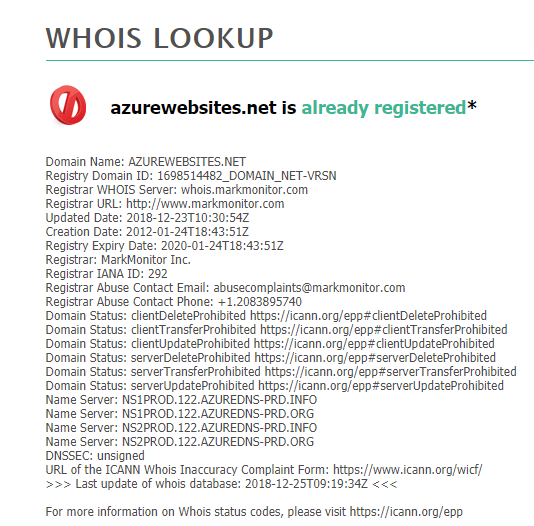
因此,您需要在域名注册器(如abc.com或其他域名注册中心)中注册一个像GoDaddy这样的域名,并将一个CNAME记录添加到Azure DNS等DNS服务器中,然后按照Google所要求的步骤来验证您的网站所有权,并收集必要的信息以制作一个PDF文档发送给谷歌。
https://stackoverflow.com/questions/54198330
复制相似问题
腾讯云开发者

Copyright © 2013 - 2026 Tencent Cloud. All Rights Reserved. 腾讯云 版权所有
深圳市腾讯计算机系统有限公司 ICP备案/许可证号:粤B2-20090059  粤公网安备44030502008569号
腾讯云计算(北京)有限责任公司 京ICP证150476号 | 京ICP备11018762号