
材料UI IconButton工具提示没有正确显示
材料UI IconButton工具提示没有正确显示
提问于 2019-01-11 14:13:08
在我的reactJS应用程序中,我使用了Material和reactJS引导表。
在一个单元格中,我使用这样的材料UI IconButton:
 <IconButton tooltip={t('tooltips:editRegulation')} tooltipPosition={'left'}
     onClick={() => this.props.history.push("/pms-records/edit/" + row.pmsFindingId)}>{cell}}>
     <FontIcon className="fa fa-pencil" aria-hidden="true"/>
 </IconButton>
其结果是:
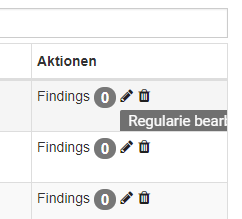
工具提示由表格单元格边框切割。我试图更改z-index并阅读以下内容:https://github.com/mui-org/material-ui/issues/5912
但没有解决办法。
有什么提示吗?
提前感谢
回答 1
Stack Overflow用户
回答已采纳
发布于 2019-01-11 14:37:44
您的单元格无疑有一个声明为overflow: hidden的css。您可以在门户中呈现工具提示,但最终会丢失元素的位置。更好地覆盖表单元格CSS
在GitHub链接问题中:
我通过将style={溢出:‘可见’}添加到IconButton驻留的TableRowColumn中来修复它。
页面原文内容由Stack Overflow提供。腾讯云小微IT领域专用引擎提供翻译支持
原文链接:
https://stackoverflow.com/questions/54148226
复制相关文章
相似问题
腾讯云开发者

Copyright © 2013 - 2026 Tencent Cloud. All Rights Reserved. 腾讯云 版权所有
深圳市腾讯计算机系统有限公司 ICP备案/许可证号:粤B2-20090059  粤公网安备44030502008569号
腾讯云计算(北京)有限责任公司 京ICP证150476号 | 京ICP备11018762号