
世博开发工具:后台运行开发应用程序
这是我第一次在世博会上开发,我正在构建一个应用程序,它可以跟踪位置并每5秒使用节点将数据发送到服务器。我正在使用世博的TaskManager API,我会跟踪所有的东西,而且它能工作,我正在获取数据。但是当我把我的应用程序放在后台时,它就会停止console.log(data)。
这应该是在后台任务中运行( TaskManager),甚至在开发环境中使用博览开发工具,还是需要投入生产模式才能工作?
当我把应用程序变成这样的背景模式时,我的console.log就停止工作了。
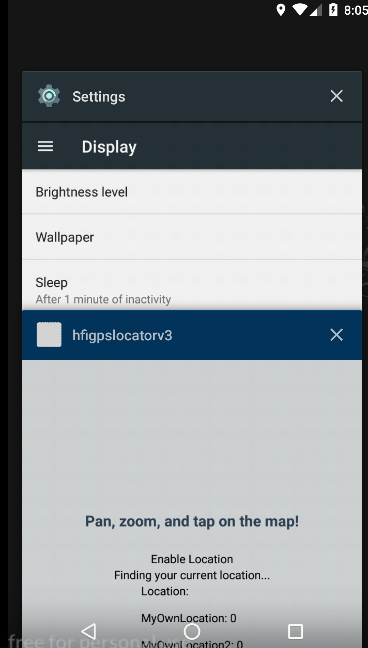
我的示例代码App.js
const LOCATION_TRACKER = 'background-task-location';

export default class App extends Component {
     state = {
      mapRegion: null,
      hasLocationPermissions: false,
      locationResult: null,
      marker: {
        latitude: 0,
        longitude: 0
      },
      latitude: 0,
      longitude: 0,
      location: null,
      errorMessage: null
    }


   componentDidMount() {
    //this.watchCurLocation();
    this.onLoad();

   }

   //init task manager
  onLoad = async() => {
    let isRegistered = await TaskManager.isTaskRegisteredAsync(LOCATION_TRACKER)
    if (!isRegistered) await Location.startLocationUpdatesAsync(LOCATION_TRACKER, {
      accuracy: Location.Accuracy.High,
      /* after edit */
      timeInterval: 2500,
      distanceInterval: 5,
    })
  }


onPress = async () => {
    console.log('waiting')
    await Location.startLocationUpdatesAsync(LOCATION_TRACKER, {
      accuracy: Location.Accuracy.High,
      timeInterval: 5000,
      distanceInterval: 5

    });

    console.log('waiting for get task option');
    //const data = await TaskManager.getTaskOptionsAsync(LOCATION_TRACKER)
    //console.log(data);

  };


watchCurLocation = () =>{
    this.onPress();
    setTimeout(() => {
      this.watchCurLocation();
    }, 5000);
  }


}


TaskManager.defineTask(LOCATION_TRACKER, ({ data, error }) => {
  if (error) {
    console.log(error)
    // Error occurred - check `error.message` for more details.
    return;
  }
  if (data) {
    const { locations } = data;
    console.log(data)
    // do something with the locations captured in the background
  }
});回答 1
Stack Overflow用户
发布于 2019-01-15 21:54:41
从Android和up,应用程序在后台不会运行这样的任务。适当限制:https://developer.android.com/about/versions/oreo/background#services
您必须在系统托盘中显示一些通知,以便使跟踪器工作在后台。
( a)您可以尝试添加使用通道的通知,而不需要弹出世博。
https://docs.expo.io/versions/v32.0.0/guides/notification-channels
或( b)弹出世博会并添加一个当应用程序进入后台时将启动的前端服务
与此类似,只是为了得到这样的想法:
public class ForegroundService extends Service {
///....

   public  void toForeground(){
        startForeground(NOTIFICATION_ID, getNotification());
    }

   public void toBackground(){
        stopForeground(true);
   }
    /**
     * Returns the {@link NotificationCompat} used as part of the foreground service.
     */
    private Notification getNotification() {
        Intent intent = new Intent(this, ForegroundService.class);

        // The PendingIntent that leads to a call to onStartCommand() in this service.
        PendingIntent servicePendingIntent = PendingIntent.getService(this, 0, intent,
                PendingIntent.FLAG_UPDATE_CURRENT);

        // The PendingIntent to launch activity.
        PendingIntent activityPendingIntent = PendingIntent.getActivity(this, 0,
                new Intent(this, MainActivity.class), 0);

        NotificationCompat.Builder builder = new NotificationCompat.Builder(this)
                .addAction(R.drawable.shell_notification_icon, getString(R.string.launch_activity),
                        activityPendingIntent)
                .setContentText(text)
                .setContentTitle(Utils.getLocationTitle(this))
                .setOngoing(true)
                .setPriority(Notification.PRIORITY_DEFAULT)
                .setSmallIcon(R.drawable.shell_notification_icon)
                .setTicker(text)
                .setDefaults(Notification.DEFAULT_LIGHTS)
                .setWhen(System.currentTimeMillis());

        // Set the Channel ID for Android O.
        if (Build.VERSION.SDK_INT >= Build.VERSION_CODES.O) {
            builder.setChannelId(CHANNEL_ID); // Channel ID
        }

        return builder.build();
    }
//...
}https://stackoverflow.com/questions/54139139
复制相似问题
腾讯云开发者

Copyright © 2013 - 2026 Tencent Cloud. All Rights Reserved. 腾讯云 版权所有
深圳市腾讯计算机系统有限公司 ICP备案/许可证号:粤B2-20090059  粤公网安备44030502008569号
腾讯云计算(北京)有限责任公司 京ICP证150476号 | 京ICP备11018762号