
从CSV文件Python中提取某些标头数据
公司名称C.N2:公司名称
C.N    Cmp Cmp  Cmp  Cmp   Cmp Cmp Cmp
C.N2   IGN IGT  IGA        IGB IGB
php     12  12   11   35     5   1   6
java    12  12   11   35     5   1   6
react   100 100 100   35   100  100  6
IOS     12  12   11   35     5   1   6
python  12  12   11   35     5   1   6
JSX     12  12   11   35     5   1   6
我在这个结构中有CSV文件。试图解析100和C.N
import csv

take = ["IGN","IGT", "IGB"]

with open("datas.csv", "r") as Data:
    Reader = csv.reader(Data)

    for line in Reader:
        if line[0] == "IOS":
            break
        print(line)
我如何选择反应数据?但是如果它包括C.N2,我的意思是可以选择某些标头的特定数据吗?然后寄给其他CSV文件?
预期产出是
Cmp   Cmp   Cmp      Cmp   Cmp        Cmp    Cmp  Cmp
100   100   100      100   100        100   100  100
如您所见,我跳过了空单元格和它们的数据。
回答 2
Stack Overflow用户
发布于 2019-01-10 08:22:11
我一直建议人们在解析excel文件时选择熊猫。将它们全部加载到一个dataframe中,使用它将变得非常容易。
import pandas as pd

df = pd.read_csv(filepath, index_col=0) # Creates a dataframe out of your csv. Your C.N row will be your header row but that's fine since it fits nicely into the output that you need
df = df.drop(columns=df.columns[df.iloc[0].isnull()]._data)  # Drop null columns
df_out = df.loc['react'] # Filters only for the desired row

# Next 2 lines to drop the C.N column to get the desired final output
df_out.reset_index()
df_out = df_out.drop(columns=['C.N']) # Drops the C.N columnStack Overflow用户
发布于 2019-01-10 09:43:36
最终编辑:
问题描述
在您发布了部分真实数据文件(https://imgur.com/a/AgRMC8S)之后,
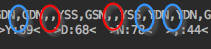
问题和解决办法立即变得清楚:
您的csv -文件是一个简单的、完全对齐的csv文件,带有逗号分隔符(见蓝色标记),因此即使是空单元格也可以很容易地处理,因为它们只是两个直接连续的逗号(参见红色标记)。
也就是说,你的样本数据与你的真实数据无关.
一个正确的等效示例数据文件应该是
C.N,Cmp,Cmp,Cmp,Cmp,Cmp,Cmp,Cmp
C.N2,IGN,IGT,IGA,,IGB,IGB,
php,12,12,11,35,5,1,6
java,12,12,11,35,5,1,6
react,100,100,100,35,100,100,6
IOS,12,12,11,35,5,1,6
python,12,12,11,35,5,1,6
JSX,12,12,11,35,5,1,6这就是为什么@kerwei的基于简单pd.read_csv的熊猫解决方案(以逗号作为默认分隔符)为您工作的原因,尽管示例csv数据中没有一个逗号。
对正确提问的回答
在中,您可以打印每一行代码(代码片段),直到您在感兴趣的行之后到达该行为止。
但是你不应该打印任何东西,除非你到达了你所关注的那条线:
import csv

with open("datas.csv", "r") as Data:
    Reader = csv.reader(Data)

    for line in Reader:
        if line[0] == "react":
            print(line)
break然而,您对过滤行的额外要求在熊猫中得到了更好的解决,因此我的大熊猫接近的方法如下:
import pandas as pd
df = pd.read_csv(filename, index_col=0)
df_r = df.loc[['C.N2', 'react'], ~df.loc['C.N2'].isna()]

#       Cmp Cmp.1 Cmp.2 Cmp.4 Cmp.5
#C.N
#C.N2   IGN   IGT   IGA   IGB   IGB
#react  100   100   100   100   100
只将此结果的数据行(df没有标头和索引)写入另一个csv文件同样容易:
df_r.to_csv('react.csv', header=False, index=False)

#IGN,IGT,IGA,IGB,IGB
#100,100,100,100,100当然,您也可以在没有外部库()的情况下使用。
with open(filename) as f:
    next(f)
    header = f.readline().strip().split(',')
    drop_idx = [i for i, h in enumerate(header) if not h]
    for line in f:
        if line.startswith('react'):
            data = line.strip().split(',')
            break

for i in drop_idx[::-1]:
    header.pop(i)
    data.pop(i)
with open('react.csv', 'w') as f:
    f.write(','.join(header[1:]) + '\n')
f.write(','.join(data[1:]))最后,对未来的问题提出一个请求:请尝试从[文]的角度来简化您的问题,使您真正问题的重要属性不会丢失,这将节省大量时间。
https://stackoverflow.com/questions/54123717
复制相似问题
腾讯云开发者

Copyright © 2013 - 2026 Tencent Cloud. All Rights Reserved. 腾讯云 版权所有
深圳市腾讯计算机系统有限公司 ICP备案/许可证号:粤B2-20090059  粤公网安备44030502008569号
腾讯云计算(北京)有限责任公司 京ICP证150476号 | 京ICP备11018762号