
防止TileImage层平滑
我在OpenLayers 4.6.5中使用了一个Landsat 8 TileImage层,该层由AWS服务器提供(根据https://github.com/mapbox/landsat-tiler),并且需要防止图像中的像素受到抖动/插值--这样每个像素(大约30米高x30米宽)只包含一种没有阴影的颜色。下面是我看到的一个例子:
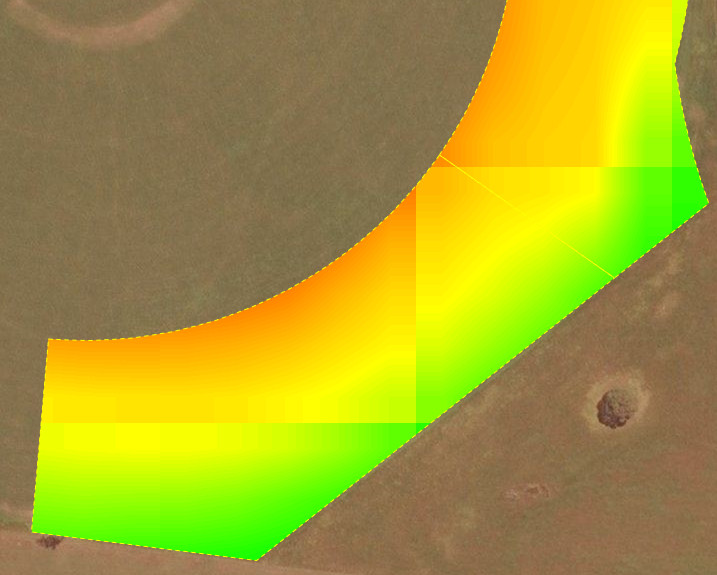
我发现了一些其他人对静态PNG源代码也有同样的问题,所以我尝试了下面的javascript:
map.on('precompose', function(evt) {
  evt.context.imageSmoothingEnabled = false;
  evt.context.webkitImageSmoothingEnabled = false;
  evt.context.mozImageSmoothingEnabled = false;
  evt.context.msImageSmoothingEnabled = false;
});
..。和下列CSS:
.tm-openlayer-map
    canvas {
      image-rendering: optimizeSpeed;
      image-rendering: -moz-crisp-edges;
      image-rendering: -webkit-optimize-contrast;
      image-rendering: -o-crisp-edges;
      image-rendering: pixelated;
      -ms-interpolation-mode: nearest-neighbor;
    }
但这两种方法似乎都不起任何作用。我只能得出结论,要么这些方法不适用于TileImage层,要么是我的平铺服务器实际上提供了预先平滑的图像。如有任何建议,将不胜感激!
回答 1
Stack Overflow用户
发布于 2021-05-29 07:15:44
我知道这是个老生常谈的问题,但我终于成功了,所以我想其他人可能会觉得这很有帮助。
由于OpenLayers 6.4.0,您可以禁用源代码的图像平滑(下面的代码示例来自OpenLayers网站上的这个例子 ):
var disabledLayer = new TileLayer({
  // specify className so forEachLayerAtPixel can distinguish layers
  className: 'ol-layer-dem',
  source: new XYZ({
    attributions: attributions,
    url:
      'https://api.maptiler.com/tiles/terrain-rgb/{z}/{x}/{y}.png?key=' + key,
    maxZoom: 10,
    crossOrigin: '',
    imageSmoothing: false,
  }),
});注意:确保您在源上设置了,而不是该层!它不会造成任何错误,如果您设置它的层,但它将不会取得任何成果;)
我已经发现,如果我希望像素化按我预期的方式工作,我需要在源上设置imageSmoothing: false,然后在源上设置maxZoom小于在层和视图上设置的maxZoom (例如,源上的maxZoom: 14,以及层和视图上的maxZoom: 19 )。然后,我得到了好的实体块像素我想,没有任何失真,阴影或不正确的值在任何像素。
最后,确保您的层上的maxZoom设置与视图上的maxZoom设置相同,否则您的用户将能够放大太远,您的层将消失。
https://stackoverflow.com/questions/54083424
复制相似问题
腾讯云开发者

Copyright © 2013 - 2026 Tencent Cloud. All Rights Reserved. 腾讯云 版权所有
深圳市腾讯计算机系统有限公司 ICP备案/许可证号:粤B2-20090059  粤公网安备44030502008569号
腾讯云计算(北京)有限责任公司 京ICP证150476号 | 京ICP备11018762号