
windeployqt复制许多不必要的文件。
windeployqt复制许多不必要的文件。
提问于 2019-01-07 17:44:46
我正在为一个非常简单的Hello类型的QML应用程序创建一个具有正确依赖项的可执行文件。使用此命令时,使用以下命令
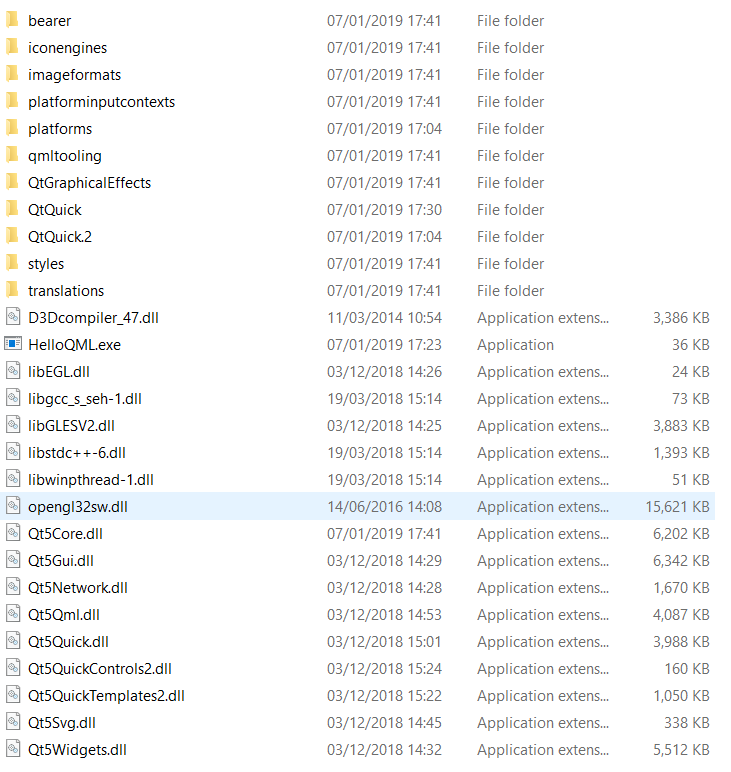
windeployqt . --release --qmldir D:\Documents\QT-Projects\HelloQML中可执行文件的文件夹中。这样做很好,而且我可以毫无问题地运行可执行文件。但是,我发现我可以删除目录中的许多文件和文件夹,而不会影响程序的运行。为了比较,这里是原始文件夹内容。
这是我删除了所有可能的东西之后的文件夹,同时仍然允许程序运行(我没有尝试删除任何子文件夹中的任何内容)。
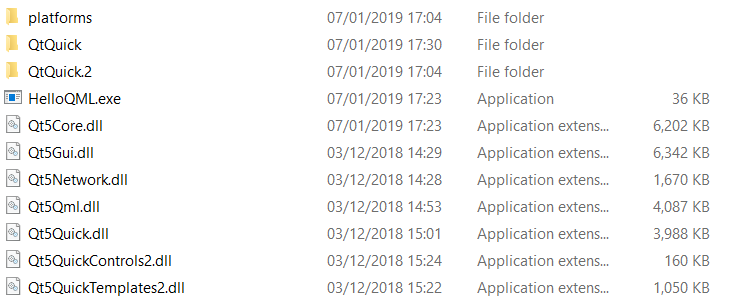
是否有一种方式使windeployqt不复制这么多不必要的项目?
回答 2
Stack Overflow用户
回答已采纳
发布于 2019-01-08 07:56:39
如果使用最新的Qt版本之一,则可以选择不复制哪些文件。
--不使用翻译和OpenGL的二进制文件,例如:
windeployqt.exe C:\sample\sample.exe --no-translations --no-opengl-sw有关更多信息,您可以运行:
windeploy --帮助
Usage: windeployqt [options] [files]
Qt Deploy Tool 5.12.0

The simplest way to use windeployqt is to add the bin directory of your Qt
installation (e.g. <QT_DIR\bin>) to the PATH variable and then run:
  windeployqt <path-to-app-binary>
If ICU, ANGLE, etc. are not in the bin directory, they need to be in the PATH
variable. If your application uses Qt Quick, run:
  windeployqt --qmldir <path-to-app-qml-files> <path-to-app-binary>

Options:
  -?, -h, --help            Displays this help.
  -v, --version             Displays version information.
  --dir <directory>         Use directory instead of binary directory.
  --libdir <path>           Copy libraries to path.
  --plugindir <path>        Copy plugins to path.
  --debug                   Assume debug binaries.
  --release                 Assume release binaries.
  --pdb                     Deploy .pdb files (MSVC).
  --force                   Force updating files.
  --dry-run                 Simulation mode. Behave normally, but do not
                            copy/update any files.
  --no-patchqt              Do not patch the Qt5Core library.
  --no-plugins              Skip plugin deployment.
  --no-libraries            Skip library deployment.
  --qmldir <directory>      Scan for QML-imports starting from directory.
  --no-quick-import         Skip deployment of Qt Quick imports.
  --no-translations         Skip deployment of translations.
  --no-system-d3d-compiler  Skip deployment of the system D3D compiler.
  --compiler-runtime        Deploy compiler runtime (Desktop only).
  --no-compiler-runtime     Do not deploy compiler runtime (Desktop only).
  --webkit2                 Deployment of WebKit2 (web process).
  --no-webkit2              Skip deployment of WebKit2.
  --json                    Print to stdout in JSON format.
  --angle                   Force deployment of ANGLE.
  --no-angle                Disable deployment of ANGLE.
  --no-opengl-sw            Do not deploy the software rasterizer library.
  --list <option>           Print only the names of the files copied.
                            Available options:
                             source:   absolute path of the source files
                             target:   absolute path of the target files
                             relative: paths of the target files, relative
                                       to the target directory
                             mapping:  outputs the source and the relative
                                       target, suitable for use within an
                                       Appx mapping file
  --verbose <level>         Verbose level (0-2).

Qt libraries can be added by passing their name (-xml) or removed by passing
the name prepended by --no- (--no-xml). Available libraries:
bluetooth concurrent core declarative designer designercomponents enginio
gamepad gui qthelp multimedia multimediawidgets multimediaquick network nfc
opengl positioning printsupport qml qmltooling quick quickparticles quickwidgets

script scripttools sensors serialport sql svg test webkit webkitwidgets
websockets widgets winextras xml xmlpatterns webenginecore webengine
webenginewidgets 3dcore 3drenderer 3dquick 3dquickrenderer 3dinput 3danimation
3dextras geoservices webchannel texttospeech serialbus webview

Arguments:
[files] Binaries or directory containing the binary.Stack Overflow用户
发布于 2019-01-08 08:10:04
在将应用程序部署到另一台PC时,可能需要这些文件中的一些。例如,您删除了opengl32sw.dll。我发现这个dll并不存在于所有的PC上,并且需要成为安装的一部分。
页面原文内容由Stack Overflow提供。腾讯云小微IT领域专用引擎提供翻译支持
原文链接:
https://stackoverflow.com/questions/54079287
复制相关文章
相似问题
腾讯云开发者

Copyright © 2013 - 2026 Tencent Cloud. All Rights Reserved. 腾讯云 版权所有
深圳市腾讯计算机系统有限公司 ICP备案/许可证号:粤B2-20090059  粤公网安备44030502008569号
腾讯云计算(北京)有限责任公司 京ICP证150476号 | 京ICP备11018762号