
在DataGridView中不可能看到数据,除非我单击或选择单元格C#
在DataGridView中不可能看到数据,除非我单击或选择单元格C#
提问于 2019-01-04 21:46:52
似乎DataGridView中的文本字体类似于背景色,所以在单击或选择单元格之前,我无法看到任何数据。我试图在DefaultCellStyle中改变颜色,但什么也没发生。我怎么才能修好它?
以下是我的DefaultCellStyle代码:
dataGridViewCellStyle1.BackColor = System.Drawing.SystemColors.Window;
dataGridViewCellStyle1.Font = new System.Drawing.Font("Microsoft Sans Serif", 8.25F, System.Drawing.FontStyle.Regular, System.Drawing.GraphicsUnit.Point, ((byte)(204)));
dataGridViewCellStyle1.ForeColor = System.Drawing.Color.Red;
dataGridViewCellStyle1.SelectionBackColor = System.Drawing.SystemColors.Highlight;
dataGridViewCellStyle1.SelectionForeColor = System.Drawing.SystemColors.HighlightText;
--应该可以,就像在这个预览版上:
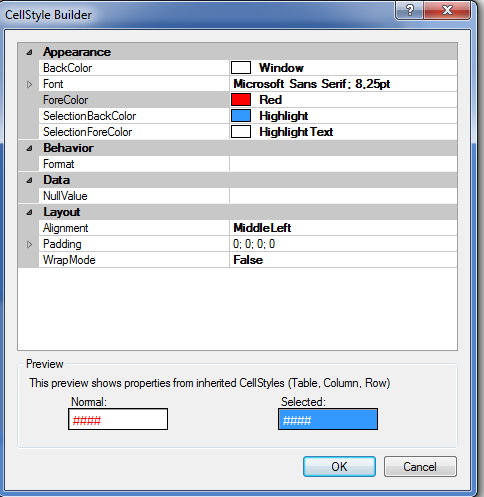
,但不是:
回答 2
Stack Overflow用户
发布于 2019-01-04 22:13:08
它似乎是SharpDevelop中的一个bug。我不确定,但我的朋友在Visual中没有遇到任何问题。要解决此问题,只需将该行添加到您的Form.cs (而不是您的设计器)。
dataGridView.ForeColor = System.Drawing.Color.Black;Stack Overflow用户
发布于 2021-10-12 13:14:06
在我的例子中,这是因为试图从另一个线程更新DGV,使用invoke为我工作。
this.Invoke(new Action(() =>
 {
//update DGV
}));页面原文内容由Stack Overflow提供。腾讯云小微IT领域专用引擎提供翻译支持
原文链接:
https://stackoverflow.com/questions/54046540
复制相关文章
相似问题
腾讯云开发者

Copyright © 2013 - 2026 Tencent Cloud. All Rights Reserved. 腾讯云 版权所有
深圳市腾讯计算机系统有限公司 ICP备案/许可证号:粤B2-20090059  粤公网安备44030502008569号
腾讯云计算(北京)有限责任公司 京ICP证150476号 | 京ICP备11018762号