
UISearchBar底线
UISearchBar底线
提问于 2019-01-04 06:44:45
如何删除UISearchBar在UITableViewController中的底线?
快速解决方案也可以应用。
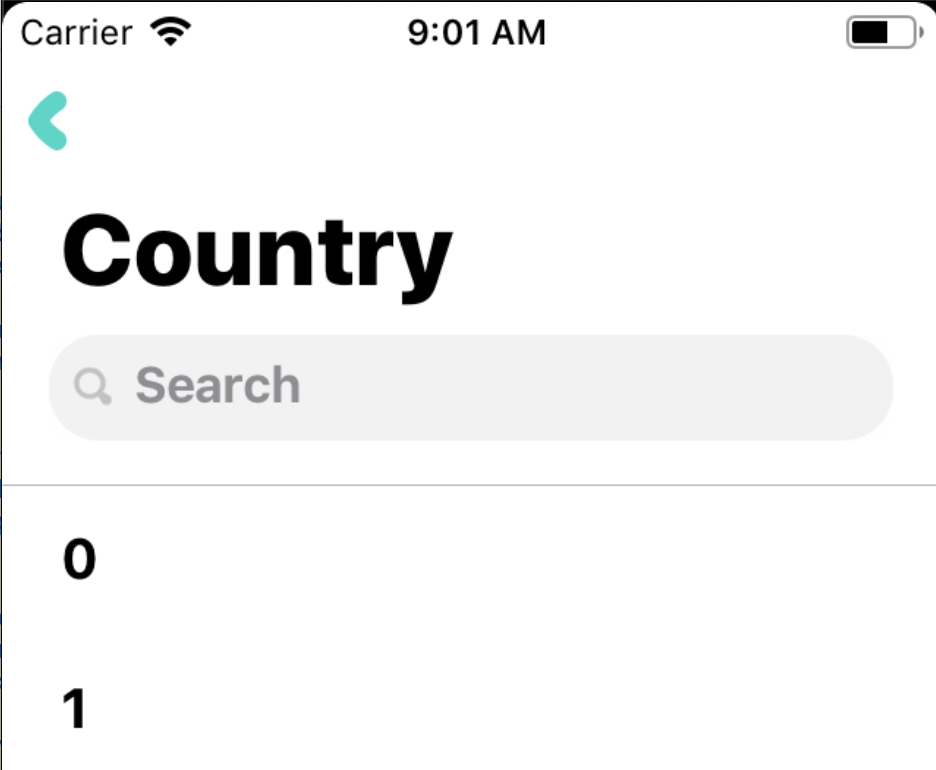
这是我的VC代码:
NavigationController.NavigationBar.PrefersLargeTitles = true;
NavigationController.NavigationItem.LargeTitleDisplayMode =  UINavigationItemLargeTitleDisplayMode.Automatic;
NavigationItem.HidesSearchBarWhenScrolling = false;
var searchController = new UISearchController(searchResultsController: null);
NavigationItem.SearchController = searchController;
NavigationItem.SearchController.DefinesPresentationContext = true;
NavigationItem.SearchController.DimsBackgroundDuringPresentation = false;对于AppDeletage.cs
UINavigationBar.Appearance.Translucent = false;
UINavigationBar.Appearance.ShadowImage = new UIImage();
我尝试了我在互联网上找到的几乎所有的解决方案。
不要使用下一个解决方案:
UISearchBar.Appearance.BackgroundImage = null;
UISearchBar.Appearance.BackgroundColor= UIColor.Clear;NavigationItem.SearchController.Layer.BorderWidth = 0
NavigationItem.SearchController.Layer.BorderColor = UIColor.White.CGColorNavigationItem.SearchController.SearchBar.ClipsToBounds = true;回答 1
Stack Overflow用户
回答已采纳
发布于 2019-01-09 06:18:08
以下是解决办法:
public override void ViewWillLayoutSubviews()
{
    base.ViewWillLayoutSubviews();
    ((UIImageView) NavigationItem.SearchController.SearchBar.Superview?.Subviews.First().Subviews.First()).Bounds = CGRect.Null;
}页面原文内容由Stack Overflow提供。腾讯云小微IT领域专用引擎提供翻译支持
原文链接:
https://stackoverflow.com/questions/54034187
复制相关文章
相似问题
腾讯云开发者

Copyright © 2013 - 2026 Tencent Cloud. All Rights Reserved. 腾讯云 版权所有
深圳市腾讯计算机系统有限公司 ICP备案/许可证号:粤B2-20090059  粤公网安备44030502008569号
腾讯云计算(北京)有限责任公司 京ICP证150476号 | 京ICP备11018762号