
使组件在列中显示
使组件在列中显示
提问于 2019-01-02 21:56:24
我对React非常陌生,我正在使用material(ui)制作我的第一个应用程序,我已经成功地呈现了我想要的组件,但我还无法打印它们,它们按行显示:
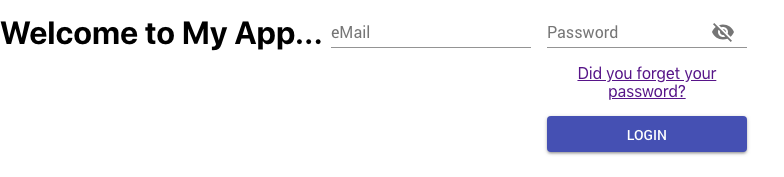
我尝试用div和p包装它们,得到了相同的结果。
这是我的组件的代码:
import React, { Component } from 'react';
import Button from '@material-ui/core/Button';
import classNames from 'classnames';
import PropTypes from 'prop-types';
import { withStyles } from '@material-ui/core/styles';
import Input from '@material-ui/core/Input';
import InputLabel from '@material-ui/core/InputLabel';
import InputAdornment from '@material-ui/core/InputAdornment';
import FormControl from '@material-ui/core/FormControl';
import Visibility from '@material-ui/icons/Visibility';
import VisibilityOff from '@material-ui/icons/VisibilityOff';
import IconButton from '@material-ui/core/IconButton';

const styles = theme => ({
  root: {
    display: 'flex',
    flexWrap: 'wrap',
  },
  margin: {
    margin: theme.spacing.unit,
  },
  withoutLabel: {
    marginTop: theme.spacing.unit * 3,
  },
  textField: {
    flexBasis: 200,
  },
  button: {
    margin: theme.spacing.unit,
  },
  input: {
    display: 'none',
  },
});

class LoginModal extends Component {
  state = {
    password: '',
    showPassword: false,
  };

  render() {
    const { classes } = this.props

    return (
      <div className={classes.root}>
        <h1>Welcome to My App...</h1>
        <FormControl className={classNames(classes.margin, classes.textField)}>
          <InputLabel htmlFor="adornment-email">eMail</InputLabel>
          <Input i
            d="adornment-email"
            variant="filled"
          />
        </FormControl>
        <FormControl className={classNames(classes.margin, classes.textField)}>
          <InputLabel htmlFor="adornment-password">Password</InputLabel>
          <Input
            id="adornment-password"
            variant="filled"
            type={this.state.showPassword ? 'text' : 'password'}
            value={this.state.password}
            endAdornment={
              <InputAdornment position="end">
                <IconButton
                  aria-label="Toggle password visibility"
                  onClick={this.handleClickShowPassword}
                >
                  {this.state.showPassword ? <Visibility /> : <VisibilityOff />}
                </IconButton>
              </InputAdornment>
            }
          />
          <p><a href="#">Did you forget your password?</a></p>
          <Button color="primary" variant="contained">Login</Button>
        </FormControl>
      </div>
    );
  };
}

LoginModal.propTypes = {
  classes: PropTypes.object.isRequired,
};

export default withStyles(styles)(LoginModal);
只有两个最新的组件显示堆叠,而其余的显示成一行。
如何指示React以堆叠方式显示组件?
回答 2
Stack Overflow用户
回答已采纳
发布于 2019-01-03 04:47:04
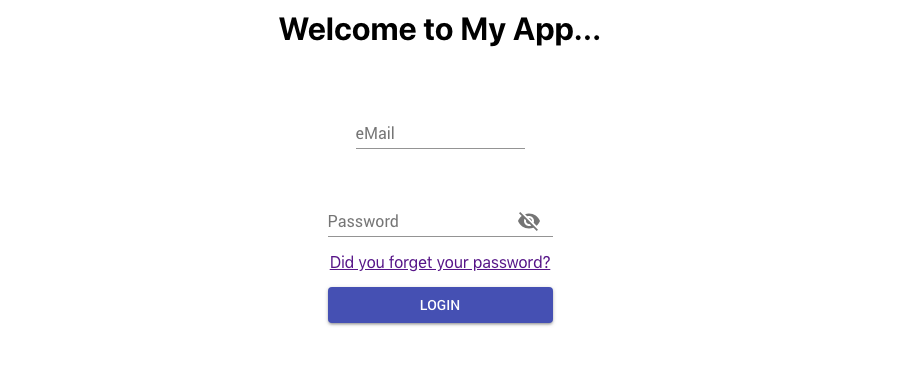
我发现Material UI使用网格组件来管理响应性,您可以使用它来排列显示中的对象。
这就是我使用Grid以我想要的方式显示对象的方式:
class LoginModal extends Component {
  state = {
    password: '',
    showPassword: false,
  };

  render() {
    const { classes } = this.props

    return (
      <div className={classes.root}>
        <Grid container spacing={24}>
          <Grid item xs={12}>
            <h1>Welcome to My App...</h1>
          </Grid>
          <Grid item xs={12}>
            <FormControl className={classNames(classes.margin, classes.textField)}>
              <InputLabel htmlFor="adornment-email">eMail</InputLabel>
              <Input
                id="adornment-email"
                variant="filled"
              />
            </FormControl>
          </Grid>
          <Grid item xs={12}>
            <FormControl className={classNames(classes.margin, classes.textField)}>
              <InputLabel htmlFor="adornment-password">Password</InputLabel>
              <Input
                id="adornment-password"
                variant="filled"
                type={this.state.showPassword ? 'text' : 'password'}
                value={this.state.password}
                endAdornment={
                  <InputAdornment position="end">
                    <IconButton
                      aria-label="Toggle password visibility"
                      onClick={this.handleClickShowPassword}
                    >
                      {this.state.showPassword ? <Visibility /> : <VisibilityOff />}
                    </IconButton>
                  </InputAdornment>
                }
              />
              <p><a href="#">Did you forget your password?</a></p>
              <Button color="primary" variant="contained">Login</Button>
            </FormControl>
          </Grid>
        </Grid>
      </div>
    );
  };
}
这就是结果:
Stack Overflow用户
发布于 2019-01-02 23:04:09
将root样式更新为:
root: {
  display: 'flex',
  flex-direction: column;
},
您可能需要调整其他flex属性以获得所需的对齐方式。
页面原文内容由Stack Overflow提供。腾讯云小微IT领域专用引擎提供翻译支持
原文链接:
https://stackoverflow.com/questions/54013686
复制相关文章
相似问题
腾讯云开发者

Copyright © 2013 - 2026 Tencent Cloud. All Rights Reserved. 腾讯云 版权所有
深圳市腾讯计算机系统有限公司 ICP备案/许可证号:粤B2-20090059  粤公网安备44030502008569号
腾讯云计算(北京)有限责任公司 京ICP证150476号 | 京ICP备11018762号