
GEOFENCE_NOT_AVAIBLE (代码1000)同时尝试设置geofence
这个问题发生在比奥利奥更老的Android上,同时也出现在奥利奥和更新版本上。
即使完成了以下步骤,我也无法让地理位置正常工作:
- 定位服务被设置为高精度
- 启用Wi和移动数据。
- 应用程序被授予位置权限。
- 将Google服务添加到项目中
- Google服务和Play Store最新更新并安装在设备上
- 禁用电池优化(测试用途)
如果启用了GPS_PROVIDER和NETWORK_PROVIDER,我已经检查了以下代码:
@Override
protected void onResume() {
    super.onResume();
    LocationManager manager = (LocationManager) getSystemService(Context.LOCATION_SERVICE);
    if (!manager.isProviderEnabled(LocationManager.GPS_PROVIDER)){
        Log.e("Provider", "Provider is not avaible");
    } else if (manager.isProviderEnabled(LocationManager.GPS_PROVIDER)){
        Log.v("Provider", "GPS Provider is avaible");
    }
    if (!manager.isProviderEnabled(LocationManager.NETWORK_PROVIDER)){
        Log.e("Network Provider", "Provider is not avaible");
    } else if (manager.isProviderEnabled(LocationManager.NETWORK_PROVIDER)){
        Log.v("Network Provider", "provider is avaible");
    }

}
以上都给了我积极的结果,所以问题不可能出现在这里。
准确错误:
E/Geofence: com.google.android.gms.common.api.ApiException: 1000:
我在mGeofencingClient的开头设置了onCreate
  @Override
protected void onCreate(Bundle savedInstanceState) {
    super.onCreate(savedInstanceState);
    setContentView(R.layout.activity_main);
    mGeofencingClient = LocationServices.getGeofencingClient(getApplicationContext());
我用以下代码设置geofence:
            mGeofenceList.add(
                    new Geofence.Builder()
                            .setRequestId("blablabla")
                            .setCircularRegion(50.32, 43.23, 232)
                            .setExpirationDuration(-1L)
                            .setTransitionTypes(Geofence.GEOFENCE_TRANSITION_ENTER |
                                    Geofence.GEOFENCE_TRANSITION_EXIT)
                            .build());

//        }
        PermissionCheck mPermissionCheck = new PermissionCheck();
        if (!mPermissionCheck.isPermissionGranted(getApplicationContext())){
            mPermissionCheck.askForPermission(MainActivity.this);
            return;
        }
        setGeofences();


    }

private GeofencingRequest getGeofencingRequest(){
    if (mGeofenceList.isEmpty()){
        return null;}
    Log.v("mGeofenceList", mGeofenceList.toString());
    GeofencingRequest.Builder builder = new GeofencingRequest.Builder();
    builder.setInitialTrigger(GeofencingRequest.INITIAL_TRIGGER_ENTER |
                                GeofencingRequest.INITIAL_TRIGGER_EXIT);
    builder.addGeofences(mGeofenceList);
    return builder.build();
}

private PendingIntent getGeofencePendingIntent(){
    if (mGeofencePendingIntent != null){
        return mGeofencePendingIntent;
    }
    Intent intent = new Intent(getApplicationContext(), Geofencing.class);
    mGeofencePendingIntent =  PendingIntent.getService(getApplication(),
            0, intent, PendingIntent.FLAG_UPDATE_CURRENT);
    return mGeofencePendingIntent;
}

@SuppressLint("MissingPermission")
private void setGeofences(){
    GeofencingRequest geofencingRequest = getGeofencingRequest();
    PendingIntent pi = getGeofencePendingIntent();
    mGeofencingClient.addGeofences(geofencingRequest, pi)
        .addOnSuccessListener(MainActivity.this, new OnSuccessListener<Void>() {
            @Override
            public void onSuccess(Void aVoid) {
                Log.d("Geofences", "geofencing set up succesfully");
                Toast.makeText(MainActivity.this, "Geofences set up", Toast.LENGTH_SHORT).show();

            }
        })
        .addOnFailureListener(MainActivity.this, new OnFailureListener() {
            @Override
            public void onFailure(@NonNull Exception e) {
                Log.e("Geofence", e.toString());
            LocationManager manager = (LocationManager) getSystemService(Context.LOCATION_SERVICE);
            if (!manager.isProviderEnabled(LocationManager.GPS_PROVIDER)){
                Log.e("Provider", "Provider is not avaible");
            }
            if (!manager.isProviderEnabled(LocationManager.NETWORK_PROVIDER)){
                Log.e("Network Provider", "Provider is not avaible");
            }

        }
    });
}
此代码与Google文档中的代码几乎相同。舱单许可:
<uses-permission android:name="android.permission.ACCESS_FINE_LOCATION" />
    <uses-permission android:name="android.permission.ACCESS_COARSE_LOCATION"/>
    <uses-permission android:name="android.permission.INTERNET"/>
    <uses-feature android:name="android.hardware.location.network"/>
    <uses-feature android:name="android.hardware.location.gps"/>
格莱德尔:
implementation 'com.google.android.gms:play-services-maps:16.0.0'
implementation 'com.google.android.gms:play-services-location:16.0.0'
有人能看到我本可以做的事吗?提前感谢!
回答 2
Stack Overflow用户
发布于 2019-01-01 19:03:06
好的,这是一个基于OP的地理位置的最小工作程序--只是为了排除您的代码实现--还有几个其他接口可以用于其他测试,所以忽略它。
“工作”意味着它成功地增加了地学。
public class MapsActivity extends FragmentActivity implements OnMapReadyCallback, GoogleApiClient.ConnectionCallbacks,
        GoogleApiClient.OnConnectionFailedListener, LocationListener, ActivityCompat.OnRequestPermissionsResultCallback {

    private List<Geofence> mGeofenceList = new ArrayList<>();

    private GeofencingClient gfc;

    @Override
    protected void onCreate(Bundle savedInstanceState) {
        super.onCreate(savedInstanceState);
        setContentView(R.layout.activity_maps);

        gfc = LocationServices.getGeofencingClient(getApplicationContext());

        mGeofenceList.add(new Geofence.Builder().setRequestId("aa").setCircularRegion(50.32, 43.23, 232).setExpirationDuration(-1L).setTransitionTypes(
                Geofence.GEOFENCE_TRANSITION_ENTER | Geofence.GEOFENCE_TRANSITION_EXIT).build());


        if (ActivityCompat.checkSelfPermission(this, Manifest.permission.ACCESS_FINE_LOCATION)
                != PackageManager.PERMISSION_GRANTED) {
            // Check Permissions Now
            ActivityCompat.requestPermissions(this,
                    new String[]{Manifest.permission.ACCESS_FINE_LOCATION},
                    1);
        }

        else {
            setGeofences();
        }

    }


    private GeofencingRequest getGeofencingRequest(){
        if (mGeofenceList.isEmpty()){
            return null;}
        Log.v("mGeofenceList", mGeofenceList.toString());
        GeofencingRequest.Builder builder = new GeofencingRequest.Builder();
        builder.setInitialTrigger(GeofencingRequest.INITIAL_TRIGGER_ENTER |
                GeofencingRequest.INITIAL_TRIGGER_EXIT);
        builder.addGeofences(mGeofenceList);
        return builder.build();
    }

    private PendingIntent mGeofencePendingIntent;

    private PendingIntent getGeofencePendingIntent(){
        if (mGeofencePendingIntent != null){
            return mGeofencePendingIntent;
        }
        Intent intent = new Intent(getApplicationContext(), Object.class);
        mGeofencePendingIntent =  PendingIntent.getService(getApplication(),
                0, intent, PendingIntent.FLAG_UPDATE_CURRENT);
        return mGeofencePendingIntent;
    }

    @SuppressLint("MissingPermission")
    private void setGeofences(){
        GeofencingRequest geofencingRequest = getGeofencingRequest();
        PendingIntent pi = getGeofencePendingIntent();
        gfc.addGeofences(geofencingRequest, pi)
                .addOnSuccessListener(this, new OnSuccessListener<Void>() {
                    @Override
                    public void onSuccess(Void aVoid) {
                        Log.d("Geofences", "geofencing set up succesfully");
                        Toast.makeText(MapsActivity.this, "Geofences set up", Toast.LENGTH_SHORT).show();

                    }
                })
                .addOnFailureListener(MapsActivity.this, new OnFailureListener() {
                    @Override
                    public void onFailure(@NonNull Exception e) {
                        Log.e("Geofence", e.toString());
                        LocationManager manager = (LocationManager) getSystemService(Context.LOCATION_SERVICE);
                        if (!manager.isProviderEnabled(LocationManager.GPS_PROVIDER)){
                            Log.e("Provider", "Provider is not avaible");
                        }
                        if (!manager.isProviderEnabled(LocationManager.NETWORK_PROVIDER)){
                            Log.e("Network Provider", "Provider is not avaible");
                        }

                    }
                });
    }


    @Override
    public void onRequestPermissionsResult(int requestCode, @NonNull String[] permissions, @NonNull int[] grantResults) {
    super.onRequestPermissionsResult(requestCode, permissions, grantResults);

        setGeofences();

    }

}经过一些调查,我发现我可以用这个代码示例重新创建1000个错误代码。它是基于以下论坛帖子:https://androidforums.com/threads/error-adding-geofence-on-android-8.1289302/
因此,为了遵循这些指导(修复--但我翻转它们以重新创建,然后修复):
使用电话“设置-安全和位置-位置模式”-在“高精度、只保留电池或只使用设备”之间切换,直到得到这个提示为止(设置路径将根据android构建的不同而有所不同):
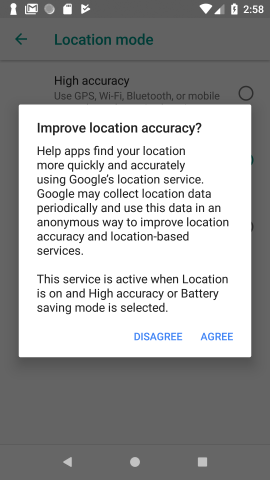
在这个示例代码中--如果你用“不同意”来响应,示例代码将生成1000个错误代码;如果你重复并以“同意”来响应,它将成功地添加geofence。
Stack Overflow用户
发布于 2021-04-16 21:23:19
对于android到android,请确保访问设置高优先级,因为geofence需要这样做,否则就变成了错误1000。
fun ceksetting(){
val builder = LocationSettingsRequest.Builder()
        .addLocationRequest(locationRequest)
val locationRequest = LocationRequest()
    locationRequest!!.interval = 50000
    locationRequest!!.fastestInterval = 50000
    locationRequest!!.smallestDisplacement = 170f // 170 m = 0.1 mile
    locationRequest!!.priority = LocationRequest.PRIORITY_HIGH_ACCURACY //set according to your app function
    val client: SettingsClient = LocationServices.getSettingsClient(requireActivity())
    val task: Task<LocationSettingsResponse> = client.checkLocationSettings(builder.build())
    task.addOnSuccessListener { locationSettingsResponse ->
       //here call your geofence
    }

    task.addOnFailureListener { exception ->
        if (exception is ResolvableApiException){
            // Location settings are not satisfied, but this can be fixed
            // by showing the user a dialog.
            try {
                // Show the dialog by calling startResolutionForResult(),
                // and check the result in onActivityResult().
                exception.startResolutionForResult(requireActivity(),
                    REQUEST_CHECK_SETTINGS)
            } catch (sendEx: IntentSender.SendIntentException) {
                // Ignore the error.
            }
        }
    }
}https://stackoverflow.com/questions/53996168
复制相似问题
腾讯云开发者

Copyright © 2013 - 2026 Tencent Cloud. All Rights Reserved. 腾讯云 版权所有
深圳市腾讯计算机系统有限公司 ICP备案/许可证号:粤B2-20090059  粤公网安备44030502008569号
腾讯云计算(北京)有限责任公司 京ICP证150476号 | 京ICP备11018762号