
在循环中只显示一次及以下的复选框元素
在循环中只显示一次及以下的复选框元素
提问于 2018-12-31 13:05:07
除了我发布的代码隐藏在展开元素中的前4张外,我还能在一个循环中生成所有图像,但我很难将展开的消息显示在所有元素下面一次。在单击展开消息之前,如下所示:
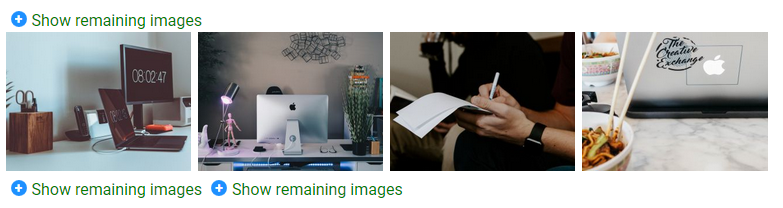
以下是点击其中任何一个之后的样子:
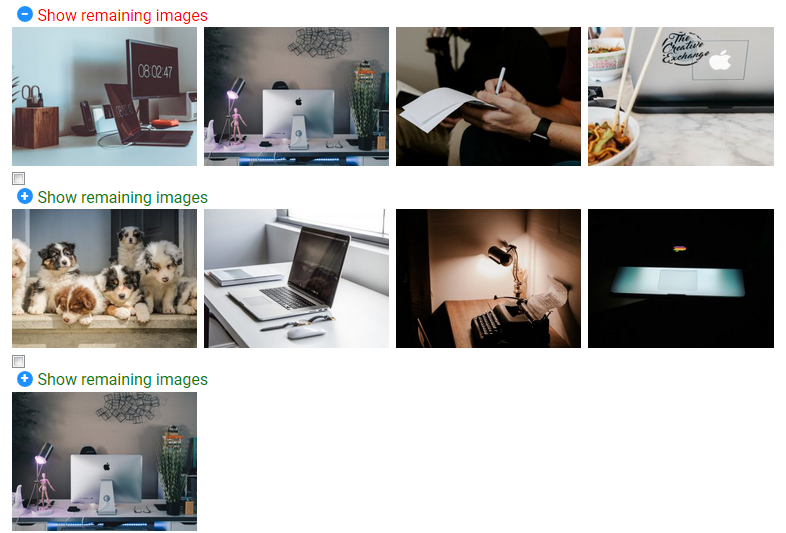
我尝试将<label for="hd-2">Show remaining images</label>放在循环下面,但随后CSS样式停止工作。不幸的是,如果我将标签移到循环下面(如果可能的话),我缺乏CSS知识来保持CSS样式的工作。
### Twig ###

{% block imagelist_field %}
    <div class="imagelist columns">
        {% for image in value %}
        {% if loop.index0 is divisibleby(4) %}
            <input class="hide" id="hd-2" type="checkbox">
            <label for="hd-2">Show remaining images</label>
            <div class="section-imagelist">
        {% endif %}
        {% if value|length < 4 %}
            <div class="below4">
        {% endif %}
        <div>
            {{ popup(image.filename, 320, 240) }}
        </div>
        {% if loop.index is divisibleby(4) or loop.last %}
            </div>
        {% endif %}
        {% if value|length < 4 %}
            </div>
        {% endif %}
    {% endfor %}
</div>
{% endblock %}

### CSS ###

.hide, .section-imagelist:nth-child(n+4)  {
  display: none;
}

.hide + label {
    margin: 0;
    padding: 0;
    color: green;
    cursor: pointer;
    display: inline-block;
    }

.hide:checked + label {
    color: red;
    border-bottom: 0;
}

.hide:checked + label ~ * {
    display: flex !important;
}

.hide + label:before {
    background-color: #1e90ff;
    color: #fff;
    content: "\002B";
    display: block;
    float: left;
    font-size: 14px;
    font-weight: bold;
    height: 16px;
    line-height: 16px;
    margin: 3px 5px;
    text-align: center;
    width: 16px;
    -webkit-border-radius: 50%;
    -moz-border-radius: 50%;
    border-radius: 50%;
}
.hide:checked + label:before {
    content: "\2212";
}回答 1
Stack Overflow用户
回答已采纳
发布于 2018-12-31 13:26:52
您应该移动循环前的复选框和之后的标签。然后调整CSS,使其不依赖于标签和复选框相邻(在标签情况下实际上不需要关系选择器+ )。
然后,您可以使用类.section-imagelist显示/隐藏所需的四组图像。
默认情况下,隐藏所有.节-映像列表,
.section-imagelist {
  display: none;
}默认情况下,显示第一个
.section-imagelist:first-of-type {
  display: inherit !important;
}显示所有.节-如果它们前面有一个带有类.hide的检查元素
.hide:checked~.section-imagelist {
  display: inherit;
}
如果这不是你想要的,请告诉我。
细枝
{% block imagelist_field %}

    <div class="imagelist columns">

      {# The checkbox can be placed as the first child. It does not need to be adjacent to the label (the for= parameter lets it know which one to change #}
      <input class="hide" id="hd-2" type="checkbox">

      {% for image in value %}

          ...
          ...
          ...

      {% endfor %}

      {# The label should be last, so it is always after the images #}
      <label for="hd-2">Show remaining images</label>

  </div>

{% endblock %}
img {
  float: left;
  width: 25%;
}

.hide {
  display: none;
}

.hide:checked~label {
  color: red;
  border-bottom: 0;
}

.section-imagelist {
  display: none;
  width: 100%;
}

.section-imagelist:first-of-type {
    display: inline-block;
}

.hide:checked~.section-imagelist {
    display: inline-block;
}

label:before {
  background-color: #1e90ff;
  color: #fff;
  content: "\002B";
  display: block;
  float: left;
  font-size: 14px;
  font-weight: bold;
  height: 16px;
  line-height: 16px;
  margin: 3px 5px;
  text-align: center;
  width: 16px;
  -webkit-border-radius: 50%;
  -moz-border-radius: 50%;
  border-radius: 50%;
}

.hide:checked~label:before {
  content: "\2212";
  background: red;
}

label[for='hd-2'] {
  cursor: pointer;
}<div class="imagelist columns">
<input class="hide" id="hd-2" type="checkbox">
<div class="section-imagelist">
<div>
<a>
<img src="https://via.placeholder.com/240/09f">
</a>
</div>
<div>
<a>
<img src="https://via.placeholder.com/240/09f">
</a>
</div>
<div>
<a>
<img src="https://via.placeholder.com/240/09f">
</a>
</div>
<div>
<a>
<img src="https://via.placeholder.com/240/09f">
</a>
</div>
</div>
<div class="section-imagelist below4">
<div>
<a>
<img src="https://via.placeholder.com/240">
</a>
</div>
<div>
<a>
<img src="https://via.placeholder.com/240">
</a>
</div>
<div>
<a>
<img src="https://via.placeholder.com/240">
</a>
</div>
</div>
<label for="hd-2">Show remaining images</label>
</div>
页面原文内容由Stack Overflow提供。腾讯云小微IT领域专用引擎提供翻译支持
原文链接:
https://stackoverflow.com/questions/53987858
复制相关文章
相似问题
腾讯云开发者

Copyright © 2013 - 2026 Tencent Cloud. All Rights Reserved. 腾讯云 版权所有
深圳市腾讯计算机系统有限公司 ICP备案/许可证号:粤B2-20090059  粤公网安备44030502008569号
腾讯云计算(北京)有限责任公司 京ICP证150476号 | 京ICP备11018762号