
角管空间
角管空间
提问于 2018-12-28 13:22:36
我正在使用管道来应用它将显示什么样的货币。R$或$。但是它被总值卡住了,我想知道如何得到管道值之间的间距。
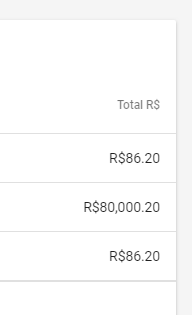
预期结果86.20雷亚尔
<ng-container matColumnDef="totalValue">
            <mat-header-cell class="mr-16" *matHeaderCellDef fxFlex="15"  fxLayoutAlign="end center">Total R$</mat-header-cell>
            <mat-cell  class="mr-16" *matCellDef="let element" fxFlex="15"  fxLayoutAlign="end center" >
              <p class="text-truncate" matTooltip='{{ element.totalValue  | currency : element.currency : "symbol" }}'>
                {{ element.total | currency : element.currency : "symbol" }}
              </p>
            </mat-cell>
          </ng-container>
回答 2
Stack Overflow用户
发布于 2018-12-28 14:50:08
您可以定义一个自定义CurrencySpacePipe,它扩展CurrencyPipe并在货币符号后面插入一个空格:
import { Pipe } from '@angular/core';
import { CurrencyPipe } from '@angular/common';

@Pipe({ name: "currencySpace" })
export class CurrencySpacePipe extends CurrencyPipe {
  transform(value: number, ...args: any[]): string {
    return super.transform(value, ...args).replace(/([^\d.,])(\d)/, "$1 $2");
  }
}并在标记中使用该管道而不是标准的CurrencyPipe:
{{ element.total | currencySpace : element.currency : "symbol" }}有关演示,请参见这一堆闪电战。
Stack Overflow用户
发布于 2021-01-11 20:35:11
如下面的代码所示,将结尾处的空格连接起来。这是给我用的。顺便说一下,我用的是角6。
<span>{{ product.price | currency:'USD' + ' ' }}</span>页面原文内容由Stack Overflow提供。腾讯云小微IT领域专用引擎提供翻译支持
原文链接:
https://stackoverflow.com/questions/53959281
复制相关文章
相似问题
腾讯云开发者

Copyright © 2013 - 2026 Tencent Cloud. All Rights Reserved. 腾讯云 版权所有
深圳市腾讯计算机系统有限公司 ICP备案/许可证号:粤B2-20090059  粤公网安备44030502008569号
腾讯云计算(北京)有限责任公司 京ICP证150476号 | 京ICP备11018762号