
CSS:当浏览器窗口大小改变时,如何使伪元素宽度动态变化?
CSS:当浏览器窗口大小改变时,如何使伪元素宽度动态变化?
提问于 2018-12-25 15:02:59
我已经建立了一个进度条,使我的客户可以看到进展。当您签出我的代码时,您可以看到我已经这样构建了它,我可以将li::after元素的li::after设置为0- 100%,这应该定义每个步骤的进度。
现在,我遇到的问题是,当我最小化第一个li的li元素破坏next li的窗口时,这是不好的。它应该最小化并且只填充每个元素之间可用空间的宽度。
因此,例如,当第一步完成40 %时,::after应该将宽度更改为40 %
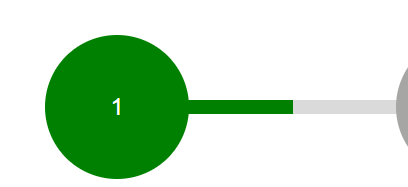
当宽度被更改为60 %时,绿色::after元素将更多地进入下一步。当您现在将40 %设置为第一个::after元素的窗口最小化时,它的宽度不会随新窗口大小而改变,并且会破坏应该避免的下一个元素。这是我的问题。
我试过很多次了,但我不明白。那么我该如何解决这个问题呢?
.progress-container {
    position: relative;
}

.progress-container::before {
    background-color: #dadada;
    width: 80%;
    height: 11px;
    position: absolute;
    left: 10%;
    right: 10%;
    top: 53px;
    content: '';
}

.progress-bar {
    list-style: none;
    margin: 0;
    padding: 0 !important;
    display: flex;
    display: -ms-flexbox;
    justify-content: space-between;
    width: 100%;
    color: #666666;
    font-size: 2em;
}

.progress-bar h3 {
    font-size: 18px;
    letter-spacing: 2px;
}

.progress-bar li {
    position: relative;
    display: inline-block;
    text-align: center;
    font-size: 0.6em;
    padding-right: 1em;
}

.progress-bar li::before {
    content: attr(data-step);
    display: block;
    background: #666666;
    color: #ffffff;
    width: 7em;
    height: 7em;
    text-align: center;
    margin: 0 auto 20px;
    line-height: 7em;
    border-radius: 100%;
    position: relative;
    z-index: 1000;
}

.progress-bar li::after {
    content: '';
    position: absolute;
    display: block;
    height: 11px;
    top: 53px;
    left: 50%;
    margin-left: 2.9em;
    z-index: 2;
}

.progress-bar li.progress-1.is-active::before,
.progress-bar li.progress-1.is-active::after {
    background: green;
}

.progress-bar li.progress-1::after {
    width: 40%;
}

.progress-bar li.progress-2.is-active::before,
.progress-bar li.progress-2.is-active::after {
    background: yellow;
}

.progress-bar li.progress-3.is-active::before,
.progress-bar li.progress-3.is-active::after {
    background: orange;
}

.progress-bar li.progress-4.is-active::before {
    background: red;
}

.progress__last {
    padding-right: 0;
}

.progress__last:after {
    display: none !important;
}<div class="progress-container">
<ol class="progress-bar">
<li class="progress-1 is-active" data-step="1">
<h3>1</h3>
</li>
<li class="progress-2 is-active" data-step="2">
<h3>2</h3>
</li>
<li class="progress-3 is-active" data-step="3">
<h3>3</h3>
</li>
<li class="progress-4 progress__last is-active" data-step="4">
<h3>4</h3>
</li>
</ol>
</div>
回答 1
Stack Overflow用户
回答已采纳
发布于 2018-12-25 15:19:57
我会像下面这样简化代码,并使用一些背景技巧。其思想是在主元素上使用背景颜色来定义百分比。
我还使用了一个CSS变量来简化它。
.progress-container {
    margin:5px;
}

.progress-bar {
    list-style: none;
    margin: 0;
    padding: 0;
    display: flex;
    justify-content: space-between;
    color: #666666;
    background:
      /*The gradient that will hide the main one based on the percentage*/
      linear-gradient(#dadada,#dadada) 100% 30px/ calc(100% - var(--p,100%)) 10px,
      /*the main gradient with 3 colors*/
      linear-gradient(to right,
        green  0             ,green  calc(100%/3),
        yellow calc(100%/3)  ,yellow calc(2*100%/3),
        orange calc(2*100%/3),orange calc(3*100%/3))
      0 30px/100% 10px;
    background-repeat:no-repeat;
    position:relative;
    z-index:0;
}
.progress-bar h3 {
    font-size: 18px;
    letter-spacing: 2px;
}
.progress-bar li {
    display: inline-block;
    text-align: center;
    font-size: 1em;
    padding-right: 1em;
}
.progress-bar li:first-child {
  margin-left:-5px;
}
.progress-bar li:last-child {
  padding-right:0;
  margin-right:-5px;
}

.progress-bar li::before {
    content: attr(data-step);
    display: block;
    background: #666666;
    color: #ffffff;
    width: 4em;
    height: 4em;
    text-align: center;
    line-height: 4em;
    border-radius: 50%;

}

.progress-bar li.progress-1.is-active::before {
  background:green;
}

.progress-bar li.progress-2.is-active::before {
  background: yellow;
}


.progress-bar li.progress-3.is-active::before {
  background: orange;
}


.progress-bar li.progress-4.is-active::before {
    background: red;
}<div class="progress-container">
<ol class="progress-bar" style="--p:20%">
<li class="progress-1 is-active" data-step="1" >
<h3>1</h3>
</li>
<li class="progress-2" data-step="2">
<h3>2</h3>
</li>
<li class="progress-3" data-step="3">
<h3>3</h3>
</li>
<li class="progress-4 progress__last" data-step="4">
<h3>4</h3>
</li>
</ol>
</div>
<div class="progress-container">
<ol class="progress-bar" style="--p:50%">
<li class="progress-1 is-active" data-step="1">
<h3>1</h3>
</li>
<li class="progress-2 is-active" data-step="2" >
<h3>2</h3>
</li>
<li class="progress-3" data-step="3">
<h3>3</h3>
</li>
<li class="progress-4 progress__last" data-step="4">
<h3>4</h3>
</li>
</ol>
</div>
<div class="progress-container">
<ol class="progress-bar" style="--p:75%">
<li class="progress-1 is-active" data-step="1">
<h3>1</h3>
</li>
<li class="progress-2 is-active" data-step="2" >
<h3>2</h3>
</li>
<li class="progress-3 is-active" data-step="3">
<h3>3</h3>
</li>
<li class="progress-4 progress__last" data-step="4">
<h3>4</h3>
</li>
</ol>
</div>
<div class="progress-container">
<ol class="progress-bar" style="--p:100%">
<li class="progress-1 is-active" data-step="1">
<h3>1</h3>
</li>
<li class="progress-2 is-active" data-step="2" >
<h3>2</h3>
</li>
<li class="progress-3 is-active" data-step="3" >
<h3>3</h3>
</li>
<li class="progress-4 progress__last is-active" data-step="4">
<h3>4</h3>
</li>
</ol>
</div>
页面原文内容由Stack Overflow提供。腾讯云小微IT领域专用引擎提供翻译支持
原文链接:
https://stackoverflow.com/questions/53923462
复制相关文章
相似问题
腾讯云开发者

Copyright © 2013 - 2026 Tencent Cloud. All Rights Reserved. 腾讯云 版权所有
深圳市腾讯计算机系统有限公司 ICP备案/许可证号:粤B2-20090059  粤公网安备44030502008569号
腾讯云计算(北京)有限责任公司 京ICP证150476号 | 京ICP备11018762号