
角跃迁
我已经创建了一个角度布局管理器,它可以接收组件,然后在视图中显示它,并在视图中添加动画,而每个组件都显示在视图中,并退出视图。
在一个时间的实例中,可以在视图中显示一个面板或两个面板的最大值。
这是同样的Stackblitz链接,问题是这个过渡不是平滑的,而且它看起来像应该的一样流线型,设计如下。
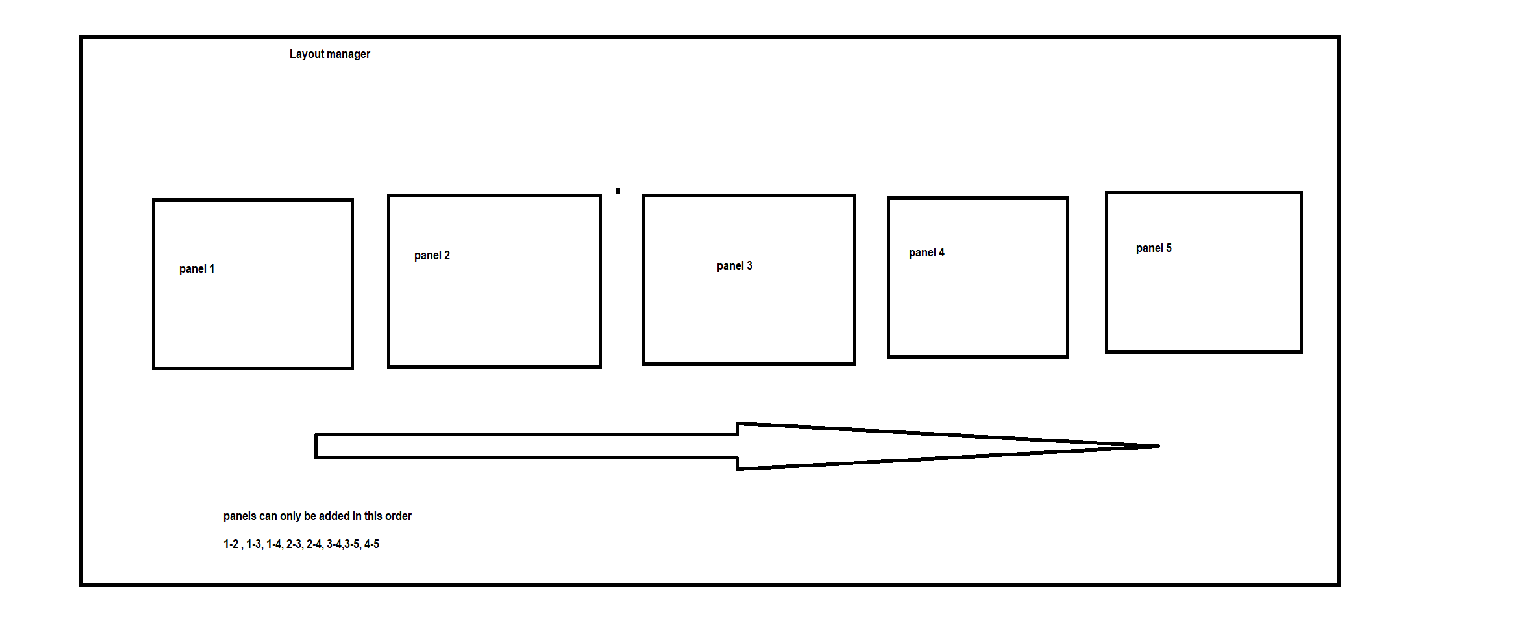
现在,我试图实现的是,当应用程序加载时,默认情况下显示为1-2,但是当我更改面板时,转换就会发生变化。
当2移出视野时,它应该向左滑,放轻松,3应该放进放轻松。然后,如果从1-3,我们走到2-3-1应该放松到右边,2应该滑入。
此外,面板可以采取一些百分比(33 %,66%或100% )的屏幕宽度。
我不知道我是否能正确地解释这件事,我已经坚持了几个星期了,如果有人能帮忙的话,谢谢。
多亏了萨达姆,他帮助创作了这幅动画,这正是我想要的动画-- https://imgur.com/a/qZ3vtDb,这只是为了视觉目的
回答 1
Stack Overflow用户
发布于 2019-01-09 23:28:03
我已经将您的PanelComponent示例中的StackBlitz更改为以提供的动画显示方式工作。
你只需要三个州。当组件最初位于右侧的外部时。从那里进入视野,这是第二种状态。在此之后,它移出视野,向左移至第三状态。一旦它从左边看不见,你就把它移回右边的初始状态,这样它就可以在需要的时候回来。
以下是更改后的面板组件的代码:
import { Component, ContentChild, QueryList,HostBinding,Input,ElementRef } from '@angular/core';
import {
  trigger,
  state,
  style,
  animate,
  transition
} from '@angular/animations';

@Component({
  selector: 'my-panel',
  templateUrl: './panel.component.html',
  styleUrls:['./panel.component.css'],
  animations: [
    trigger('transition', [
      state('right', style({
        transform: 'translateX(100%)',
        opacity: 0
      })),
      state('inview', style({
      })),
      state('left', style({
        transform: 'translateX(-100%)',
        opacity: 0
      })),
      transition('right => inview', [
        animate(`${PanelComponent.ANIMATION_DURATION}ms 0ms ease-out`,style({
          transform: 'translateX(0)',
          opacity: 1 }))
      ]),
      transition('inview => left', [
        animate(`${PanelComponent.ANIMATION_DURATION}ms 0ms ease-in`,style({
          transform: 'translateX(-100%)',
          opacity: 0 }))
      ])
    ])]
})
export class PanelComponent  {
  public static readonly ANIMATION_DURATION = 500;
  @Input() destroyOnHidden: boolean = false;
  @Input() id : string = null;
  @ContentChild('layout') contentChild : QueryList<ElementRef>;
  @HostBinding('style.width') componentWidth = null;
  @HostBinding('style.height') componentHeight = null;
  @HostBinding('style.overflow') componentOverflow = null;
  public state: string = null;

  public getId() {
    return this.id;
  }

  constructor() {
    this.state = 'right';
  }

  public setInViewStyle(width: string, height: string, overflow: string): void {
    this.componentWidth = width + '%';
    this.componentHeight = height + '%';
    this.componentOverflow = overflow;
    this.state = 'inview';
  }

  public setDefault(): void {
    this.state = 'right';
  }

  public moveOut(): void {
    this.state = 'left';
  }


  public transitionDoneHide(): void {
    if(this.state === 'right') {
      console.log('hiding transition done');
      this.componentWidth = '0' + '%';
      this.componentHeight = '0' + '%';
      this.componentOverflow = 'hidden';
    }
  }
}正如您所看到的,我已经将setStyle分为setInViewStyle和moveOut两种方法。setInViewStyle设置面板样式并将其移动到视图中。moveOut方法将面板移出视图的左侧。因此,我还更改了布局管理器方法panelTransformation。
以下是修改后的代码:
panelTransformation(transitions) {
    if (transitions) {
      let movement = null;
      let panelsToRemove = [];
      let panelsToAdd = [];
      if (this.previousPanels) {
        panelsToRemove = this.previousPanels.filter((panel) => transitions.panel.indexOf(panel) < 0);
        panelsToAdd = transitions.panel.filter((panel) => this.previousPanels.indexOf(panel) < 0);
      } else {
        panelsToAdd = transitions.panel
      }

      if (panelsToRemove.length > 0) {
        for (let panelToRemove of panelsToRemove) {
          this.idPanelMap.get(panelToRemove).moveOut();
        }
        // wait for fade out to finish then start fade in
        timer(PanelComponent.ANIMATION_DURATION + 100).subscribe(() => {
          for (let panelToAdd of panelsToAdd) {
            this.idPanelMap.get(panelToAdd).setInViewStyle(transitions.width[transitions.panel.indexOf(panelToAdd)], '100', 'initial');
          }
          for (let panelToRemove of panelsToRemove) {
            this.idPanelMap.get(panelToRemove).setDefault();
          }
        });
      } else { // first time so just fade in
        for (let panelToAdd of panelsToAdd) {
          this.idPanelMap.get(panelToAdd).setInViewStyle(transitions.width[transitions.panel.indexOf(panelToAdd)], '100', 'initial');
        }
      }

      this.previousPanels = transitions.panel;
    }
}正如您所看到的,我已经完全改变了逻辑,所以我首先移出必须移除的面板,等待动画完成,然后在新面板中移动。这里有一个指向我的StackBlitz样品的链接,它实现了所有这些,所以您也可以看到它的工作原理。
按照注释中的要求,我还提供了另一个向双向移动的示例。这使得事情变得更复杂。我不得不为另一个方向的移动再增加一个过渡。并增加了在moveOut方法中设置方向的可能性。在我看来,它看起来不太好,因为它可以有一些闪烁。新的面板组件代码:
import { Component, ContentChild, QueryList,HostBinding,Input,ElementRef } from '@angular/core';
import {
  trigger,
  state,
  style,
  animate,
  transition
} from '@angular/animations';
import { timer } from 'rxjs';

@Component({
  selector: 'my-panel',
  templateUrl: './panel.component.html',
  styleUrls:['./panel.component.css'],
  animations: [
    trigger('transition', [
      state('right', style({
        transform: 'translateX(100%)',
        opacity: 0
      })),
      state('inview', style({
      })),
      state('left', style({
        transform: 'translateX(-100%)',
        opacity: 0
      })),
      transition('right => inview', [
        animate(`${PanelComponent.ANIMATION_DURATION}ms 0ms ease-out`,style({
          transform: 'translateX(0)',
          opacity: 1 }))
      ]),
      transition('inview => left', [
        animate(`${PanelComponent.ANIMATION_DURATION}ms 0ms ease-in`,style({
          transform: 'translateX(-100%)',
          opacity: 0 }))
      ]),
      transition('inview => right', [
        animate(`${PanelComponent.ANIMATION_DURATION}ms 0ms ease-in`,style(         {
          transform: 'translateX(100%)',
          opacity: 0
       }))
      ]),
      transition('left => inview', [
        animate(`${PanelComponent.ANIMATION_DURATION}ms 0ms ease-out`,style({
          transform: 'translateX(0)',
          opacity: 1 }))
      ])
    ])]
})
export class PanelComponent  {
  public static readonly ANIMATION_DURATION = 500;
  public static readonly ANIMATION_DELAY = 100;
  @Input() destroyOnHidden: boolean = false;
  @Input() id : string = null;
  @ContentChild('layout') contentChild : QueryList<ElementRef>;
  @HostBinding('style.width') componentWidth = null;
  @HostBinding('style.height') componentHeight = null;
  @HostBinding('style.overflow') componentOverflow = null;
  public state: string = null;
  private lastDirection: 'left' | 'right';

  public getId() {
    return this.id;
  }

  constructor() {
    this.state = 'right';
  }

  public setInViewStyle(width: string, height: string, overflow: string): void {
    this.componentWidth = width + '%';
    this.componentHeight = height + '%';
    this.componentOverflow = overflow;
    this.state = 'inview';
  }

  public setDefault(): void {
    this.state = 'right';
  }

  public moveOut(direction: 'left' | 'right'): void {
    this.lastDirection = direction;
    this.state = direction;
  }


  public transitionDoneHide(): void {
    if(this.state === this.lastDirection) {
      if (this.lastDirection === 'right') {
        timer(PanelComponent.ANIMATION_DELAY).subscribe(() => this.hide());
      } else {
        this.hide();
      }
      console.log('hiding transition done');

    }
  }

  private hide() {
    this.componentWidth = '0' + '%';
    this.componentHeight = '0' + '%';
    this.componentOverflow = 'hidden';
  }
}在panelTransformation方法中,如果是第一个面板,我添加了设置向右移动的方向的逻辑。这是更新的代码:
panelTransformation(transitions) {
  if (transitions) {
    let movement = null;
    let panelsToRemove = [];
    let panelsToAdd = [];
    if (this.previousPanels) {
      panelsToRemove = this.previousPanels.filter((panel) => transitions.panel.indexOf(panel) < 0);
      panelsToAdd = transitions.panel.filter((panel) => this.previousPanels.indexOf(panel) < 0);
    } else {
      panelsToAdd = transitions.panel
    }

    if (panelsToRemove.length > 0) {
      for (let panelToRemove of panelsToRemove) {
        let direction: 'left' | 'right' = 'left';
        // if it is the first panel we move out right
        if (this.previousPanels.indexOf(panelToRemove) === 0) {
          direction = 'right';
        }
        this.idPanelMap.get(panelToRemove).moveOut(direction);
      }
      // wait for fade out to finish then start fade in
      timer(PanelComponent.ANIMATION_DURATION + PanelComponent.ANIMATION_DELAY).subscribe(() => {
        for (let panelToAdd of panelsToAdd) {
          this.idPanelMap.get(panelToAdd).setInViewStyle(transitions.width[transitions.panel.indexOf(panelToAdd)], '100', 'initial');
        }
        for (let panelToRemove of panelsToRemove) {
          this.idPanelMap.get(panelToRemove).setDefault();
        }
      });
    } else { // first time so just fade in
      for (let panelToAdd of panelsToAdd) {
        this.idPanelMap.get(panelToAdd).setInViewStyle(transitions.width[transitions.panel.indexOf(panelToAdd)], '100', 'initial');
      }
    }

    this.previousPanels = transitions.panel;
  }
}以及用于此实现的StackBlitz样品。
https://stackoverflow.com/questions/53910367
复制相似问题
腾讯云开发者

Copyright © 2013 - 2026 Tencent Cloud. All Rights Reserved. 腾讯云 版权所有
深圳市腾讯计算机系统有限公司 ICP备案/许可证号:粤B2-20090059  粤公网安备44030502008569号
腾讯云计算(北京)有限责任公司 京ICP证150476号 | 京ICP备11018762号