
传感器的本机模块不可用。本机链接运行成功吗?
我在这里遵循了React Native教程的第一步:
https://facebook.github.io/react-native/docs/getting-started.html
然后我想从设备传感器上读取信息。
为此,我还遵循了本教程:
https://medium.com/react-native-training/using-sensors-in-react-native-b194d0ad9167
最后得到以下代码(只需从那里复制/粘贴):
// Reference:
// https://medium.com/react-native-training/using-sensors-in-react-native-b194d0ad9167
// https://react-native-sensors.github.io

import React, { Component } from 'react';
import {
  StyleSheet,
  Text,
  View
} from 'react-native';
import { Accelerometer } from "react-native-sensors";

const Value = ({name, value}) => (
  <View style={styles.valueContainer}>
    <Text style={styles.valueName}>{name}:</Text>
    <Text style={styles.valueValue}>{new String(value).substr(0, 8)}</Text>
  </View>
)

export default class App extends Component {
  constructor(props) {
    super(props);

    new Accelerometer({
      updateInterval: 400 // defaults to 100ms
    })
      .then(observable => {
        observable.subscribe(({x,y,z}) => this.setState({x,y,z}));
      })
      .catch(error => {
        console.log("The sensor is not available");
      });

    this.state = {x: 0, y: 0, z: 0};
  }

  render() {
    return (
      <View style={styles.container}>
        <Text style={styles.headline}>
          Accelerometer values
        </Text>
        <Value name="x" value={this.state.x} />
        <Value name="y" value={this.state.y} />
        <Value name="z" value={this.state.z} />
      </View>
    );
  }
}

const styles = StyleSheet.create({
  container: {
    flex: 1,
    justifyContent: 'center',
    alignItems: 'center',
    backgroundColor: '#F5FCFF',
  },
  headline: {
    fontSize: 30,
    textAlign: 'center',
    margin: 10,
  },
  valueContainer: {
    flexDirection: 'row',
    flexWrap: 'wrap',
  },
  valueValue: {
    width: 200,
    fontSize: 20
  },
  valueName: {
    width: 50,
    fontSize: 20,
    fontWeight: 'bold'
  },
  instructions: {
    textAlign: 'center',
    color: '#333333',
    marginBottom: 5,
  },
});
下面是您可以立即下载并试用的完整存储库:
$ git clone https://github.com/napolev/react-native-app
$ cd react-native-app
$ npm i
$ expo start我的问题是,在我做了:$ expo start之后,我得到了以下错误:
Native modules for sensors not available. Did react-native link run successfully?正如您在下面的图片中所看到的:
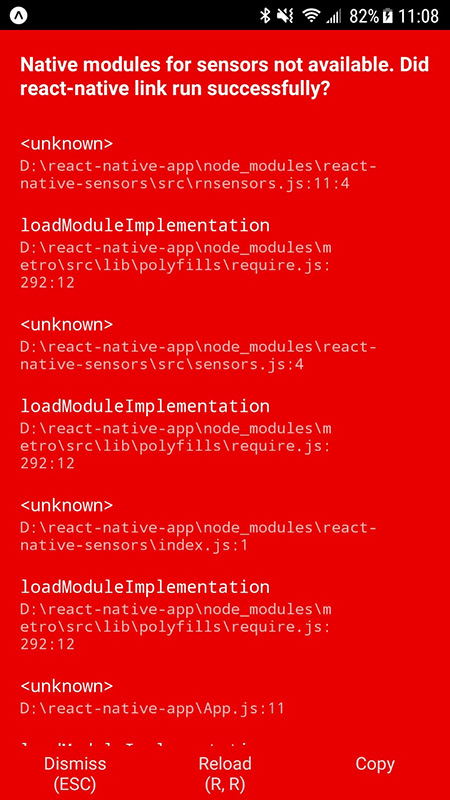
知道我该怎么做吗?
谢谢!
回答 2
Stack Overflow用户
发布于 2018-12-23 17:38:05
这可能是因为您使用的是博览,而react-native-sensors需要React本地的完整版本。
要使用react-native-sensors,您可能需要弹出应用程序,然后安装依赖项。如果你弹出你的应用程序,它将要求你在你的开发机器上安装Xcode (用于iOS)和Android (用于安卓)。
要了解更多关于世博会和React之间的区别的细节,请查看以下内容:世博和本地人的反应有什么区别?
然而,世博会确实可以访问一些传感器信息,您可以在这里阅读更多有关使用加速度计的https://docs.expo.io/versions/latest/sdk/accelerometer信息。
Stack Overflow用户
发布于 2020-05-09 16:17:23
我也有过类似的问题,解决这个问题的是使用npx。
npx反应-本机链接反应-本机-传感器;
https://blog.npmjs.org/post/162869356040/introducing-npx-an-npm-package-runner
然后,我清除了应用程序的数据,并从我的手机上删除应用程序,然后重建!
https://stackoverflow.com/questions/53905714
复制相似问题
腾讯云开发者

Copyright © 2013 - 2026 Tencent Cloud. All Rights Reserved. 腾讯云 版权所有
深圳市腾讯计算机系统有限公司 ICP备案/许可证号:粤B2-20090059  粤公网安备44030502008569号
腾讯云计算(北京)有限责任公司 京ICP证150476号 | 京ICP备11018762号