
Boost signals2未编译
当我在VS中添加标题#include <boost/signals2.hpp>时
我得到了跟踪错误,即使它能够找到标题。
1>signals.cpp
1>c:\apps\mvs15\vc\tools\msvc\14.10.25017\include\memory(53): error C4996: 'std::uninitialized_copy::_Unchecked_iterators::_Deprecate': Call to 'std::uninitialized_copy' with parameters that may be unsafe - this call relies on the caller to check that the passed values are correct. To disable this warning, use -D_SCL_SECURE_NO_WARNINGS. See documentation on how to use Visual C++ 'Checked Iterators'
1>c:\apps\mvs15\vc\tools\msvc\14.10.25017\include\memory(53): note: see declaration of 'std::uninitialized_copy::_Unchecked_iterators::_Deprecate'
1>c:\boost_1_69_0\boost\signals2\detail\auto_buffer.hpp(191): note: see reference to function template instantiation '_FwdIt *std::uninitialized_copy<I,boost::shared_ptr<void>*>(_InIt,_InIt,_FwdIt)' being compiled我解决不了这个问题。但是我的Boost.Asio库头工作正常,代码是可编译的。所以我认为boost安装没有问题。
Edit1:我从助推网站下载并安装了windows预构建二进制文件。我在用VS 2017。我在属性中将路径添加到库中,标题如下。
配置属性->链接->一般->附加库目录C:\boost_1_69_0\lib64 64-msvc-14.1; 配置属性->包括添加了附加文件夹C:\boost_1_69_0的目录;
Edit2:通过在
配置属性->C/C++->命令行。
回答 1
Stack Overflow用户
发布于 2018-12-21 09:30:59
我假设您正在windows上编译,使用VS 2017。
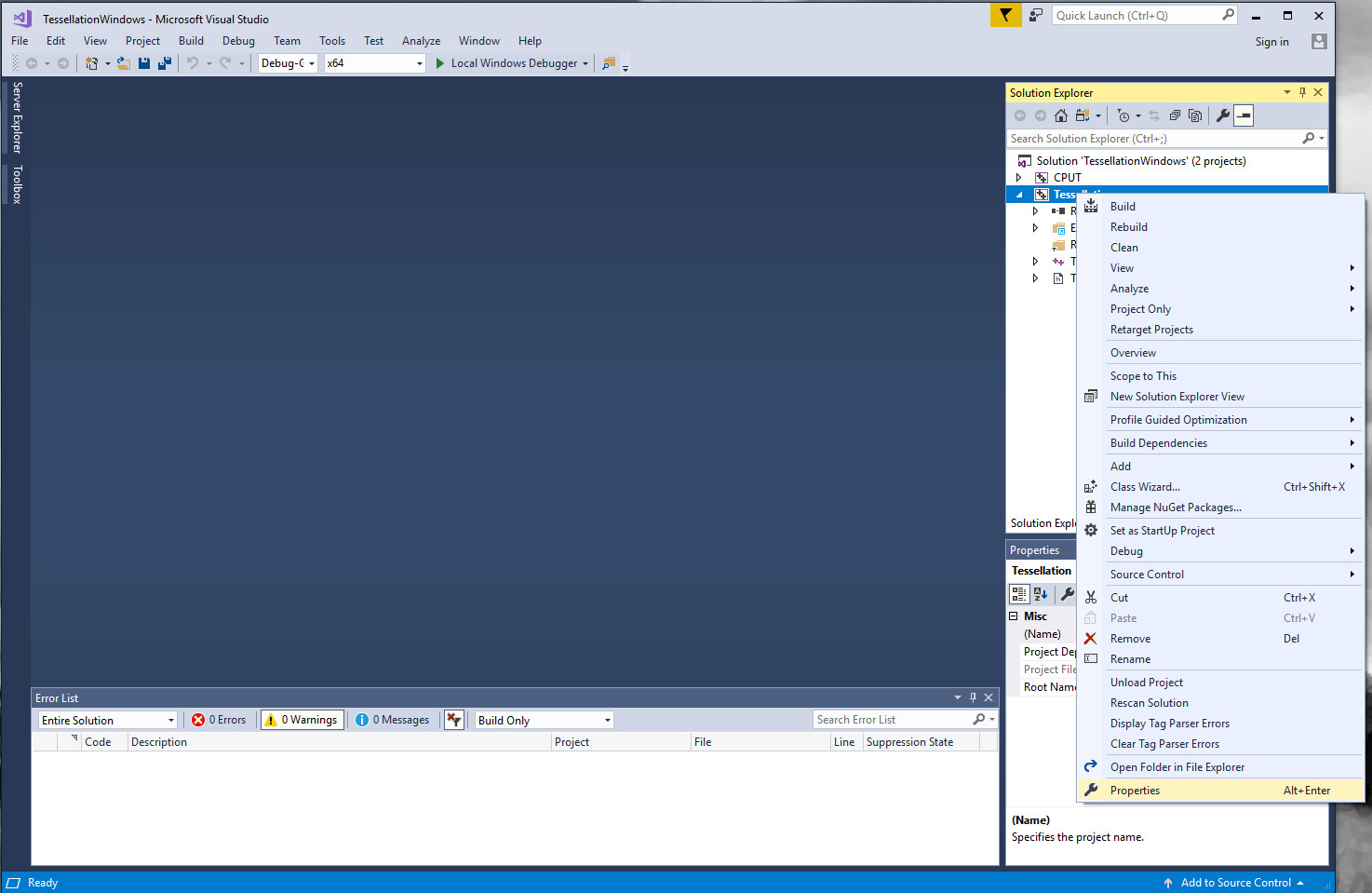
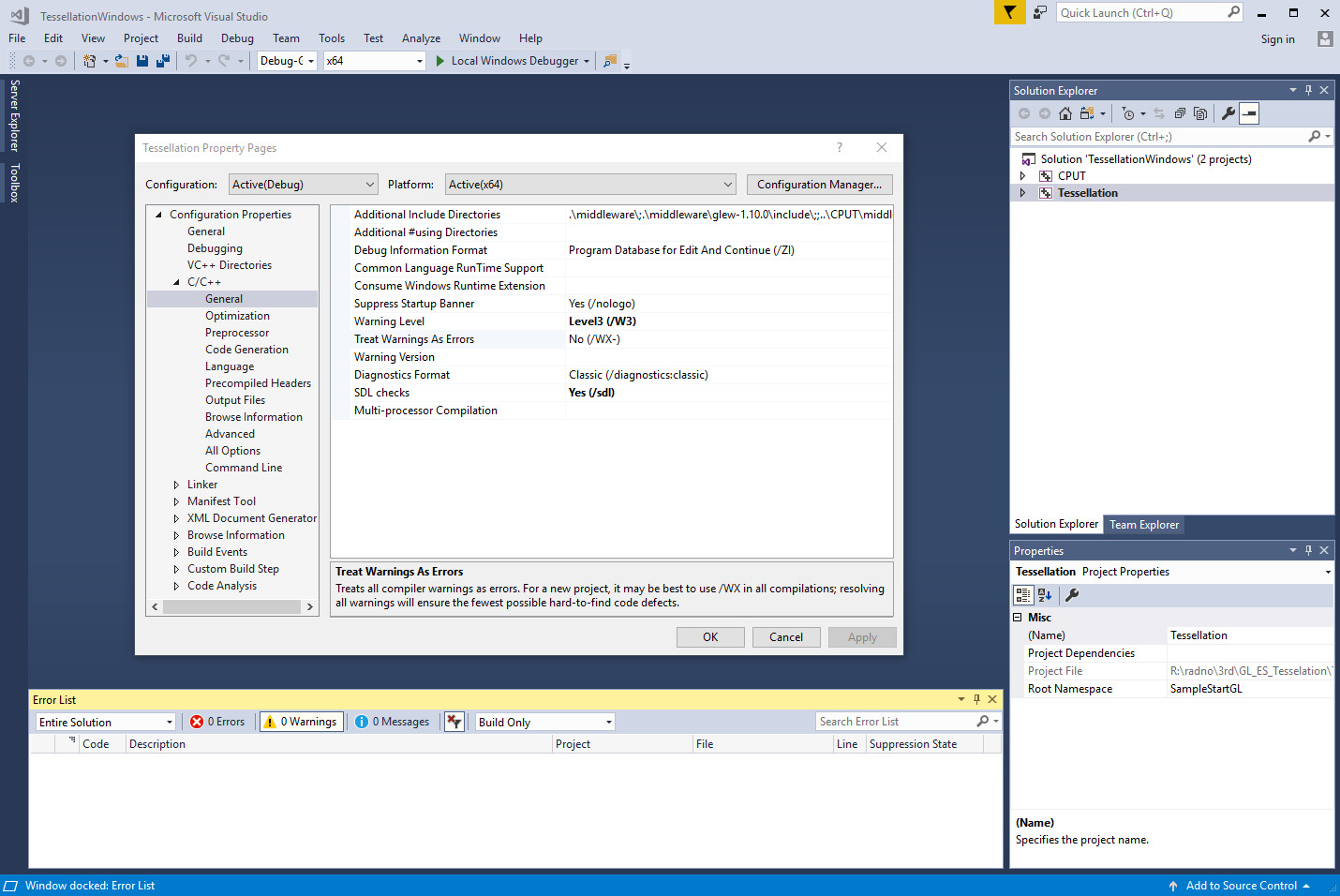
C4996实际上是一个警告(编译器警告C4996),而不是错误,因此您可能已经激活了将所有警告视为错误的选项。要检查,右键单击目标属性,然后展开"C/C++",然后转到General properties,如以下快照所示:
如果我的假设是错误的,添加必要的信息(编译器/os/您如何获得boost,它是否正确编译,.),这样我们可以找到更好的答案。
编辑:既然你说你没有改变编译选项,你应该搜索源代码中的某个地方的#语用警告(错误:.)。
https://stackoverflow.com/questions/53881649
复制相似问题
腾讯云开发者

Copyright © 2013 - 2026 Tencent Cloud. All Rights Reserved. 腾讯云 版权所有
深圳市腾讯计算机系统有限公司 ICP备案/许可证号:粤B2-20090059  粤公网安备44030502008569号
腾讯云计算(北京)有限责任公司 京ICP证150476号 | 京ICP备11018762号