
从Google+登录迁移到Google登录
我今天刚收到一封电子邮件,说Google+登录API将在2019年3月被关闭。有没有一种方法可以使用现有的PHP库迁移到更新的Google登录?所有迁移文档似乎都是为JavaScript编写的。
谢谢
回答 2
Stack Overflow用户
发布于 2019-01-04 05:24:54
我还试图用PHP完成这个迁移,并找到了一篇相同的文章,但我不能百分之百肯定。我将描述下面的场景,请确认是否有帮助:
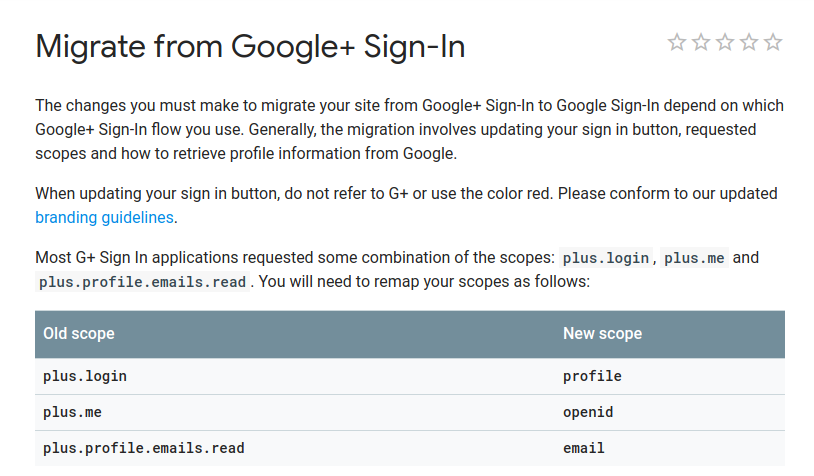
参考链接:
链接1- sign-in
链接2- https://developers.google.com/identity/protocols/googlescopes#plusv1
使用Google2.0访问Google,Google使用OAuth 2.0协议进行身份验证和授权。谷歌支持常见的OAuth 2.0场景,比如用于web服务器、安装和客户端应用程序的场景。
因此,根据我的发现,如果我们对google+使用oauth2自定义,我们只需更改API调用中的范围就可以访问google+和google+ api。
For Google Sign In, please see **Link 1** above.
For Google+ API, please see **Link 2** above.
我还为相同的内容创建了一个测试脚本,请参见下面的内容:
user_authentication.php
<?php

session_start();

//Google API PHP Library includes
require_once 'dbcontroller.php';
require_once 'vendor/autoload.php';

// Fill CLIENT ID, CLIENT SECRET ID, REDIRECT URI from Google Developer Console
$client_id = 'XXXXXX';
$client_secret = 'XXXXXX';
$redirect_uri = 'http://localhost/googleplus/user_authentication.php';
$simple_api_key = 'XXXXXXXX';

//Create Client Request to access Google API
$client = new Google_Client();
$client->setApplicationName("PHP Google OAuth Login Example");
$client->setClientId($client_id);
$client->setClientSecret($client_secret);
$client->setRedirectUri($redirect_uri);
$client->setDeveloperKey($simple_api_key);
$client->addScope(array('openid', 'email', 'profile'));
//$client->addScope("https://www.googleapis.com/auth/contacts.readonly");
//$client->addScope(array('https://www.googleapis.com/auth/plus.profile.emails.read', 'https://www.googleapis.com/auth/plus.login'));

//Send Client Request
$objOAuthService = new Google_Service_Oauth2($client);

//Logout
if (isset($_REQUEST['logout']))
{
    unset($_SESSION['access_token']);
    $client->revokeToken();
    header('Location: ' . filter_var($redirect_uri, FILTER_SANITIZE_URL)); //redirect user back to page
}

//Authenticate code from Google OAuth Flow
//Add Access Token to Session
if (isset($_GET['code']))
{
    $client->authenticate($_GET['code']);
    $_SESSION['access_token'] = $client->getAccessToken();
    header('Location: ' . filter_var($redirect_uri, FILTER_SANITIZE_URL));
}

//Set Access Token to make Request
if (isset($_SESSION['access_token']) && $_SESSION['access_token'])
{
    $client->setAccessToken($_SESSION['access_token']);
}

//Get User Data from Google Plus
//If New, Insert to Database
if ($client->getAccessToken())
{
    $userData = $objOAuthService->userinfo->get();
    if (!empty($userData))
    {
        $objDBController = new DBController();
        $conn = ($objDBController->_conn);

        $existing_member = $objDBController->getUserByOAuthId($conn, $userData->id);
        if (empty($existing_member))
        {
            $objDBController->insertOAuthUser($conn, $userData);
        }
    }
    $_SESSION['access_token'] = $client->getAccessToken();
}
else
{
    $authUrl = $client->createAuthUrl();
}
require_once("viewlogin.php")
?>备注:请替换您的google客户端ID、客户端机密和API密钥
viewlogin.php
<html>
    <head>
        <style>
            .box {font-family: Arial, sans-serif;background-color: #F1F1F1;border:0;width:340px;webkit-box-shadow: 0px 1px 1px rgba(0, 0, 0, 0.3);box-shadow: 0px 1px 1px rgba(0, 0, 0, 0.3);margin: 0 auto 25px;text-align:center;padding:10px 0px;}
            .box img{padding: 10px 0px;}
            .box a{color: #427fed;cursor: pointer;text-decoration: none;}
            .heading {text-align:center;padding:10px;font-family: 'Open Sans', arial;color: #555;font-size: 18px;font-weight: 400;}
            .circle-image{width:100px;height:100px;-webkit-border-radius: 50%;border-radius: 50%;}
            .welcome{font-size: 16px;font-weight: bold;text-align: center;margin: 10px 0 0;min-height: 1em;}
            .oauthemail{font-size: 14px;}
            .logout{font-size: 13px;text-align: right;padding: 5px;margin: 20px 5px 0px 5px;border-top: #CCCCCC 1px solid;}
            .logout a{color:#8E009C;}
        </style>
    </head>
    <body>
        <div class="heading">PHP Google OAuth 2.0 Login</div>
        <div class="box">
            <div>
                <!-- Show Login if the OAuth Request URL is set -->
                <?php if (isset($authUrl)): ?>
                    <img src="images/user.png" width="100px" size="100px" /><br/>
                    <a class='login' href='<?php echo $authUrl; ?>'>Sign In with Google</a>
                    <!-- Show User Profile otherwise-->
                <?php else: ?>
                    <img class="circle-image" src="<?php echo $userData["picture"]; ?>" width="100px" size="100px" /><br/>
                    <p class="welcome">Welcome <a href="<?php echo $userData["link"]; ?>" /><?php echo $userData["name"]; ?></a>.</p>
                    <p class="oauthemail"><?php echo $userData["email"]; ?></p>
                    <div class='logout'><a href='?logout'>Logout</a></div>
                <?php endif ?>
            </div>
        </div>
    </body>
</html>
dbcontroller.php
<?php

class DBController
{

    private $host = "localhost";
    private $user = "root";
    private $password = "root";
    private $database = "test";
    public $_conn = '';

    function __construct()
    {
        $conn = $this->connectDB();
        if (!empty($conn))
        {
            $this->_conn = $conn;
            $this->selectDB($conn);
        }
    }

    function __destruct()
    {
        mysqli_close($this->_conn);
    }

    function connectDB()
    {
        $conn = mysqli_connect($this->host, $this->user, $this->password, $this->database);
        return $conn;
    }

    function selectDB($conn)
    {
        mysqli_select_db($conn, $this->database);
    }

    function getUserByOAuthId($conn, $oauth_user_id)
    {
        $query = "SELECT * FROM members WHERE oauth_user_id = '" . $oauth_user_id . "'";
        $result = mysqli_query($conn, $query);
        if (!empty($result))
        {
            $existing_member = mysqli_fetch_assoc($result);
            return $existing_member;
        }
    }

    function insertOAuthUser($conn, $userData)
    {
        $query = "INSERT INTO members (member_name, member_email, oauth_user_id, oauth_user_page, oauth_user_photo) VALUES ('" . $userData->name . "','" . $userData->email . "','" . $userData->id . "','" . $userData->link . "','" . $userData->picture . "')";
        $result = mysqli_query($conn, $query);
    }

}

?>
composer.json
{
    "name": "google/apiclient",
    "type": "library",
    "description": "Client library for Google APIs",
    "keywords": ["google"],
    "homepage": "http://developers.google.com/api-client-library/php",
    "license": "Apache-2.0",
    "require": {
        "php": ">=5.4",
        "google/auth": "^1.0",
        "google/apiclient-services": "~0.13",
        "firebase/php-jwt": "~2.0||~3.0||~4.0||~5.0",
        "monolog/monolog": "^1.17",
        "phpseclib/phpseclib": "~0.3.10||~2.0",
        "guzzlehttp/guzzle": "~5.3.1||~6.0",
        "guzzlehttp/psr7": "^1.2"
    },
    "require-dev": {
        "phpunit/phpunit": "~4.8.36",
        "squizlabs/php_codesniffer": "~2.3",
        "symfony/dom-crawler": "~2.1",
        "symfony/css-selector": "~2.1",
        "cache/filesystem-adapter": "^0.3.2"
    },
    "suggest": {
        "cache/filesystem-adapter": "For caching certs and tokens (using Google_Client::setCache)"
    },
    "autoload": {
        "psr-0": {
            "Google_": "src/"
        },
        "classmap": [
            "src/Google/Service/"
        ]
    },
    "extra": {
        "branch-alias": {
            "dev-master": "2.x-dev"
        }
    }
}您可以从github:https://github.com/googleapis/google-api-php-client下载google客户端库。 并且可以使用composer.json获取供应商的信息。
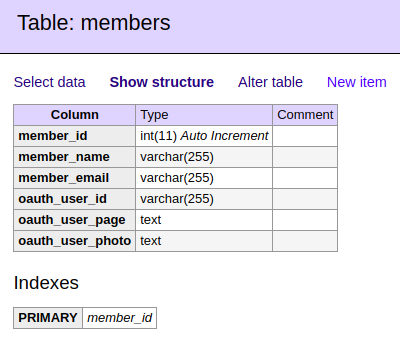
对于您的表“成员”,表结构将如下图所示:
Stack Overflow用户
发布于 2019-06-26 10:26:55
尝试使用以下方法从Google+登录迁移到Google登录:
步骤1:标识Google端点并找到等效的Google端点。
步骤2:通常使用的Google+ API端点是'/me‘端点,它返回用户信息:https://www.googleapis.com//plus/v1/people/me
步骤3:将旧的Google端点替换为新的Google端点。
您可以使用以下链接测试所有可以传递以检索用户其他各种信息的字段:https://developers.google.com/people/api/rest/v1/people/get
您可以参考下面的代码:
index.php
<?php
require_once('settings.php');
?>
<html>
    <head>
        <style type="text/css">

            #login-button {
                display: block;
                text-align: center;
                margin: 50px 0;
            }

        </style>
    </head>

    <body>

        <a id="login-button" href="<?php echo 'https://accounts.google.com/o/oauth2/auth?scope=' . urlencode('https://www.googleapis.com/auth/userinfo.profile https://www.googleapis.com/auth/userinfo.email') . '&redirect_uri=' . urlencode(CLIENT_REDIRECT_URL) . '&response_type=code&client_id=' . CLIENT_ID . '&access_type=online' ?>">
            Login with Google
        </a>
    </body>
</html>
settings.php
<?php

$clientId = 'xxxxxxxxxxxxxx'; //Google client ID
$clientSecret = 'xxxxxxxxxxxxxxx'; //Google client secret
$redirectURL = 'http://localhost/login-with-google/gauth.php'; //Callback URL

/* Google App Client Id */
define('CLIENT_ID', $clientId);

/* Google App Client Secret */
define('CLIENT_SECRET', $clientSecret);

/* Google App Redirect Url */
define('CLIENT_REDIRECT_URL', $redirectURL);
?>
google-login-api.php
<?php

class GoogleLoginApi
{

    public function GetAccessToken($client_id, $redirect_uri, $client_secret, $code)
    {
        $url = 'https://www.googleapis.com/oauth2/v4/token';
        $curlPost = 'client_id=' . $client_id . '&redirect_uri=' . $redirect_uri . '&client_secret=' . $client_secret . '&code=' . $code . '&grant_type=authorization_code';
        $ch = curl_init();
        curl_setopt($ch, CURLOPT_URL, $url);
        curl_setopt($ch, CURLOPT_RETURNTRANSFER, 1);
        curl_setopt($ch, CURLOPT_POST, 1);
        curl_setopt($ch, CURLOPT_SSL_VERIFYPEER, FALSE);
        curl_setopt($ch, CURLOPT_POSTFIELDS, $curlPost);
        $data = json_decode(curl_exec($ch), true);
        $http_code = curl_getinfo($ch, CURLINFO_HTTP_CODE);
        if($http_code != 200)
            throw new Exception('Error : Failed to receieve access token');

        return $data;
    }

    public function GetUserProfileInfo($access_token)
    {
        $url = 'https://people.googleapis.com/v1/people/me?personFields=names,emailAddresses,photos,genders';
        $ch = curl_init();
        curl_setopt($ch, CURLOPT_URL, $url);
        curl_setopt($ch, CURLOPT_RETURNTRANSFER, 1);
        curl_setopt($ch, CURLOPT_SSL_VERIFYPEER, FALSE);
        curl_setopt($ch, CURLOPT_HTTPHEADER, array('Authorization: Bearer ' . $access_token));
        $data = json_decode(curl_exec($ch), true);
        $http_code = curl_getinfo($ch, CURLINFO_HTTP_CODE);
        if($http_code != 200)
            throw new Exception('Error : Failed to get user information');

        return $data;
    }

}

?>
gauth.php
<?php
require_once('settings.php');
require_once('google-login-api.php');

// Google passes a parameter 'code' in the Redirect Url
if(isset($_GET['code'])) {
    try {
        $gapi = new GoogleLoginApi();
        // Get the access token
        $data = $gapi->GetAccessToken(CLIENT_ID, CLIENT_REDIRECT_URL, CLIENT_SECRET, $_GET['code']);
        // Get user information
        $user_info = $gapi->GetUserProfileInfo($data['access_token']);
    } catch (Exception $e) {
        echo $e->getMessage();
        exit();
    }
}
?>
<head>
    <style type="text/css">
        #information-container {
            width: 400px;
            margin: 50px auto;
            padding: 20px;
            border: 1px solid #cccccc;
        }

        .information {
            margin: 0 0 30px 0;
        }

        .information label {
            display: inline-block;
            vertical-align: middle;
            width: 150px;
            font-weight: 700;
        }

        .information span {
            display: inline-block;
            vertical-align: middle;
        }

        .information img {
            display: inline-block;
            vertical-align: middle;
            width: 100px;
        }

    </style>
</head>

<body>
    <div id="information-container">
        <div class="information">
            <label>Name</label><span><?php echo $user_info['names'][0]['displayName'] ?></span>
        </div>
        <div class="information">
            <label>Email</label><span><?php echo $user_info['emailAddresses'][0]['value'] ?></span>
        </div>
        <div class="information">
            <label>Picture</label><img src="<?php echo $user_info['photos'][0]['url'] ?>" />
        </div>
    </div>

</body>
</html>
反馈被赞赏了。(谢谢:)
https://stackoverflow.com/questions/53877392
复制相似问题
腾讯云开发者

Copyright © 2013 - 2026 Tencent Cloud. All Rights Reserved. 腾讯云 版权所有
深圳市腾讯计算机系统有限公司 ICP备案/许可证号:粤B2-20090059  粤公网安备44030502008569号
腾讯云计算(北京)有限责任公司 京ICP证150476号 | 京ICP备11018762号