
如何在这段代码中形成对角线?
如何在这段代码中形成对角线?
提问于 2018-12-19 13:57:50
最终产品应该如下所示
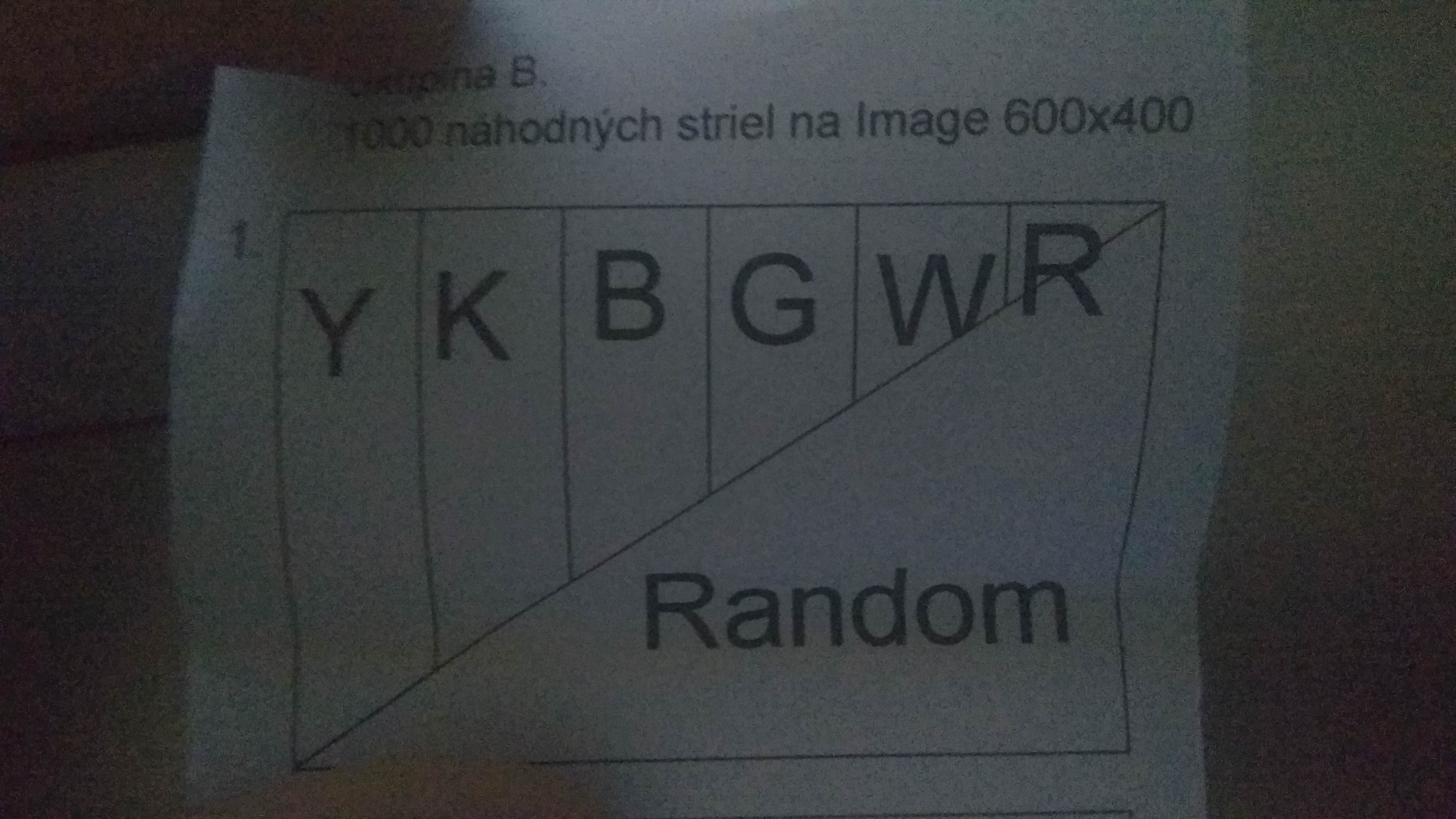
如何使三角形在图像的下半部分?到目前为止我只有6条条纹。我用的是平移器和随机的。
import tkinter
import random
import math
import time

canvas = tkinter.Canvas(width=600 ,height=400)
canvas.pack()
previerka = tkinter.Tk()
frame = tkinter.Frame(previerka)
frame.pack()

def shooting1():
    for a in range(8000):
        y = 0
        x = 0
        xr = random.randint(0,600)
        yp = random.randint(0,600)
        if yp <= 600:
            canvas.create_oval(x+xr,y+yp,x+xr,y+yp, outline="yellow", width=2)
        if 100 <= xr <= 300:
            canvas.create_oval(x+xr,y+yp,x+xr,y+yp, outline="black", width=2)
        if 200 <= xr <= 400:
            canvas.create_oval(x+xr,y+yp,x+xr,y+yp, outline="blue", width=2)
        if 300 <= xr <= 500:
            canvas.create_oval(x+xr,y+yp,x+xr,y+yp, outline="green", width=2)
        if 400 <= xr <= 600:
            canvas.create_oval(x+xr,y+yp,x+xr,y+yp, outline="white", width=2)
        if 500 <= xr <= 700:
            canvas.create_oval(x+xr,y+yp,x+xr,y+yp, outline="red", width=2)
button1=tkinter.Button(frame, text="shooting", fg="black", bg="white", command=shooting1)
button1.pack()回答 1
Stack Overflow用户
回答已采纳
发布于 2018-12-19 14:28:49
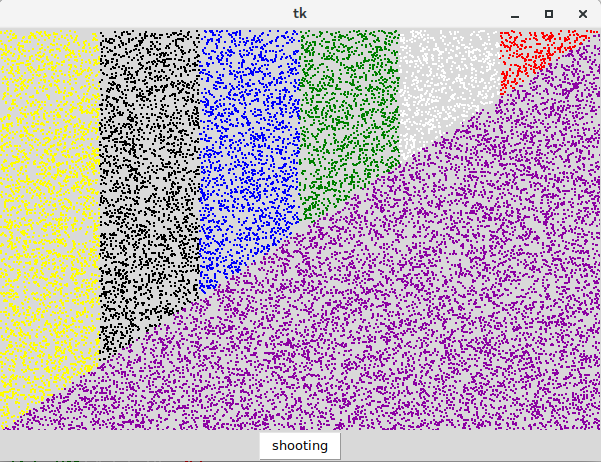
我不知道你是否意识到这一点,但你是重叠所有的颜色点(尝试改变任何椭圆形的宽度为3或4,你就会意识到这一点)。您需要根据这一行y = 2x/3计算x和y值是否兼容(对于计算机y轴是倒的,所以是y = 400 - 2x/3)。只有到那时你才会在画布上画画。下面是一个例子。
import tkinter
import random

previerka = tkinter.Tk()
canvas = tkinter.Canvas(previerka, width=600, height=400)
canvas.pack()
frame = tkinter.Frame(previerka)
frame.pack()

def shooting1():
    y = 0
    x = 0
    i = 0
    r  =("%02x"%random.randint(0,255))
    g = ("%02x"%random.randint(0,255))
    b = ("%02x"%random.randint(0,255))
    rand_color="#"+r+g+b

    for _ in range(20000):
        xr = random.randint(0,600)
        yp = random.randint(0,400)
        if yp<=400-2*xr//3:
            if xr < 100:
                canvas.create_oval(x+xr,y+yp,x+xr,y+yp, outline="yellow", width=2)
            elif xr < 200:
                canvas.create_oval(x+xr,y+yp,x+xr,y+yp, outline="black", width=2)
            elif xr < 300:
                canvas.create_oval(x+xr,y+yp,x+xr,y+yp, outline="blue", width=2)
            elif xr < 400:
                canvas.create_oval(x+xr,y+yp,x+xr,y+yp, outline="green", width=2)
            elif xr < 500:
                canvas.create_oval(x+xr,y+yp,x+xr,y+yp, outline="white", width=2)
            elif xr <= 600:
                canvas.create_oval(x+xr,y+yp,x+xr,y+yp, outline="red", width=2)
        else:
            canvas.create_oval(x+xr,y+yp,x+xr,y+yp, outline=rand_color, width=2)

button1=tkinter.Button(frame, text="shooting", fg="black", bg="white", command=shooting1)
button1.pack()
previerka.mainloop()
页面原文内容由Stack Overflow提供。腾讯云小微IT领域专用引擎提供翻译支持
原文链接:
https://stackoverflow.com/questions/53852790
复制相关文章
相似问题
腾讯云开发者

Copyright © 2013 - 2026 Tencent Cloud. All Rights Reserved. 腾讯云 版权所有
深圳市腾讯计算机系统有限公司 ICP备案/许可证号:粤B2-20090059  粤公网安备44030502008569号
腾讯云计算(北京)有限责任公司 京ICP证150476号 | 京ICP备11018762号