
如何在Windows 10操作系统上使用Bazel调试c++代码
最近我开始使用Bazel,我在调试应用程序时遇到了问题,我可以用g++进行调试,但是我不能调试Bazel生成的.exe文件。
谢谢你看这个。
此外,我使用Bazel和VsCode任务构建源代码。
- 我应该针对哪个.exe文件来调试我的应用程序?
- 我的装置还好吗?
- 在Windows上使用Bazel调试c++源代码是可能的。
- 我应该使用minGW来调试bazel生成的可执行文件或其他工具或调试器吗?
版本
- 操作系统: Windows 10
- Bazel版本: Build label: 0.20.0
我有这样的项目结构:
|-- CPP_TESTS
    |-- .gitignore
    |-- a.exe  <-- I generated this with g++ minGW
    |-- readme.md
    |-- WORKSPACE
    |-- .vscode
    |   |-- c_cpp_properties.json
    |   |-- launch.json
    |   |-- settings.json
    |   |-- tasks.json
    |-- project
        |-- WORKSPACE
        |-- main
            |-- app.cc
            |-- BUILD
            |-- readme.md
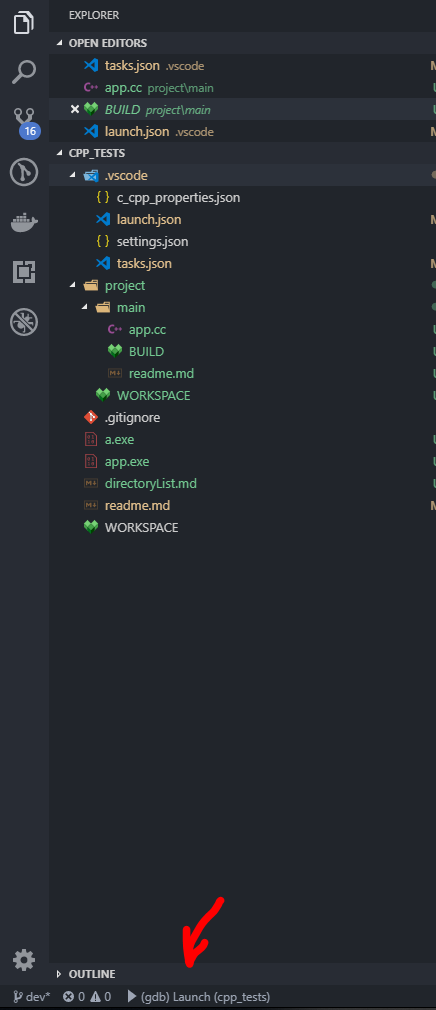
app.cc
#include <iostream>

int main(int argc, char const *argv[])
{
    int a = 3;
    int b = 5;
    int c = a + b;

    /* code */
    std::cout << "Hello world" << std::endl;
    std::cout << c << std::endl;
    return 0;
}
生成文件
cc_binary(
    name = "app",
    srcs = ["app.cc"]
)
然后在./CPP_TESTS的根目录上运行以下命令
bazel build //project/main:app
此命令将生成一些文件和文件夹。
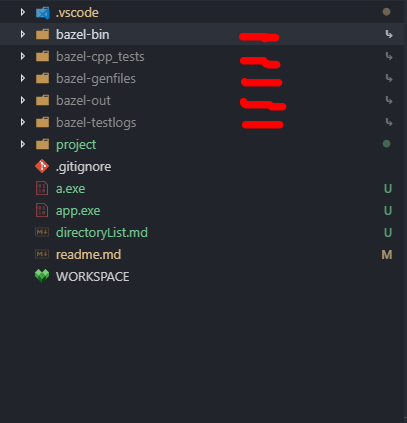
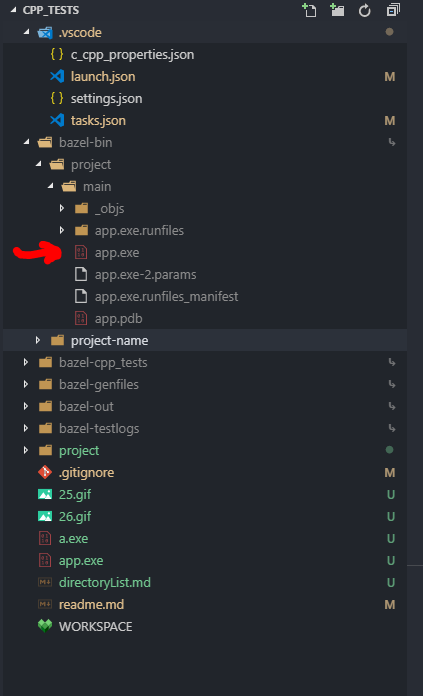
有些文件夹包含app.exe文件,例如在bazel-bin dir中,我有以下文件和文件夹:
|-- bazel-bin
    |-- project
    |   |-- main
    |       |-- app.exe
    |       |-- app.exe-2.params
    |       |-- app.exe.runfiles_manifest
    |       |-- app.pdb
    |       |-- app.exe.runfiles
    |       |   |-- MANIFEST
    |       |-- _objs
    |           |-- app
    |               |-- app.obj
    |-- project-name
        |-- main
            |-- app.exe
            |-- app.exe-2.params
            |-- app.exe.runfiles_manifest
            |-- app.pdb
            |-- app.exe.runfiles
            |   |-- MANIFEST
            |-- _objs
                |-- app
                    |-- app.obj
因此,如果我在
|-- bazel-bin
    |-- project
    |   |-- main
    |       |-- app.exe   <=========
我得到了这个输出
INFO: Elapsed time: 0,145s, Critical Path: 0,01s
INFO: 0 processes.
INFO: Build completed successfully, 1 total action
INFO: Build completed successfully, 1 total action
Hello world
8
PS C:\dev\tests\cpp_tests>
如果我调试应用程序,我就会得到这个错误。
在我开始之前,这是我的任务/json
{
    // See https://go.microsoft.com/fwlink/?LinkId=733558
    // for the documentation about the tasks.json format
    "version": "2.0.0",
    "tasks": [
        {
            "label": "bazel_run",
            "type": "shell",
            "command": "bazel run //project/main:app",
            "args": [],
            "group": {
                "kind": "build",
                "isDefault": true
            }
        },
        {
            "label": "bazel_build",
            "type": "shell",
            "command": "bazel build //project/main:app",
            "args": [],
            "group": {
                "kind": "build",
                "isDefault": true
            }
        },
        {
            "label": "bazel_debug_build",
            "type": "shell",
            "command": "bazel",
            "args": [
                "build",
                "//project/main:app",
                "--compilation_mode=dbg"
            ],
            "group": {
                "kind": "build",
                "isDefault": true
            },
            "problemMatcher": [
                "$gcc"
            ]
        }
    ]
}
launch.json
{
    // Use IntelliSense to learn about possible attributes.
    // Hover to view descriptions of existing attributes.
    // For more information, visit: https://go.microsoft.com/fwlink/?linkid=830387
    "version": "0.2.0",
    "configurations": [
        {
            "name": "(gdb) Launch",
            "type": "cppdbg",
            "request": "launch",
            // "program": "${workspaceFolder}/a.exe",
            "program": "${workspaceFolder}\\bazel-bin\\project\\main\\app.exe",
            "args": [],
            "stopAtEntry": false,
            "cwd": "${workspaceFolder}",
            "environment": [],
            "externalConsole": true,
            "MIMode": "gdb",
            "miDebuggerPath": "C:/MinGW/bin/gdb.exe",
            "preLaunchTask": "bazel_debug_build",
            "setupCommands": [
                {
                    "description": "Enable pretty-printing for gdb",
                    "text": "-enable-pretty-printing",
                    "ignoreFailures": true
                }
            ]
        }
    ]
}
所以我运行
bazel build //project/main:app命令
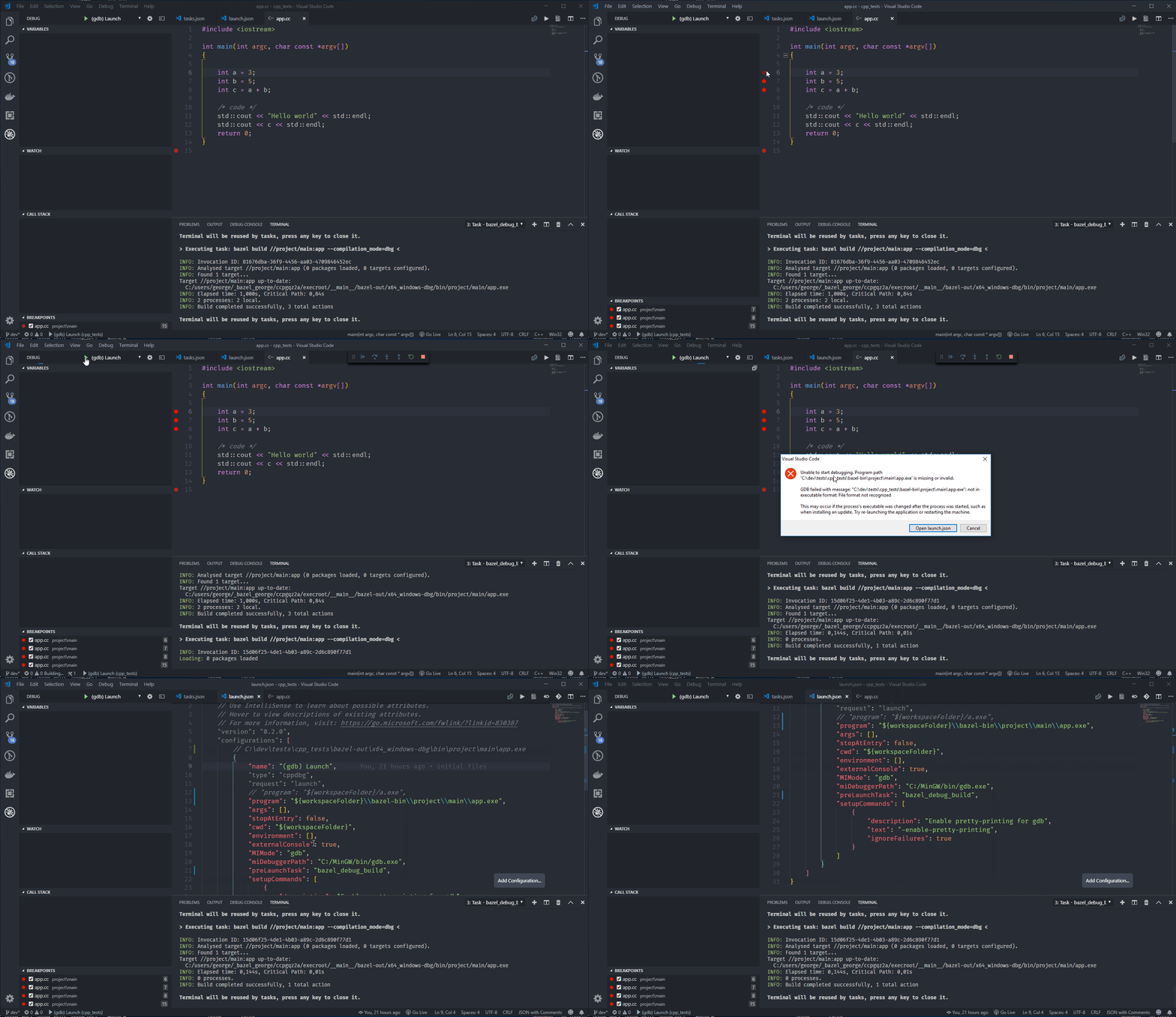
错误信息。
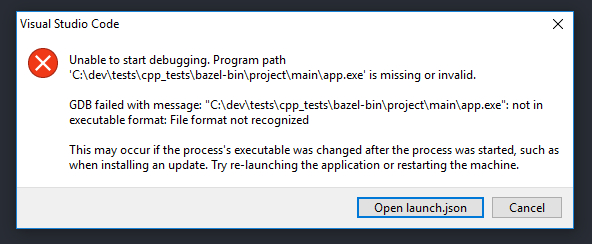
但是app.exe在那里吗?
回答 3
Stack Overflow用户
发布于 2019-07-01 07:35:32
您应该使用位于构建文件夹bazel-out/x64_windows-dbg/project/main/app.exe中的可执行文件。
如果您正在设置断点,您可能也需要--strip=never参数。
如果它不能工作,那么在您的launch.json中尝试"cppvsdbg“而不是"cppdbg”作为配置类型。
Stack Overflow用户
发布于 2020-01-10 03:28:17
首先,您需要添加一些bazel选项来进行调试。手册在这里:在这里输入链接描述
如果您想调试您的程序,您需要一些选项,例如:
bazel build --copt="-g" --strip="never" ... Stack Overflow用户
发布于 2019-01-02 14:20:15
请看我对相关问题的回答:https://stackoverflow.com/a/54007919/7778502
虽然我无法判断您的设置是否正确(我需要知道更多信息,例如您安装了哪些VSCode插件,其他.json文件的内容是什么),但我可以肯定地说,您有两个WORKSPACE文件看起来不对。
您应该删除project\WORKSPACE,因为Bazel认为每一个包含WORKSPACE文件的目录树都是唯一的工作区。每个工作区只需要根目录中的一个工作区文件。如果子目录有自己的工作区文件,那么它是一个单独的工作区,Bazel不会在“父”工作区中使用来自它的目标。
https://stackoverflow.com/questions/53821315
复制相似问题
腾讯云开发者

Copyright © 2013 - 2026 Tencent Cloud. All Rights Reserved. 腾讯云 版权所有
深圳市腾讯计算机系统有限公司 ICP备案/许可证号:粤B2-20090059  粤公网安备44030502008569号
腾讯云计算(北京)有限责任公司 京ICP证150476号 | 京ICP备11018762号