
在TypeConverter中实现Enum到String Array TypeConverter
在C#或VB.NET中,在WinForms下,我有一个返回枚举数组的属性。见一个例子:
public enum TestEnum: int {
    Name1 = 0,
    Name2 = 1,
    Name3 = 2
} // Note that the enum does not apply for the [Flags] attribute.

public TestEnum[] TestProperty {get; set;} =
new[] {TestEnum.Name1, TestEnum.Name2, TestEnum.Name3};默认情况下,PropertyGrid将将值显示为int[],例如:{0,1,2},而不是枚举值名称,例如:{"Name1“、"Name2”、"Name2"},这是我想要捕捉的视觉表示形式.
因此,我想设计一个TypeConverter,它可以返回一个具有值名的字符串数组,并按如下方式应用:
[TypeConverter(typeof(EnumArrayToStringArrayTypeConverter))]
public TestEnum[] TestProperty {get; set;} =
    new[] {TestEnum.Name1, TestEnum.Name2, TestEnum.Name3};
换句话说,如果我的属性在PropertyGrid中是这样表示的:
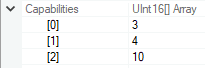
我想要这样做:
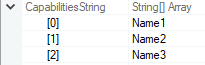
我面临的最大问题是试图从自定义类型转换器类中检索枚举的类型,以获得该枚举的值名称。我只能得到数组的原始数据类型(如: int[]、uint16[]等).
public class EnumArrayToStringArrayTypeConverter : TypeConverter {
    // ...

    public override object ConvertTo(ITypeDescriptorContext context,
                                     CultureInfo culture,
                                     object value,
                                     Type destinationType) {

        if (destinationType == null) {
            throw new ArgumentNullException(nameof(destinationType));
        }

        try {
            // This will return the array-type for the
            // primitive data type of the declared enum,
            // such as int[], uint16[], etc.
            Type t = value.GetType();

            // I'm stuck at this point.
            // ...

        } catch (Exception ex) {

        }

        return null;
    }

    // ...
}请注意,我要求的是一个可重用的解决方案,可以用于任何类型的枚举。而且,在本例中,我的枚举没有应用flags属性,但是解决方案应该关心枚举是否具有它,因此,如果枚举数组的枚举项是带有各种标志的枚举,则应该将这些标志(值名称)连接起来,例如使用string.join().。
回答 2
Stack Overflow用户
发布于 2018-12-17 13:30:36
PropertyGrid已经显示了enum值的名称。它甚至可以正确地处理[Flags]。请参阅下面的示例,使用带有默认PropertyGrid和默认按钮的表单,而不使用其他任何内容。
public partial class Form1 : Form
{
    public Form1()
    {
        InitializeComponent();
    }

    [Flags]
    public enum TestEnum : int
    {
        Name1 = 0,
        Name2 = 1,
        Name3 = 2
    }

    public class TestObject
    {
        public string Name { get; set; } = "Hello World";
        public TestEnum[] TestProperty { get; set; } =
            new[] { TestEnum.Name1, TestEnum.Name2 | TestEnum.Name3, TestEnum.Name3 };
    }

    private void button1_Click(object sender, EventArgs e)
    {
        TestObject o = new TestObject();
        propertyGrid1.SelectedObject = o;
    }
}
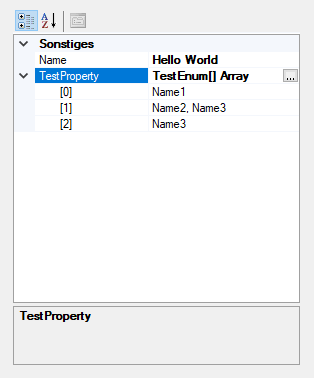
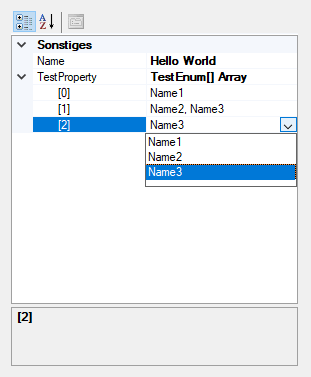
请提供一些示例代码,这些代码可以再现枚举名称没有显示在PropertyGrid中。你一开始肯定做错了什么。
Stack Overflow用户
发布于 2018-12-17 14:25:01
正如他的回答中的@NineBerry所提到的,PropertyGrid已经显示了枚举值的名称。然而,我发现,在一个奇怪的情况下,它不会这样做.
由于我的原始源代码是用VB.NET编写的,所以我将使用VB.NET示例代码来重现这个问题。
问题是,我从WMI类的实例(特别是:DiskDrive.Capabilities)中获得了一个值,该实例返回一个需要转换为uint16数组的对象。然后,我将生成的uint16数组转换为枚举类型。为了简化事情,我不会显示WMI代码,而是一个表示我从WMI中得到的东西的对象.
Dim wmiValue As Object = {1US, 2US, 3US}
Dim castedValue As UShort() = DirectCast(wmiValue, UShort())
TestProperty = DirectCast(castedValue, TestEnum())因此,在进行类型转换时,感谢@NineBerry应答,我发现由于某种原因,TestProperty的默认类型转换器出错了,PropertyGrid显示的是uint16值而不是枚举值名称。
(注意,使用DirectCast()或VB.NET中的CType(),它没有改变DirectCast的行为。)
为了修复错误,我使用Array.ConvertAll(),结束,然后PropertyGrid正确地显示了值名.
Dim wmiValue As Object = {1US, 2US, 3US}
Dim castedValue As UShort() = DirectCast(wmiValue, UShort())
TestProperty = Array.ConvertAll(castedValue,
                                Function(value As UShort)
                                    Return DirectCast(value, TestEnum)
End Function)https://stackoverflow.com/questions/53814456
复制相似问题
腾讯云开发者

Copyright © 2013 - 2026 Tencent Cloud. All Rights Reserved. 腾讯云 版权所有
深圳市腾讯计算机系统有限公司 ICP备案/许可证号:粤B2-20090059  粤公网安备44030502008569号
腾讯云计算(北京)有限责任公司 京ICP证150476号 | 京ICP备11018762号