
MailItem附件未知
MailItem附件未知
提问于 2018-12-17 10:29:24
我有一个邮件,只包含一个签名作为图像和附件,如下面的截图。
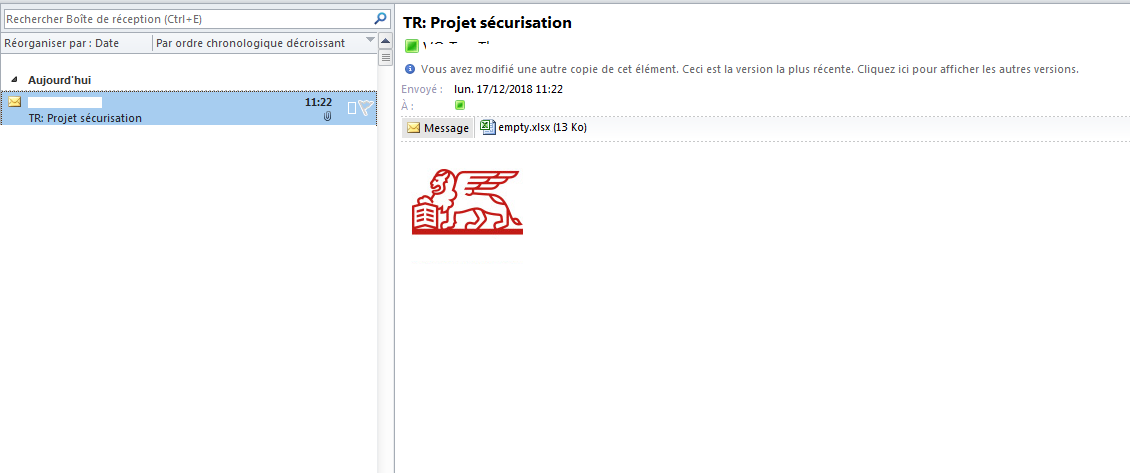
我将这封电子邮件保存为C:\mail.msg,然后尝试按以下代码读取:
var oApp = new Microsoft.Office.Interop.Outlook.Application();
MailItem outlookMsg = (Microsoft.Office.Interop.Outlook.MailItem)oApp.CreateItemFromTemplate(@"C:\mail.msg");

//there are 2 attachments inside
foreach(var att in outlookMsg.Attachments)
{
    att.SaveAsFile($@"C:\{att.FileName}");
}
问题
在名为2的MailItem中有两个附件:
-empty.xlsx
-lot4.xlsx
如果我将lot4.xlsx的扩展更改为lot4.png,则可以将其作为签名中的图像打开。
有人见过这种奇怪的情况,当附件中添加了不正确的名称?
回答 2
Stack Overflow用户
发布于 2018-12-18 02:56:44
您可以使用以下代码下载附件:
private void ThisApplication_NewMail()
{
    Outlook.MAPIFolder inBox = this.Application.ActiveExplorer()
        .Session.GetDefaultFolder(Outlook
        .OlDefaultFolders.olFolderInbox);
    Outlook.Items inBoxItems = inBox.Items;
    Outlook.MailItem newEmail = null;
    inBoxItems = inBoxItems.Restrict("[Unread] = true");
    try
    {
        foreach (object collectionItem in inBoxItems)
        {
            newEmail = collectionItem as Outlook.MailItem;
            if (newEmail != null)
            {
                if (newEmail.Attachments.Count > 0)
                {
                    for (int i = 1; i <= newEmail
                       .Attachments.Count; i++)
                    {
                        newEmail.Attachments[i].SaveAsFile
                            (@"C:\TestFileSave\" +
                            newEmail.Attachments[i].FileName);
                    }
                }
            }
        }
    }
    catch (Exception ex)
    {
        string errorInfo = (string)ex.Message
            .Substring(0, 11);
        if (errorInfo == "Cannot save")
        {
            MessageBox.Show(@"Create Folder C:\TestFileSave");
        }
    }
}
欲了解更多信息,请参考以下链接:
Stack Overflow用户
发布于 2018-12-18 03:25:08
使用微软EWS,很容易做到:
参考资料:http://johnlabtest.blogspot.com/2014/01/save-attachments-from-exchange-mail-box.html
static void Main(string[] args)
{
      ExchangeService service = new ExchangeService(ExchangeVersion.Exchange2007_SP1);
      service.Credentials = new WebCredentials("user1@contoso.com", "password");
      service.TraceEnabled = true;
      service.TraceFlags = TraceFlags.All;
      service.AutodiscoverUrl("user1@contoso.com", RedirectionUrlValidationCallback);

      var messages = new List<EmailMessage>();

      // only get unread emails
      SearchFilter folderSearchFilter = new SearchFilter.IsEqualTo(EmailMessageSchema.IsRead, false);
     // we just need the id in our results
     var itemView = new ItemView(10) {PropertySet = new PropertySet(BasePropertySet.IdOnly)};

     FindItemsResults<Item> findResults = service.FindItems(folder.Id, folderSearchFilter, itemView);

     foreach (Item item in findResults.Items.Where(i => i is EmailMessage))
     {
        EmailMessage message = EmailMessage.Bind(service, item.Id, new PropertySet(BasePropertySet.IdOnly, ItemSchema.Attachments, ItemSchema.HasAttachments));
        messages.Add(message);
     }

  // loop through messages and call processemail here.
}

public static void ProcessEmail(EmailMessage message)
{
     string saveDir = ConfigurationManager.AppSettings["AttachmentSaveDirectory"];
     if (message.HasAttachments)
     {
        foreach (Attachment attachment in message.Attachments.Where(a=> a is FileAttachment))
        {
            FileAttachment fileAttachment = attachment as FileAttachment;
            fileAttachment.Load(); // populate the content property of the attachment

            using (FileStream fs = new FileStream(saveDir + attachment.Name, FileMode.Create))
            {
               using (BinaryWriter w = new BinaryWriter(fs))
               {
                  w.Write(fileAttachment.Content);
               }
            }
        }
    }
message.IsRead = true;
message.Update(ConflictResolutionMode.AutoResolve); // push changes back to server
}

private static bool RedirectionUrlValidationCallback(string redirectionUrl)
{
     // The default for the validation callback is to reject the URL.
     bool result = false;
     Uri redirectionUri = new Uri(redirectionUrl);
     // Validate the contents of the redirection URL. In this simple validation
     // callback, the redirection URL is considered valid if it is using HTTPS
    // to encrypt the authentication credentials.
    if (redirectionUri.Scheme == "https")
    {
       result = true;
    }
       return result;
}页面原文内容由Stack Overflow提供。腾讯云小微IT领域专用引擎提供翻译支持
原文链接:
https://stackoverflow.com/questions/53813268
复制相关文章
相似问题
腾讯云开发者

Copyright © 2013 - 2026 Tencent Cloud. All Rights Reserved. 腾讯云 版权所有
深圳市腾讯计算机系统有限公司 ICP备案/许可证号:粤B2-20090059  粤公网安备44030502008569号
腾讯云计算(北京)有限责任公司 京ICP证150476号 | 京ICP备11018762号