
GPS转换仪表为位移度
我需要在地图上画一个地理投影的圆圈。我想用纬度和经度来定义中心,用米来定义它的半径。我正在使用KDE Marble。在API中有一个函数drawEllipse,它以中心为(lat,lon)以及椭圆的宽度和高度。
GeoPainter::drawEllipse(const GeoDataCoordinates& center, qreal width, qreal height, bool isGeoProjected = false)对于地球投影椭圆,宽度和高度被认为是以度表示的。不过,我需要他们在米内。没有简单的度和米之间的转换,因为它取决于中心在全球的位置。
我需要把圆的半径(以米为单位)转换成指向地球中心的向量的一对位移度。
我还使用boost几何做其他几何计算。boost-geometry中是否有执行此转换的函数?
更新一
我首先尝试有两个GeoDataCoordinates,一个是中心,另一个是周界。我预计它们的纬度和经度之间的差异将适用于drawEllipse函数。
painter->drawEllipse(_center, std::abs(_border.longitude(GeoDataCoordinates::Degree)-_center.longitude(GeoDataCoordinates::Degree)), std::abs(_border.latitude(GeoDataCoordinates::Degree)-_center.latitude(GeoDataCoordinates::Degree)), true);然而,它产生的椭圆比我预期的要小得多。应该在圆周上的边界点是椭圆以外的。
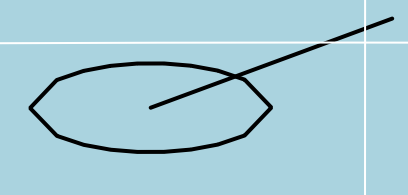
最新情况二
然后我尝试在维基百科上使用中心角公式。
double angular_distance = acos(
     (sin(_center.latitude(GeoDataCoordinates::Radian))*sin(_border.latitude(GeoDataCoordinates::Radian)))
    +(cos(_center.latitude(GeoDataCoordinates::Radian))*cos(_border.latitude(GeoDataCoordinates::Radian)))
    *(double)cos(std::abs(_border.longitude(GeoDataCoordinates::Radian)-_center.longitude(GeoDataCoordinates::Radian)))
);
painter->drawEllipse(_center, stmr::internal::rad2deg(angular_distance), stmr::internal::rad2deg(angular_distance), true);
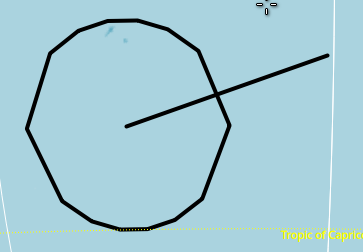
结果与前一次没有太大的不同。然而,这一次,椭圆比前一个略大一些。
最新情况三
用弧线与球体大圆周之间的距离比来计算@ to答案中的角位移。
painter->drawEllipse(_center, 2*(distance/earthRadiusKm)* 180.0/3.14159, 2*(distance/earthRadiusKm)* 180.0/3.14159, true);产生一个正确的椭圆。
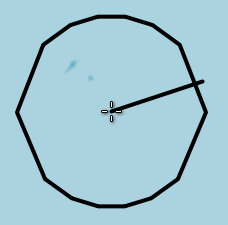
因此,我将与2.0的角度乘以更新II代码,这也产生了类似的结果(如更新III)。
最新情况四
但是drawEllipse的问题是,它实际上绘制了一个多边形,在放大状态上的点要少得多。有时候它看起来像个广场。

因此,在椭圆圆周上画更多的点是一个更好的选择,这样篱笆看起来就像放大视图中的一个圆圈。在评论中发布的KDE论坛链接也是如此。
GeoDataLineString ellipse;
qreal lon = 0.0;
qreal lat = 0.0;
int precision = 180;
for ( int i = 0; i < precision; ++i){
    qreal t = 1.0 - 2.0 * (qreal)(i) / (qreal)(precision);
    lat = center.latitude(GeoDataCoordinates::Degree)  + 0.5 * radius * sqrt(1.0 - t * t);
    lon = center.longitude(GeoDataCoordinates::Degree) + 0.5 * radius * t;
    ellipse << GeoDataCoordinates(lon, lat, 0.0, GeoDataCoordinates::Degree);
}
for ( int i = 0; i < precision; ++i){
    qreal t = 2.0 * (qreal)(i) / (qreal)(precision) - 1.0;
    lat = center.latitude(GeoDataCoordinates::Degree)  - 0.5 * radius * sqrt(1.0 - t * t);
    lon = center.longitude(GeoDataCoordinates::Degree) + 0.5 * radius * t;
    ellipse << GeoDataCoordinates(lon, lat, 0.0, GeoDataCoordinates::Degree);
}
painter->drawPolyline(ellipse);
然而,它画了一个半径比输入大得多的圆。我认为在那里张贴的片段是不完整的。我在代码中忽略了一些未使用的条件块。此外,守则在注释中特别提到,围栏的半径必须以公里为单位。我这么做了。我也不明白这背后的数学原理。它不在片段中的任何地方使用地球半径。对这段代码的修正可能会产生一个更好的椭圆。数学看起来像是一些参数曲线,它产生了一半的椭圆。但并没有提到这个等式。
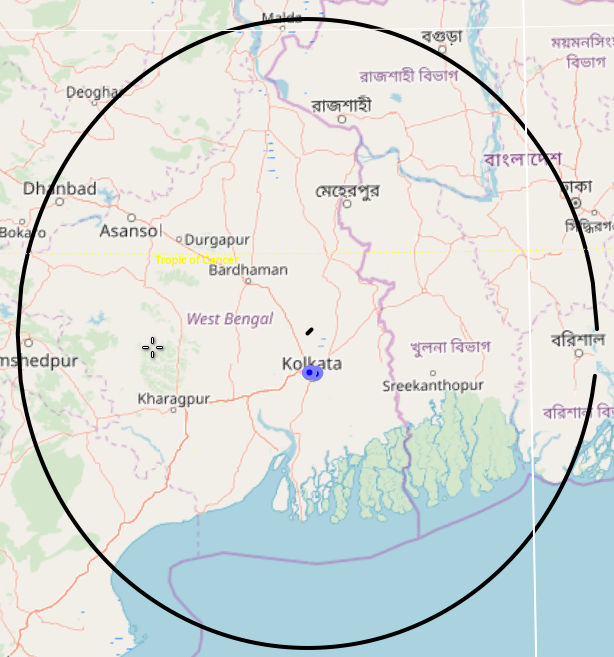
而且,这只适用于第一象限,其中lat和lon都是正的。
回答 2
Stack Overflow用户
发布于 2018-12-14 21:59:54
围栏的半径,沿球体的曲线,除以球体的半径,是以弧度为单位的角度。
double circular_radius_of_fence = 1000;    // circular radius of fence
double sphere_radius = 6378000;   // radius of sphere, meters

// included angle in radians
double ang_radians = circular_radius_of_fence / sphere_radius;

// convert to degrees
double ang_degrees = ang_radians * 180.0/PI;

// width and height of circle is twice the angle
double width = ang_degrees * 2;
double height = ang_degrees * 2;Stack Overflow用户
发布于 2018-12-21 14:01:09
KDE论坛中的答案实际上是GeoPainter::drawEllipse中的实现。
const int precision = qMin<qreal>( width / degreeResolution / 8 + 1, 81 )该实现中的这一行降低了精度,当缩放时,它看起来就像一个正方形。因此,为了提高精度,我用单行修改复制了drawEllipse代码。
void FenceLayer::drawFence(Marble::GeoPainter* painter, Marble::GeoDataCoordinates center, double radius){
    double height = radius;
    double width  = radius;
    // Initialize variables
    const qreal centerLon = center.longitude( GeoDataCoordinates::Degree );
    const qreal centerLat = center.latitude( GeoDataCoordinates::Degree );
    const qreal altitude = center.altitude();

    // Ensure a valid latitude range:
    if ( centerLat + 0.5 * height > 90.0 || centerLat - 0.5 * height < -90.0 ) {
        return;
    }

    // Don't show the ellipse if it's too small:
    GeoDataLatLonBox ellipseBox( centerLat + 0.5 * height, centerLat - 0.5 * height,
                            centerLon + 0.5 * width,  centerLon - 0.5 * width,
                            GeoDataCoordinates::Degree );
    if ( !_map->viewport()->viewLatLonAltBox().intersects( ellipseBox ) ||
    !_map->viewport()->resolves( ellipseBox ) ) return;

    GeoDataLinearRing ellipse;

    // Optimizing the precision by determining the size which the
    // ellipse covers on the screen:
    const qreal degreeResolution = _map->viewport()->angularResolution() * RAD2DEG;
    // To create a circle shape even for very small precision we require uneven numbers:
    const int scaled_resolution = qMin<qreal>( width / degreeResolution / 8 + 1, 81 );
    const int precision = qMin<qreal>( width / degreeResolution / 8 + 1, 81 ) < 81 ? 81 : scaled_resolution ;

    // Calculate the shape of the upper half of the ellipse:
    for ( int i = 0; i <= precision; ++i ) {
        const qreal t = 1.0 - 2.0 * (qreal)(i) / (qreal)(precision);
        const qreal lat = centerLat + 0.5 * height * sqrt( 1.0 - t * t );
        const qreal lon = centerLon + 0.5 * width * t;
        ellipse << GeoDataCoordinates( lon, lat, altitude, GeoDataCoordinates::Degree );
    }
    // Calculate the shape of the lower half of the ellipse:
    for ( int i = 0; i <= precision; ++i ) {
        const qreal t = 2.0 * (qreal)(i) / (qreal)(precision) -  1.0;
        const qreal lat = centerLat - 0.5 * height * sqrt( 1.0 - t * t );
        const qreal lon = centerLon + 0.5 * width * t;
        ellipse << GeoDataCoordinates( lon, lat, altitude, GeoDataCoordinates::Degree );
    }

    painter->drawPolygon(ellipse);
}在调用drawFence时,我将距离转换为位移的程度,这在@ to的回答中是这样建议的。
drawFence(painter, _center, 2*(distance/earthRadiusKm)* 180.0/3.14159);其中distance是围栏的半径。
https://stackoverflow.com/questions/53786590
复制相似问题
腾讯云开发者

Copyright © 2013 - 2026 Tencent Cloud. All Rights Reserved. 腾讯云 版权所有
深圳市腾讯计算机系统有限公司 ICP备案/许可证号:粤B2-20090059  粤公网安备44030502008569号
腾讯云计算(北京)有限责任公司 京ICP证150476号 | 京ICP备11018762号