
Graphviz:树结构
Graphviz:树结构
提问于 2018-12-14 15:10:12
我想用图形生成结构树,从左到右这样的结构(请忽略颜色):
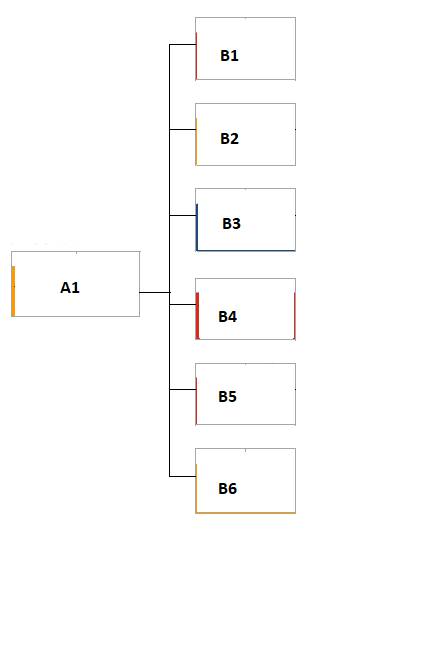
我得出的结论是,我需要使用不可见的节点来实现这一点,我当前的代码如下所示:
digraph G {
  node [ shape="box", width = 2, height = 1, fixedsize=true];
  edge [arrowhead=none];
  nodesep = 1;
  ranksep=0.05;
  splines = ortho;
  rankdir = LR;

  A1 [ shape="box", width = 2, height = 1, fixedsize=true];
  B1 [ shape="box", width = 2, height = 1, fixedsize=true];
  B2 [ shape="box", width = 2, height = 1, fixedsize=true];
  B3 [ shape="box", width = 2, height = 1, fixedsize=true];
  B4 [ shape="box", width = 2, height = 1, fixedsize=true];
  B5 [ shape="box", width = 2, height = 1, fixedsize=true];
  B6 [ shape="box", width = 2, height = 1, fixedsize=true];

  W0 [ shape="circle", width = 0, height = 0, fixedsize=true, label=""];
  W1 [ shape="circle", width = 0, height = 0, fixedsize=true, label=""];
  W2 [ shape="circle", width = 0, height = 0, fixedsize=true, label=""];
  W3 [ shape="circle", width = 0, height = 0, fixedsize=true, label=""];
  W4 [ shape="circle", width = 0, height = 0, fixedsize=true, label=""];
  W5 [ shape="circle", width = 0, height = 0, fixedsize=true, label=""];
  W6 [ shape="circle", width = 0, height = 0, fixedsize=true, label=""];

  subgraph {
    A1 -> W0
    W0 -> W3
    W3 -> W2
    W2 -> W1
    W0 -> W4
    W4 -> W5
    W5 -> W6

    W1 -> B1
    W2 -> B2
    W3 -> B3
    W4 -> B4
    W5 -> B5
    W6 -> B6

    {rank = same; A1;}
    {rank = same; B1; B2; B3; B4; B5; B6;}
    {rank = same; W0; W1; W2; W3; W4; W5; W6;}
  }
}
使用点引擎,我得到:
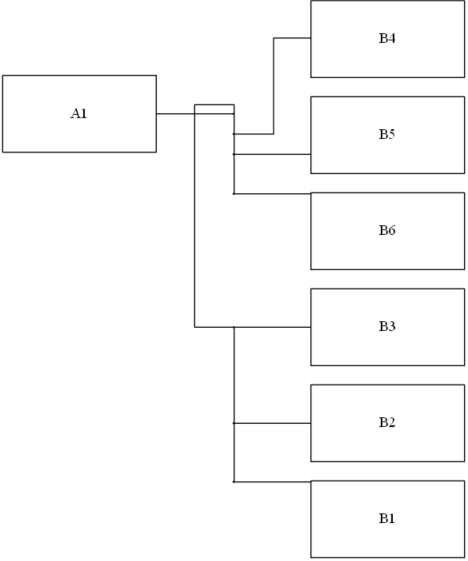
我的问题:
我是否可以强制某些节点占据中心位置(A1)?
我是否可以强迫边缘连接到节点形状边界上的特定位置(例如:中间左)?
也许有更好的方法来实现这样的树结构,它将以节点为中心(我必须考虑到树的下一层可能相当复杂)。
回答 1
Stack Overflow用户
回答已采纳
发布于 2018-12-14 16:09:04
为了得到你想要的,你需要
- 按您想要的顺序定义节点(这里给出的示例中不是严格必要的,而是良好的实践)
- 确保空节点处于相同的级别(您已经有了)
- 并以正确的顺序将这些空节点连接起来(这是这里的关键项)
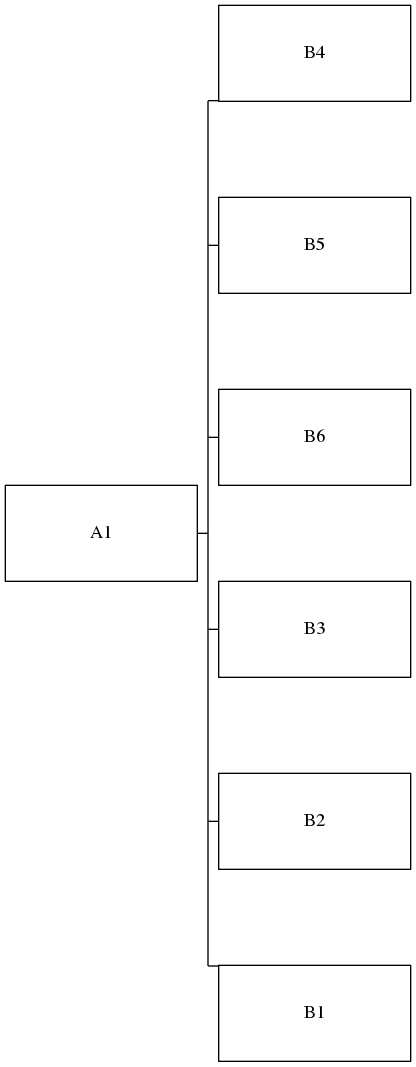
应用这些更改,并简化您的代码(您可能喜欢与否,这正是我要做的),我得到了
digraph G {
  edge [arrowhead=none];
  nodesep = 1;
  ranksep=0.05;
  splines = ortho;
  rankdir = LR;

  node [ shape="box", width = 2, height = 1, fixedsize=true];
  A1;
  B4 B5 B6 B3 B2 B1;

  node [ shape="point", width = 0, height = 0 ];
  { rank = same; W4 W5 W6 W0 W3 W2 W1 }

  A1 -> W0;
  W4 -> W5 -> W6 -> W0 -> W3 -> W2 -> W1;        /* critical! */
  W1 -> B1;
  W2 -> B2;
  W3 -> B3;
  W4 -> B4;
  W5 -> B5;
  W6 -> B6;
}
产额
页面原文内容由Stack Overflow提供。腾讯云小微IT领域专用引擎提供翻译支持
原文链接:
https://stackoverflow.com/questions/53782308
复制相关文章
相似问题
腾讯云开发者

Copyright © 2013 - 2026 Tencent Cloud. All Rights Reserved. 腾讯云 版权所有
深圳市腾讯计算机系统有限公司 ICP备案/许可证号:粤B2-20090059  粤公网安备44030502008569号
腾讯云计算(北京)有限责任公司 京ICP证150476号 | 京ICP备11018762号