
如何在WooCommerce中找到运输类id?
使用Hide shipping method for specific shipping classes in woocommerce应答代码,我试图隐藏基于配送类的配送选项。
在我们的网站上,大件和小件都有自己的送货等级,我们只想在小物品上提供快递服务。
add_filter( 'woocommerce_package_rates', 'hide_shipping_method_based_on_shipping_class', 10, 2 );
function hide_shipping_method_based_on_shipping_class( $rates, $package )
{
    if ( is_admin() && ! defined( 'DOING_AJAX' ) )
        return;

    // HERE define your shipping class to find
    $class = 92;

    // HERE define the shipping method to hide
    $method_key_id = 'flat_rate:7';

    // Checking in cart items
    foreach( WC()->cart->get_cart() as $cart_item ){
        // If we find the shipping class
        if( $cart_item['data']->get_shipping_class_id() == $class ){
            unset($rates[$method_key_id]); // Remove the targeted method
            break; // Stop the loop
        }
    }
    return $rates;
}
我知道如何实现代码,但是我不知道在哪里可以找到传送类id,我只能找到代码段塞和传送类名
// HERE define your shipping class to find

$class = 92;在上面的示例中,我在哪里找到替换92的Id?
提前谢谢。
将要
回答 1
Stack Overflow用户
发布于 2018-12-14 03:20:42
为了使它与类一起工作,您将使用WC_Product get_shipping_class()方法,而不是这样:
add_filter( 'woocommerce_package_rates', 'hide_shipping_method_based_on_shipping_class', 10, 2 );
function hide_shipping_method_based_on_shipping_class( $rates, $package )
{
    if ( is_admin() && ! defined( 'DOING_AJAX' ) )
        return;

    // HERE define your shipping class SLUG
    $class_slug = 'large';

    // HERE define the shipping method to hide
    $method_key_id = 'flat_rate:7';

    // Checking in cart items
    foreach( WC()->cart->get_cart() as $cart_item ){
        // If we find the shipping class
        if( $cart_item['data']->get_shipping_class() == $class_slug ){
            unset($rates[$method_key_id]); // Remove the targeted method
            break; // Stop the loop
        }
    }
    return $rates;
}
代码在活动子主题(或活动主题)的function.php文件中.
有时,您可能需要刷新到发货区域的传送方法,然后禁用/保存和重新启用/保存您的“固定费率”传送方法。 查找传送方法ID和传送类ID,请参见…下面
查找运输类ID.
1)在wp_terms表下的数据库中:
搜索术语名称或词组,您将得到术语ID (运输类ID)。
2)在Woocommerce航运设置上,使用浏览器html检查工具编辑“统一费率”,检查航运级别费率字段,如:
在imput属性中有woocommerce_flat_rate_class_cost_64。所以64是运输类的ID。
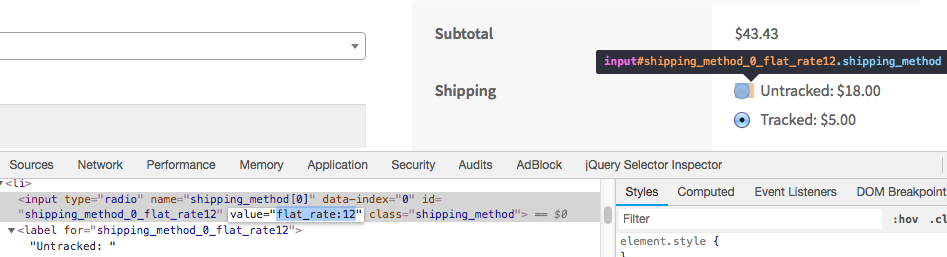
获取运费方法费率ID:
要获取相关的
flat_rate:12,配送方法,请使用浏览器代码检查器(每个相关的单选按钮属性name)检查,类似于name:
https://stackoverflow.com/questions/53769697
复制相似问题
腾讯云开发者

Copyright © 2013 - 2026 Tencent Cloud. All Rights Reserved. 腾讯云 版权所有
深圳市腾讯计算机系统有限公司 ICP备案/许可证号:粤B2-20090059  粤公网安备44030502008569号
腾讯云计算(北京)有限责任公司 京ICP证150476号 | 京ICP备11018762号