
Telerik Xamarin RadListView怪异行为
Telerik Xamarin RadListView怪异行为
提问于 2018-12-11 13:05:52
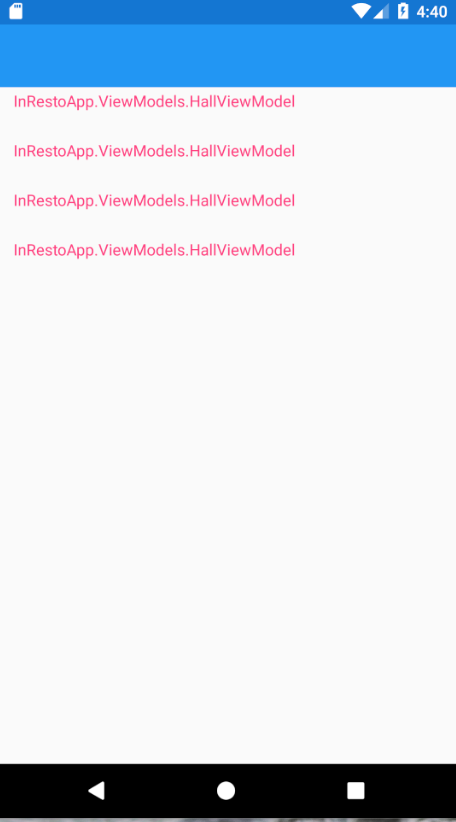
在Xamarin (Portable)项目中,当我将RadlistView放在第一页时,我得到了绑定列表,它没有在Android中呈现模板。我没有检查其他平台。在本例中,第二页中的RadListView呈现为ok。
带有 RadListView的第一页
带有 RadListView的第二页
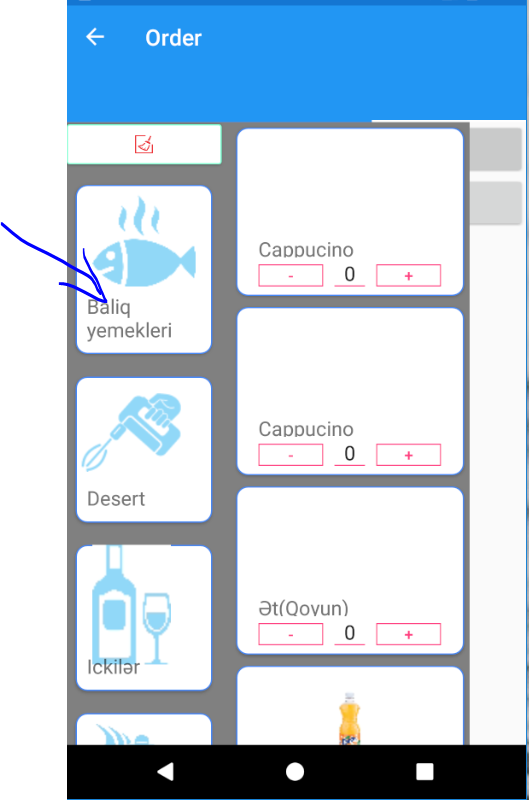
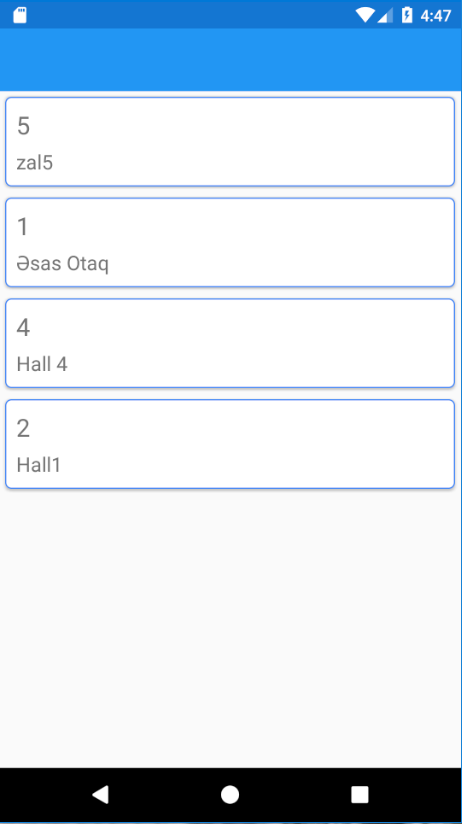
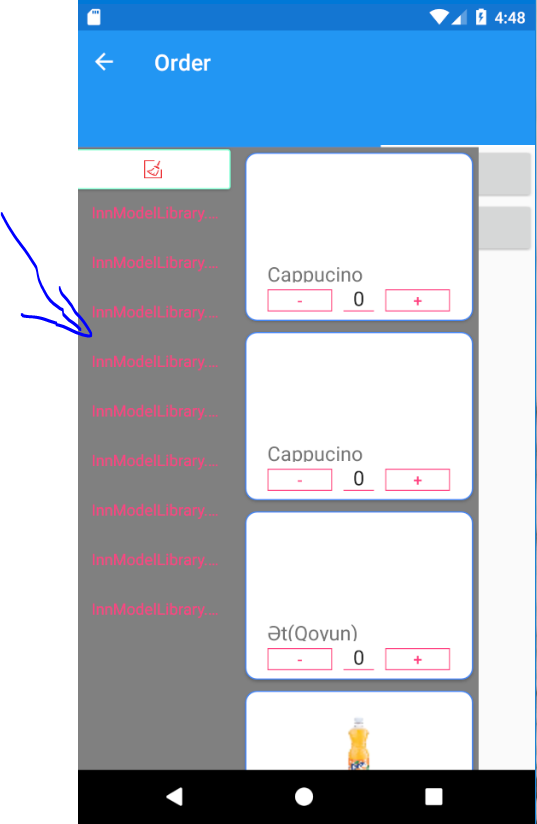
但是,如果我用Xamarin.Forms.ListView替换第一页中的radlistview,则显示正常,而在第二页中,RadListView显示没有模板。
ListView的第一页
带有丢失模板的RadListView第二页
首页代码如下:
<?xml version="1.0" encoding="utf-8" ?>
<ContentPage x:Name="Page"
             xmlns="http://xamarin.com/schemas/2014/forms"
             xmlns:x="http://schemas.microsoft.com/winfx/2009/xaml"
             xmlns:telerikPrimitives="clr-namespace:Telerik.XamarinForms.Primitives;assembly=Telerik.XamarinForms.Primitives"
             xmlns:telerikListView="clr-namespace:Telerik.XamarinForms.DataControls.ListView;assembly=Telerik.XamarinForms.DataControls"

             xmlns:telerikDataControls="clr-namespace:Telerik.XamarinForms.DataControls;assembly=Telerik.XamarinForms.DataControls"
             xmlns:viewmodels="clr-namespace:InRestoApp.ViewModels"
             xmlns:behaviors="clr-namespace:InRestoApp.Behaviors"
             xmlns:helpers="clr-namespace:InRestoApp.Helpers"

             x:Class="InRestoApp.Views.HallsPage">

    <ContentPage.Padding>
        <OnPlatform x:TypeArguments="Thickness">
            <On Platform="iOS" Value="10, 20, 10, 0" />
            <On Platform="Android, UWP" Value="10, 0" />
        </OnPlatform>
    </ContentPage.Padding>
    <ContentPage.Resources>
        <helpers:InvertBoolConverter x:Key="invertBoolConverter"/>
    </ContentPage.Resources>
   <Grid HeightRequest="800">

        <Grid.RowDefinitions>
            <RowDefinition Height="*" />
        </Grid.RowDefinitions>

        <telerikDataControls:RadListView x:Name="ItemsListView" SelectionMode="Single" HeightRequest="800"
                                         ItemsSource="{Binding Halls}"
                                         ItemTapped="ListView_OnItemTapped">


            <telerikDataControls:RadListView.LayoutDefinition>
                <telerikListView:ListViewLinearLayout VerticalItemSpacing="0" />
            </telerikDataControls:RadListView.LayoutDefinition>
            <telerikDataControls:RadListView.ItemTemplate>
                <DataTemplate>
                    <telerikListView:ListViewTemplateCell>
                        <telerikListView:ListViewTemplateCell.View>
                            <Frame  CornerRadius="5" HasShadow="True" OutlineColor="#4488F6"   Padding="10" Margin="10">
                                <StackLayout Orientation="Horizontal">
                                    <Label Text="{Binding HallCode}" FontSize="Large" VerticalOptions="StartAndExpand" />
                                        <Label Text="{Binding HallName}"  FontSize="Medium"  VerticalOptions="CenterAndExpand" />

                                </StackLayout>
                            </Frame>

                        </telerikListView:ListViewTemplateCell.View>
                    </telerikListView:ListViewTemplateCell>
                </DataTemplate>
            </telerikDataControls:RadListView.ItemTemplate>
        </telerikDataControls:RadListView>


    </Grid>
</ContentPage>
下面的第二个视图XAML (使用ContentView,因为它作为幻灯片抽屉打开)
<?xml version="1.0" encoding="UTF-8"?>
<ContentView xmlns="http://xamarin.com/schemas/2014/forms"
             xmlns:x="http://schemas.microsoft.com/winfx/2009/xaml"
             xmlns:flv="clr-namespace:DLToolkit.Forms.Controls;assembly=DLToolkit.Forms.Controls.FlowListView"
              xmlns:telerikListView="clr-namespace:Telerik.XamarinForms.DataControls.ListView;assembly=Telerik.XamarinForms.DataControls"
             xmlns:helpers="clr-namespace:InRestoApp.Helpers"
             xmlns:telerikDataControls="clr-namespace:Telerik.XamarinForms.DataControls;assembly=Telerik.XamarinForms.DataControls"
             xmlns:ffimageloading="clr-namespace:FFImageLoading.Forms;assembly=FFImageLoading.Forms"
             xmlns:telerikInput="clr-namespace:Telerik.XamarinForms.Input;assembly=Telerik.XamarinForms.Input"
             x:Name="productView"
             x:Class="InRestoApp.Views.ProductsView">
    <ContentView.Resources>
        <helpers:ImageBytesConverter x:Key="imageBytesConverter"/>
        <helpers:TempConverter x:Key="tempConverter"/>
        <helpers:ImageFileToImageSourceConverter x:Key="imageFileToImageSourceConverter"/>

    </ContentView.Resources>
    <ContentView.Content>


            <Grid>
                <Grid.ColumnDefinitions>
                    <ColumnDefinition Width="4*"/>
                    <ColumnDefinition Width="6*"/>
                </Grid.ColumnDefinitions>
                <Grid>
                    <Grid.RowDefinitions>
                        <RowDefinition Height="40"/>
                        <RowDefinition Height="*"/>
                    </Grid.RowDefinitions>
                    <Frame  CornerRadius="2" HasShadow="True" OutlineColor="Aquamarine" Padding="10"  Margin="2">
                        <Image x:Name="btnClear"  Source="clear_icon.png" HeightRequest="50" WidthRequest="50" >
                            <Image.GestureRecognizers>
                                <TapGestureRecognizer Command="{Binding Path=BindingContext.ClearProductsFilterCommand, Source={x:Reference productView}}"  CommandParameter="{Binding .}" />
                            </Image.GestureRecognizers>
                        </Image>
                    </Frame>
                <telerikDataControls:RadListView x:Name="CategoriesListView" Grid.Row="1" SelectedItem="{Binding SelectedProductCategory, Mode=TwoWay}" SelectionMode="Single"
                                         ItemsSource="{Binding ProductCategories}">
                        <telerikDataControls:RadListView.LayoutDefinition>
                            <telerikListView:ListViewLinearLayout VerticalItemSpacing="0" />
                        </telerikDataControls:RadListView.LayoutDefinition>
                        <!--<telerikDataControls:RadListView.ItemStyle>
                            <telerikListView:ListViewItemStyle BackgroundColor="Transparent" BorderLocation="None"/>
                        </telerikDataControls:RadListView.ItemStyle>-->
                        <telerikDataControls:RadListView.ItemTemplate>
                            <DataTemplate>
                                <telerikListView:ListViewTemplateCell>
                                    <telerikListView:ListViewTemplateCell.View>
                                        <Frame  CornerRadius="10" HasShadow="True" OutlineColor="#4488F6"   Padding="10" Margin="10" >
                                            <StackLayout Orientation="Horizontal">
                                                <StackLayout>

                                                    <ffimageloading:CachedImage HeightRequest="70" Aspect="AspectFill" WidthRequest="70" Margin="5"
                            DownsampleHeight="70" DownsampleUseDipUnits="false"
                            LoadingPlaceholder="image_loading.png" ErrorPlaceholder="image_error.png"
                            Source="{Binding FileName, Converter={StaticResource imageFileToImageSourceConverter}}"/>

                                                    <Label Text="{Binding ProductCategoryName}"  FontSize="Medium"  VerticalOptions="CenterAndExpand" />
                                                </StackLayout>
                                            </StackLayout>
                                        </Frame>
                                    </telerikListView:ListViewTemplateCell.View>
                                </telerikListView:ListViewTemplateCell>
                            </DataTemplate>
                        </telerikDataControls:RadListView.ItemTemplate>
                    </telerikDataControls:RadListView>

                </Grid>

            <telerikDataControls:RadListView x:Name="ProductsListView" Grid.Column="1" SelectedItem="{Binding SelectedProduct, Mode=TwoWay}" SelectionMode="Single"
                                         ItemsSource="{Binding Products}">


                    <telerikDataControls:RadListView.LayoutDefinition>
                        <telerikListView:ListViewLinearLayout VerticalItemSpacing="0" />
                    </telerikDataControls:RadListView.LayoutDefinition>

                    <telerikDataControls:RadListView.ItemTemplate>
                        <DataTemplate>

                            <telerikListView:ListViewTemplateCell>
                                <telerikListView:ListViewTemplateCell.View>
                                    <Frame  CornerRadius="10" HasShadow="True" OutlineColor="#4488F6" Margin="5" HeightRequest="110" >
                                        <Grid>
                                        <Grid.RowDefinitions>
                                            <RowDefinition Height="70"/>
                                            <RowDefinition Height="20"/>
                                            <RowDefinition Height="20"/>
                                        </Grid.RowDefinitions>

                                                <ffimageloading:CachedImage HeightRequest="70" Aspect="AspectFit" WidthRequest="70" Margin="2"
                            DownsampleHeight="50" DownsampleUseDipUnits="false"
                            LoadingPlaceholder="image_loading.png" ErrorPlaceholder="image_error.png"
                            Source="{Binding FileName, Converter={StaticResource imageFileToImageSourceConverter}}"/>
                                                <Label Text="{Binding RestProductNameEntity.ProductName}"  FontSize="Medium"  VerticalOptions="CenterAndExpand" Grid.Row="1" />


                                        <telerikInput:RadNumericInput   Value="{Binding Quantity, Mode=TwoWay}" Grid.Row="2" HeightRequest="20" />

                                        </Grid>
                                    </Frame>
                                </telerikListView:ListViewTemplateCell.View>
                            </telerikListView:ListViewTemplateCell>
                        </DataTemplate>
                    </telerikDataControls:RadListView.ItemTemplate>
                </telerikDataControls:RadListView>
            </Grid>
    </ContentView.Content>
</ContentView>
c#文件没有提供,因为它使用了来自另一个项目的web,而且使用虚拟源代码也有相同的效果。作为来源使用
ObservableCollection
回答 1
Stack Overflow用户
发布于 2018-12-14 05:54:16
我忘记补充说,在发行之前,我更新了Telerik平台。清除解决方案后,删除bin和obj文件夹,并解决rebild项目。
页面原文内容由Stack Overflow提供。腾讯云小微IT领域专用引擎提供翻译支持
原文链接:
https://stackoverflow.com/questions/53724835
复制相关文章
相似问题
腾讯云开发者

Copyright © 2013 - 2026 Tencent Cloud. All Rights Reserved. 腾讯云 版权所有
深圳市腾讯计算机系统有限公司 ICP备案/许可证号:粤B2-20090059  粤公网安备44030502008569号
腾讯云计算(北京)有限责任公司 京ICP证150476号 | 京ICP备11018762号